Distributed Cloud
47 TopicsHow I Did it - Migrating Applications to Nutanix NC2 with F5 Distributed Cloud Secure Multicloud Networking
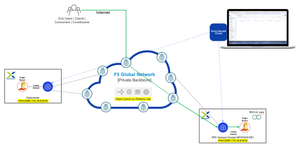
In this edition of "How I Did it", we will explore how F5 Distributed Cloud Services (XC) enables seamless application extension and migration from an on-premises environment to Nutanix NC2 clusters.1.2KViews4likes0CommentsDeploying F5 Distributed Cloud Customer Edge in Red Hat OpenShift Virtualization
Introduction Red Hat OpenShift Virtualization is a feature that brings virtual machine (VM) workloads into the Kubernetes platform, allowing them to run alongside containerized applications in a seamless, unified environment. Built on the open-source KubeVirt project, OpenShift Virtualization enables organizations to manage VMs using the same tools and workflows they use for containers. Why OpenShift Virtualization? Organizations today face critical needs such as: Rapid Migration: "I want to migrate ASAP" from traditional virtualization platforms to more modern solutions. Infrastructure Modernization: Transitioning legacy VM environments to leverage the benefits of hybrid and cloud-native architectures. Unified Management: Running VMs alongside containerized applications to simplify operations and enhance resource utilization. OpenShift Virtualization addresses these challenges by consolidating legacy and cloud-native workloads onto a single platform. This consolidation simplifies management, enhances operational efficiency, and facilitates infrastructure modernization without disrupting existing services. Integrating F5 Distributed Cloud Customer Edge (XC CE) into OpenShift Virtualization further enhances this environment by providing advanced networking and security capabilities. This combination offers several benefits: Multi-Tenancy: Deploy multiple CE VMs, each dedicated to a specific tenant, enabling isolation and customization for different teams or departments within a secure, multi-tenant environment. Load Balancing: Efficiently manage and distribute application traffic to optimize performance and resource utilization. Enhanced Security: Implement advanced threat protection at the edge to strengthen your security posture against emerging threats. Microservices Management: Seamlessly integrate and manage microservices, enhancing agility and scalability. This guide provides a step-by-step approach to deploying XC CE within OpenShift Virtualization, detailing the technical considerations and configurations required. Technical Overview Deploying XC CE within OpenShift Virtualization involves several key technical steps: Preparation Cluster Setup: Ensure an operational OpenShift cluster with OpenShift Virtualization installed. Access Rights: Confirm administrative permissions to configure compute and network settings. F5 XC Account: Obtain access to generate node tokens and download the XC CE images. Resource Optimization: Enable CPU Manager: Configure the CPU Manager to allocate CPU resources effectively. Configure Topology Manager: Set the policy to single-numa-node for optimal NUMA performance. Network Configuration: Open vSwitch (OVS) Bridges: Set up OVS bridges on worker nodes to handle networking for the virtual machines. NetworkAttachmentDefinitions (NADs): Use Multus CNI to define how virtual machines attach to multiple networks, supporting both external and internal connectivity. Image Preparation: Obtain XC CE Image: Download the XC CE image in qcow2 format suitable for KubeVirt. Generate Node Token: Create a one-time node token from the F5 Distributed Cloud Console for node registration. User Data Configuration: Prepare cloud-init user data with the node token and network settings to automate the VM initialization process. Deployment: Create DataVolumes: Import the XC CE image into the cluster using the Containerized Data Importer (CDI). Deploy VirtualMachine Resources: Apply manifests to deploy XC CE instances in OpenShift. Network Configuration Setting up the network involves creating Open vSwitch (OVS) bridges and defining NetworkAttachmentDefinitions (NADs) to enable multiple network interfaces for the virtual machines. Open vSwitch (OVS) Bridges Create a NodeNetworkConfigurationPolicy to define OVS bridges on all worker nodes: apiVersion: nmstate.io/v1 kind: NodeNetworkConfigurationPolicy metadata: name: ovs-vms spec: nodeSelector: node-role.kubernetes.io/worker: '' desiredState: interfaces: - name: ovs-vms type: ovs-bridge state: up bridge: allow-extra-patch-ports: true options: stp: true port: - name: eno1 ovn: bridge-mappings: - localnet: ce2-slo bridge: ovs-vms state: present Replace eno1 with the appropriate physical network interface on your nodes. This policy sets up an OVS bridge named ovs-vms connected to the physical interface. NetworkAttachmentDefinitions (NADs) Define NADs using Multus CNI to attach networks to the virtual machines. External Network (ce2-slo): External Network (ce2-slo): Connects VMs to the physical network with a specific VLAN ID. This setup allows the VMs to communicate with external systems, services, or networks, which is essential for applications that require access to resources outside the cluster or need to expose services to external users. apiVersion: k8s.cni.cncf.io/v1 kind: NetworkAttachmentDefinition metadata: name: ce2-slo namespace: f5-ce spec: config: | { "cniVersion": "0.4.0", "name": "ce2-slo", "type": "ovn-k8s-cni-overlay", "topology": "localnet", "netAttachDefName": "f5-ce/ce2-slo", "mtu": 1500, "vlanID": 3052, "ipam": {} } Internal Network (ce2-sli): Internal Network (ce2-sli): Provides an isolated Layer 2 network for internal communication. By setting the topology to "layer2", this network operates as an internal overlay network that is not directly connected to the physical network infrastructure. The mtu is set to 1400 bytes to accommodate any overhead introduced by encapsulation protocols used in the internal network overlay. apiVersion: k8s.cni.cncf.io/v1 kind: NetworkAttachmentDefinition metadata: name: ce2-sli namespace: f5-ce spec: config: | { "cniVersion": "0.4.0", "name": "ce2-sli", "type": "ovn-k8s-cni-overlay", "topology": "layer2", "netAttachDefName": "f5-ce/ce2-sli", "mtu": 1400, "ipam": {} } VirtualMachine Configuration Configuring the virtual machine involves preparing the image, creating cloud-init user data, and defining the VirtualMachine resource. Image Preparation Obtain XC CE Image: Download the qcow2 image from the F5 Distributed Cloud Console. Generate Node Token: Acquire a one-time node token for node registration. Cloud-Init User Data Create a user-data configuration containing the node token and network settings: #cloud-config write_files: - path: /etc/vpm/user_data content: | token: <your-node-token> slo_ip: <IP>/<prefix> slo_gateway: <Gateway IP> slo_dns: <DNS IP> owner: root permissions: '0644' Replace placeholders with actual network configurations. This file automates the VM's initial setup and registration. VirtualMachine Resource Definition Define the VirtualMachine resource, specifying CPU, memory, disks, network interfaces, and cloud-init configurations. Resources: Allocate sufficient CPU and memory. Disks: Reference the DataVolume containing the XC CE image. Interfaces: Attach NADs for network connectivity. Cloud-Init: Embed the user data for automatic configuration. Conclusion Deploying F5 Distributed Cloud CE in OpenShift Virtualization enables organizations to leverage advanced networking and security features within their existing Kubernetes infrastructure. This integration facilitates a more secure, efficient, and scalable environment for modern applications. For detailed deployment instructions and configuration examples, please refer to the attached PDF guide. Related Articles: BIG-IP VE in Red Hat OpenShift Virtualization VMware to Red Hat OpenShift Virtualization Migration OpenShift Virtualization1.1KViews2likes2CommentsVIPTest: Rapid Application Testing for F5 Environments
VIPTest is a Python-based tool for efficiently testing multiple URLs in F5 environments, allowing quick assessment of application behavior before and after configuration changes. It supports concurrent processing, handles various URL formats, and provides detailed reports on HTTP responses, TLS versions, and connectivity status, making it useful for migrations and routine maintenance.1KViews5likes2CommentsExperience the power of F5 NGINX One with feature demos
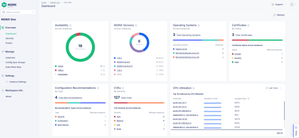
Introduction Introducing F5 NGINX One, a comprehensive solution designed to enhance business operations significantly through improved reliability and performance. At the core of NGINX One is our data plane, which is built on our world-class, lightweight, and high-performance NGINX software. This foundation provides robust traffic management solutions that are essential for modern digital businesses. These solutions include API Gateway, Content Caching, Load Balancing, and Policy Enforcement. NGINX One includes a user-friendly, SaaS-based NGINX One Console that provides essential telemetry and overseas operations without requiring custom development or infrastructure changes. This visibility empowers teams to promptly address customer experience, security vulnerabilities, network performance, and compliance concerns. NGINX One's deployment across various environments empowers businesses to enhance their operations with improved reliability and performance. It is a versatile tool for strengthening operational efficiency, security posture, and overall digital experience. le: Simplifying Application Delivery and Management NGINX One has several promising features on the horizon. Let's highlight three key features: Monitor Certificates and CVEs, Editing and Update Configurations, and Config Sync Groups. Let's delve into these in details. Monitor Certificates and CVE’s: One of NGINX One's standout features is its ability to monitor Common Vulnerabilities and Exposures (CVEs) and Certificate status. This functionality is crucial for maintaining application security integrity in a continually evolving threat landscape. The CVE and Certificate Monitoring capability of NGINX One enables teams to: Prioritize Remediation Efforts: With an accurate and up-to-date database of CVEs and a comprehensive certificate monitoring system, NGINX One assists teams in prioritizing vulnerabilities and certificate issues according to their severity, guaranteeing that essential security concerns are addressed without delay. Maintain Compliance: Continuous monitoring for CVEs and certificates ensures that applications comply with security standards and regulations, crucial for industries subject to stringent compliance mandates. Edit and Update Configurations: This feature empowers users to efficiently edit configurations and perform updates directly within the NGINX One Console interface. With Configuration Editing, you can: Make Configuration Changes: Quickly adapt to changing application demands by modifying configurations, ensuring optimal performance and security. Simplify Management: Eliminate the need to SSH directly into each instance to edit or update configurations. Reduce Errors: The intuitive interface minimizes potential errors in configuration changes, enhancing reliability by offering helpful recommendations. Enhance Automation with NGINX One SaaS Console: Integrates seamlessly into CI/CD and GitOps workflows, including GitHub, through a comprehensive set of APIs. Config Sync Groups: The Config Sync Group feature is invaluable for environments running multiple NGINX instances. This feature ensures consistent configurations across all instances, enhancing application reliability and reducing administrative overhead. The Config Sync Group capability offers: Automated Synchronization: Configurations are seamlessly synchronized across NGINX instances, guaranteeing that all applications operate with the most current and secure settings. When a configuration sync group already has a defined configuration, it will be automatically pushed to instances as they join. Scalability Support: Organizations can easily incorporate new NGINX instances without compromising configuration integrity as their infrastructure expands. Minimized Configuration Drift: This feature is crucial for maintaining consistency across environments and preventing potential application errors or vulnerabilities from configuration discrepancies. Conclusion NGINX One Cloud Console redefines digital monitoring and management by combining all the NGINX core capabilities and use cases. This all-encompassing platform is equipped with sophisticated features to simplify user interaction, drastically cut operational overhead and expenses, bolster security protocols, and broaden operational adaptability. Read our announcement blog for more details on the launch. To explore the platform’s capabilities and see it in action, we invite you to tune in to our webinar on September 25th. This is a great opportunity to witness firsthand how NGINX One can revolutionize your digital monitoring and management strategies.1KViews4likes1CommentHow I did it - “Delivering Kasm Workspaces three ways”
Securing modern, containerized platforms like Kasm Workspaces requires a robust and multi-faceted approach to ensure performance, reliability, and data protection. In this edition of "How I did it" we'll see how F5 technologies can enhance the security and scalability of Kasm Workspaces deployments.984Views2likes0Comments
Need help to understand operation between RE and CE ?
Hi all, We have installed CE site in our network and this site has established IPSEC tunnels with RE nodes. The on-prem DC site has workloads (e.g actual web application servers that are serving the client requests). I have citrix netscaler background and the Citrix Netscalers ADCs are configured with VIPs which are the frontend for the client requests coming from outside (internet), when the request land on VIPs, it goes through both source NAT and destination NAT, its source address is changed to private address according to the service where the actual application servers are configured and then sent to the actual application server after changing the destination to IP address of the server. In XC, the request will land to the cloud first because the public IP, which is assigned to us will lead the request to RE. I have few questions regarding the events that will happen from here after Will there going to be any SNAT on the request or will it send it as it is to the site? And if there is SNAT then what IP address will it be ? and will it be done by the RE or on-prem CE There has to be destination NAT. Will this destination NAT is going to be performed by the XC cloud or the request will be sent to the site and site will do the destination NAT ? When the request will land the CE it will be landed in VN local outside so this means that we have to configure the network connector between the VN Local outside and the VN in which the actual workloads are configured, what type of that VN would be ? When the request will be responded by the application server in local on-prem the site the request has to go out to the XC cloud first, it will be routed via IPSEC tunnel so this means that we have to install the network connector between the Virtual network where the workloads are present and site local outside, do we have to install the default route in application VN ? Is there any document, post or article that actually help me to understand the procedure (frankly I read a lot of F5 documents but couldn’t able to find the answers738Views0likes10CommentsF5 Distributed Cloud and Transfer Encoding: Chunking
My team recently came across an unusual request from an F5 Distributed Cloud customer: How do we support HTTP/API clients that can only support transfer encoding chunked requests. What even is chunking? What is Transfer Encoding? The key word is "encoding" and HTTP uses a header to communicate what scheme encodes the data in a message body. These can be used for functional purposes as well as communication optimization. In the case of Transfer Encoding it is most commonly leveraged for chunking, which is taking a large bit of data and breaking it up into smaller pieces that are sent between two nodes along a path, transparently to the application sending/receiving messages. These nodes may not necessarily be the source and destination of an HTTP conversation, so proxies in between could transparently reassemble the chunks for differing parts of the path. It does not use a content-length header: Contrasting with Content Encoding, which is more commonly used for compression of message bodies (although this can be done with transfer encoding too) and requires the length to be defined. Proxies along the path are expected to not change these values, but this is not always the case. In our customer scenario, the request was exactly for the proxy (in this case Distributed Cloud) to support chunked requests from the client to an HTTP 2 server (HTTP2 does away with chunking completely). With Distributed Cloud, we fulfill this with three simple config elements: 1. The HTTP Load Balancer Object is configured to be an HTTP 1.1 virtual server: 2. The Origin is configured to use HTTP 2 (which defines Distributed Cloud's behavior as an HTTP client): And after applying the config, we go back to the HTTP Load Balancer dialog, to the Other Settings section and configure a Buffer Policy under Miscellaneous Options: A value configured in that dialog (it is the only property aside from an enable checkbox) will limit the request size to the specified value in bytes, but it has the added benefit of allowing the Distributed Cloud proxy to buffer the chunked requests and then convert them into content-encoding friendly values with length specified, and then send to the server via an HTTP 2 connection. To test this connection, a simple cURL command with the header "Transfer-Encoding: chunked" and the -v flag can validate your config. ex. curl -v --location 'https:/[URL/PATH]:PORT --header 'Transfer-Encoding: chunked' --data ‘’ In the ensuing response, the -v flag (verbose) will include the following in the response: * using HTTP/1.x > POST [PATH] HTTP/1.1 > Host: [URL] > User-Agent: curl/8.7.1 … > Transfer-Encoding: chunked … Note the Transfer-Encoding chunked line, which shows that chunking was used on the client-side connection. You can validate the server-side connection in the request logs in the Distributed Cloud dashboard by looking at the request headers specified in the event JSON: "rsp_headers": "{\":status\":\"200\",\"connection\":\"close\",\"content-length\":\"26930\", [TRUNCATED] This is a transfer-encoded chunked client-side request being converted to a content-encoded request on the server side: Special shoutout to fellow F5er Gowry Bhaagavathula for collaborating with me on getting this figured out!625Views1like0CommentsExtending F5 ADSP: Multi-Tailnet Egress
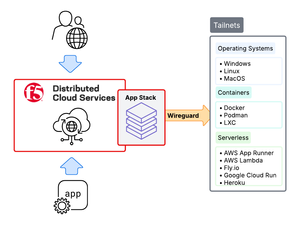
Tailscale tailnets make private networking simple, secure, and efficient. They’re quick to establish, easy to operate, and provide strong identity and network-level protection through zero-trust WireGuard mesh networking. However, while tailnets are secure, applications inside these environments still need enterprise-grade application security, especially when exposed beyond the mesh. This is where F5 Distributed Cloud (XC) App Stack comes in. As F5 XC’s Kubernetes-native platform, App Stack integrates directly with Tailscale to extend F5 ADSP into tailnets. The result is that applications inside tailnets gain the same enterprise-grade security, performance, and operational consistency as in traditional environments, while also taking full advantage of Tailscale networking.601Views4likes2CommentsIntroducing AI Assistant for F5 Distributed Cloud, F5 NGINX One and BIG-IP
This article is an introduction to AI Assistant and shows how it improves SecOps and NetOps speed across all F5 platforms (Distributed Cloud, NGINX One and BIG-IP) , by solving the complexities around configuration, analytics, log interpretation and scripting. 599Views3likes1Comment
Overview of MITRE ATT&CK Framework and Initial Access Tactic (TA0001)
Introduction to MITRE ATT&CK: In today’s modern world, cyber threats are becoming more and more sophisticated, causing an urgent need for organizations across the world to understand how adversaries operate, so that they can protect their digital assets from being compromised. MITRE ATT&CK (Adversarial Tactics, Techniques and Common Knowledge) framework acts as a helpful resource for security teams in organizations to identify and analyze the attack patterns, techniques and tactics used to achieve exploitation. It is a globally accepted, continually updated and publicly available framework based on real-world observations of the latest cyber attacks. It keeps track of APT (Advanced Persistent Threat) groups and TTPs (Tactics, Techniques and Procedures) to provide guidance on procedures followed by the adversaries to compromise an organization’s resources. It is widely used in the cybersecurity field to improve security measures for organizations by enhancing their defensive capabilities. Here are some key words to be familiarized with before we dive deeper. APT (Advanced Persistent Threat): These are advanced groups of cyber attackers, heavily backed and funded to perform cyber-attack campaigns for a long period of time without getting detected. TTPs (Tactics, Techniques and Procedures): Tactics: It deals with the objective and goal of attackers Techniques: It deals with how attackers are going to accomplish their objective Sub-Techniques: It provides a more granular detail about the implementation of a specific technique Procedures: It deals with the implementation of techniques or sub-techniques to attain the objective. The current version of Enterprise ATT&CK matrix includes 14 tactics with each tactic containing multiple techniques and sub-techniques. Below are the tactics included in Enterprise matrix with their brief overview: TA0043 Reconnaissance: Gather information about the target. TA0042 Resource Development: Accumulate and prepare resources to carry out attacks. TA0001 Initial Access: Infiltrate into the target’s infra or network or system. TA0002 Execution: Run malicious code on victim’s system. TA0003 Persistence: Maintain access to the compromised system. TA0004 Privilege Escalation: Elevate privileges to access more sensitive information. TA0005 Defense Evasion: Bypass security detections. TA0006 Credential access: Steal credentials. TA0007 Discovery: Learn more about the compromised system’s environment. TA0008 Lateral Movement: Hop to other system’s connected in the same network. TA0009 Collection: Gather sensitive information. TA0011 Command and Control: Establish remote communication with compromised system. TA0010 Exfiltration: Steal data from the compromised system. TA0040 Impact: Destruction or manipulation of data or system, making it unavailable for victim Introduction to Initial Access Tactic (TA0001): As the name explains, Initial access means gaining access to the network. Initial Access tactic provides all the possible techniques used by adversaries to gain access and enter a network. This is a crucial phase in the attack lifecycle as the attacker looks for an entry point to step their foot into the network. Successful initial access can open the door to a wide range of exploitations like privilege escalation, confidential data theft and much more. Let us now quickly go through the techniques that fall under Initial Access and understand them. 1. Content Injection (T1659): Content Injection is a web application vulnerability where an attacker tries to manipulate and inject malicious content into a web page through a vulnerable endpoint within the application. Attackers can inject any type of content like harmful HTML, JavaScript or alter the existing content on the web page, which could lead to harmful consequences. Ideally, this type of attack takes place upon user interactions (click, enter data, submit a form). Example: File inclusion or upload 2. Drive-by Compromise (T1189): Using Drive-by compromise technique, the adversary typically tries to compromise the victim’s browser through a malicious or compromised website. Attackers inject malicious code such as malware, ransomware or exploit kits into the web page, which is then automatically executed when the victim visits the page without their knowledge or interaction. Example: Cross-Site Scripting 3. Exploit Public-Facing Applications (T1190): In this technique, attackers attempt to exploit vulnerabilities in publicly accessible web applications, web servers, or databases to gain access to a network. Vulnerability in the application, security misconfigurations, inadequate access control mechanisms, or the use of outdated or unpatched software are some of the possible reasons for these attacks. Such weaknesses provide attackers the opportunity to gain unauthorized access, escalate privileges, or compromise sensitive data. Example: SQL Injection 4. External Remote Services (T1133): Adversaries target to enter an organization’s network by exploiting weaknesses in external sources like VPNs, Remote Desktop Protocol (RDP), Citrix, Cloud Services, external file sharing and others that allow remote access to the internal systems. Lack of proper authentication mechanisms, access control, VPN misconfiguration and usage of insecure connections lay the path to this type of attack. 5. Hardware Additions (T1200): In this technique, the attacker exploits the target system/network by connecting new hardware, networking devices or other computing devices to gain access. Attackers can use USB keyloggers to capture keystrokes and steal credentials or can use routers/switches/passive network tapping/network traffic modification that can intercept or control networks. As this technique involves physical hardware, it provides persistent access to the attacker even if the software’s defenses are intact. 6. Phishing (T1566): Phishing is a technique in which attackers exploit an individual/organization by sending deceptive emails, texts, files that appear to be from trusted and legitimate sources. Attackers craft and design the content to trick users into clicking malicious links, downloading attachments, or revealing personal sensitive information such as usernames, passwords, or financial details. A more targeted form of phishing is called Spearphishing. (.001) Spearphishing Attachment: This is a type of phishing in which an attacker sends an email or text with malicious files attached to them, such as executable files, PDFs, or Word Documents. When a user opens/downloads an attachment, a malicious payload will be injected into the system. (.002) Spearphishing Link: Here, adversaries send emails or texts with malicious links in it that look legitimate. When a user clicks or copy and pastes the URL into a browser, it can download the malicious content into the system or sometimes, the users are tricked into entering their personal information like credentials, bank details, Unique Identity numbers. (.003) Spearphishing via Service: Here, adversaries use third party online services or platforms like social media services, personal web mail as the source to conduct their phishing attack. (.004) Spearphishing Voice : Here, an attacker compromises a victim with voice communication. The attacker pretends to be a person from trusted organizations such as banks or government officials and tricks the victims into revealing sensitive information over the phone. 7. Replication Through Removable Media (T1091): Replication through removable media is a technique in which adversaries use removable media like USB drives, external hard disks to spread malicious payloads and also to replicate the malware between systems. Sometimes, malicious code can automatically execute when the device is plugged in if the system has autoplay or autorun enabled, or the attacker might rely on user interaction to run the malicious payload. 8. Supply Chain Compromise (T1195): In Supply Chain Compromise, an adversary targets and compromises a company’s supply chain such as suppliers, vendors, or third-party service providers before receipt by the end customer. Attackers can introduce malicious elements into Software updates, hardware or Dependent sources before its delivery. (.001) Compromise Software Dependencies and Development Tools: Here, an adversary tries to manipulate the third-party open-source software system, development tools or service providers that are being used by the organization. (.002) Compromise Software Supply Chain: Attacker manipulates software updates, libraries, or repository used for distributing software before it reaches out to the final customer. This compromised patch will be unknowingly installed by the organization when they update or install software. (.003) Compromise Hardware Supply Chain: Here, an attacker manipulates hardware components or devices before they reach the end-user. Once the device is installed within an organization, it provides a persistent backdoor for attackers. Example: Insecure Deserialization, log4j 9. Trusted Relationship (T1199): In Trusted Relationship technique, adversaries exploit the relationship between the target organization and their partners, vendors, or internal users to gain access. Adversaries focus the trusted entities and leverage them as sources of attack because these entities are typically subjected to less stringent scrutiny and may have elevated permissions to critical systems within the target organization, which adversaries can exploit to carry out their attack. Example: Unsafe Consumption of APIs 10. Valid Accounts (T1078): The Valid Accounts technique is one of the most common methods adversaries use to gain unauthorized access to systems by exploiting legitimate credentials. Attackers attempt to use stolen credentials or guessed passwords to gain access to the systems, leveraging the compromised or weak credentials as this can bypass security mechanisms, gain persistent and privileged access. Example: Brute Force (.001) Default Accounts: Here, adversaries try to exploit credentials of default accounts like Guest or Administrator accounts. Default accounts also include factory/provider set accounts on other types of systems, software, or devices, including the root user account in AWS and the default service account in Kubernetes. Failing to change the credentials provided for default accounts exposes the organization to high security risks. (.002) Domain Accounts: Here, adversaries exploit user or system credentials that are part of a domain. Domain accounts are managed by Active Directory Domain Services, where access and permissions are set across systems and services within the domain. (.003) Local Accounts: Adversaries exploit the credentials of local accounts. Local accounts are typically configured by an organization for use by users, remote support services, or for administrative tasks on individual systems or services. (.004) Cloud Accounts: Adversaries exploit valid credentials of cloud accounts to access cloud-based services and infrastructure. As organizations increasingly rely on cloud environments such as Amazon Web Services (AWS), Microsoft Azure, Google Cloud, and other cloud platforms, adversaries target cloud accounts to exploit resources, steal data, or perform further malicious activities within the cloud environment. How F5 can help? F5 security solutions like WAF (Web Application Firewall), API security, and DDoS mitigation protect the applications and APIs across platforms including Clouds, Edge, On-prem or Hybrid thereby reducing security risks. In addition to the above solutions, F5 bot and risk management solutions effectively mitigate malicious bots and automation, which can enhance the security posture of your modern applications. The example attacks mentioned under techniques can be effectively mitigated by F5 products like Distributed Cloud, BIG-IP and NGINX. Here are a few links which explain the mitigation steps. Mitigating Cross-Site Scripting (XSS) using F5 Advanced WAF Mitigating Injection flaws using F5 Distributed Cloud Mitigating Log4j vulnerability using F5 Distributed Cloud Mitigating SQL injection using F5 NGINX App Protect For more details on the other mitigation techniques of MITRE ATT&CK Initial Access Tactic TA0001, please reach out to your local F5 team. NOTE: This is the first article in MITRE series and stay tuned for more tactics-related articles. Reference Links: MITRE ATT&CK® Initial Access, Tactic TA0001 - Enterprise | MITRE ATT&CK® MITRE ATT&CK: What It Is, How it Works, Who Uses It and Why | F5 Labs599Views1like0Comments