Distributed Cloud
47 TopicsVIPTest: Rapid Application Testing for F5 Environments
VIPTest is a Python-based tool for efficiently testing multiple URLs in F5 environments, allowing quick assessment of application behavior before and after configuration changes. It supports concurrent processing, handles various URL formats, and provides detailed reports on HTTP responses, TLS versions, and connectivity status, making it useful for migrations and routine maintenance.1.1KViews5likes2CommentsThinking Outside the Box: Rewriting Web Pages with F5 Distributed Cloud (XC)
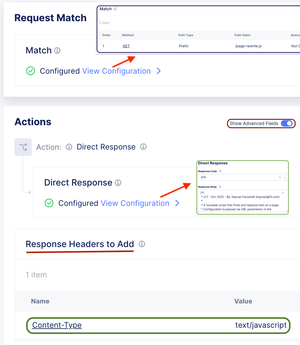
This article demonstrates how to dynamically rewrite web page content, such as updating links or replacing text, by using native features in F5 Distributed Cloud (XC). It provides a creative workaround that leverages JavaScript injection to modify pages on the fly, avoiding the need for a separate proxy like NGINX or BIG-IP.460Views4likes3CommentsHow to deploy an F5XC SMSv2 site with the help of automation
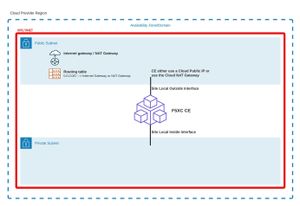
To deploy an F5XC Customer Edge (CE) in SMSv2 mode with the help of automation, it is necessary to follow the three main steps below: Verify the prerequisites at the technical architecture level for the environment in which the CE will be deployed (public cloud or datacenter/private cloud) Create the necessary objects at the F5XC platform level Deploy the CE instance in the target environment We will provide more details for all the steps as well as the simplest Terraform skeleton code to deploy an F5XC CE in the main cloud environments (AWS, GCP and Azure). Step 1: verification of architecture prerequisites To be deployed, a CE must have an interface (which is and will always be its default interface) that has Internet access. This access is necessary to perform the installation steps and provide the "control plane" part to the CE. The name of this interface will be referred to as « Site Local Outside or SLO ». This Internet access can be provided in several ways: "Cloud provider" type site: Public IP address directly on the interface Private IP address on the interface and use of a NAT Gateway as default route Private IP address on the interface and use of a security appliance (firewall type, for example) as default route Private IP address on the interface and use of an explicit proxy Datacenter or "private cloud" type site: Private IP address on the interface and use of a security appliance (firewall type, for example) or router as default route Private IP address on the interface and use of an explicit proxy Furthermore, public IP addresses on the interface and "direct" routing to Internet It is highly recommended (not to say required) to add at least a second interface during the site first deployment. Because depending on the infrastructure (for example, GCP) it is not possible to add network interfaces after the creation of the VM. Even on platforms where adding a network interface is possible, a reboot of the F5XC CE is needed. An F5XC SMSv2 CE can have up to eight interfaces overall. Additional interfaces are (most of the time) used as “Site Local Inside or SLI” interfaces or "Segment interfaces" (that specific part will be covered in another article). Basic CE matrix flow. Interface Direction and protocols Use case / purpose SLO Egress – TCP 53 (DNS), TCP 443 (HTTPS), UDP 53 (DNS), UDP 123 (NTP), UDP 4500 (IPSEC) Registration, software download and upgrade, VPN tunnels towards F5XC infrastructure for control plane SLO Ingress – None RE / CE use case CE to CE use case by using F5 ADN SLO Ingress – UDP 4500 Site Mesh Group for direct CE to CE secure connectivity over SLO interface (no usage of F5 ADN) SLO Ingress – TCP 80 (HTTP), TCP 443 (HTTPS) HTTP/HTTPS LoadBalancer on the CE for WAAP use cases SLI Egress – Depends on the use case / application, but if the security constraint permits it, no restriction SLI Ingress – Depends on the use case / application, but if the security constraint permits it, no restriction For advanced details regarding IPs and domains used for: Registration / software upgrade Tunnels establishment towards F5XC infrastructure Please refer to: https://docs.cloud.f5.com/docs-v2/platform/reference/network-cloud-ref#new-secure-mesh-v2-sites Step 2: creation of necessary objects at the F5XC platform level This step will be performed by the Terraform script by: Creating an SMSv2 token Creating an F5XC site of SMSv2 type API certificate and terraform variables First, it is necessary to create an API certificate. Please follow the instructions in our official documentation here: https://docs.cloud.f5.com/docs-v2/administration/how-tos/user-mgmt/Credentials#generate-api-certificate-for-my-credentials or here: https://docs.cloud.f5.com/docs-v2/administration/how-tos/user-mgmt/Credentials#generate-api-certificate-for-service-credentials Depending on the type of API certificate you want to create and use (user credential or service credential). In the Terraform variables, those are the ones that you need to modify: The “location of the api key” should be the full path where your API P12 file is stored. variable "f5xc_api_p12_file" { type = string description = "F5XC tenant api key" default = "<location of the api key>" } If your F5XC console URL is https://mycompany.console.ves.volterra.io then the value for the f5xc_api_url will be https://mycompany.console.ves.volterra.io/api variable "f5xc_api_url" { type = string default = "https://<tenant name>.console.ves.volterra.io/api" } When using terraform, you will also need to export the P12 certificate password as an environment variable. export VES_P12_PASSWORD=<password of P12 cert> Creation of the SMSv2 token. This is achieved with the following Terraform code and with the “type = 1” parameter. # #F5XC objects creation # resource "volterra_token" "smsv2-token" { depends_on = [volterra_securemesh_site_v2.site] name = "${var.f5xc-ce-site-name}-token" namespace = "system" type = 1 site_name = volterra_securemesh_site_v2.site.name } Creation of the F5XC SMSv2 site. This is achieved with the following Terraform code (example for GCP). This is where you need to configure all the options you want to be applied at site creation. resource "volterra_securemesh_site_v2" "site" { name = format("%s-%s", var.f5xc-ce-site-name, random_id.suffix.hex) namespace = "system" block_all_services = false logs_streaming_disabled = true enable_ha = false labels = { "ves.io/provider" = "ves-io-GCP" } re_select { geo_proximity = true } gcp { not_managed {} } } For instance, if you want to use a corporate proxy and have the CE tunnels passing through the proxy, the following should be added: custom_proxy { enable_re_tunnel = true proxy_ip_address = "10.154.32.254" proxy_port = 8080 } And if you want to force CE to REs connectivity with SSL, the following should be added: tunnel_type = "SITE_TO_SITE_TUNNEL_SSL" Step 3: creation of the CE instance in the target environment This step will be performed by the Terraform script by: Generating a cloud-init file Creating the F5XC site instance in the environment based on the marketplace images or the available F5XC images How to list F5XC available images in Azure: az vm image list --all --publisher f5-networks --offer f5xc_customer_edge --sku f5xccebyol --output table | sort -k4 -V And check in the output, the one with the highest version. x64 f5xc_customer_edge f5-networks f5xccebyol f5-networks:f5xc_customer_edge:f5xccebyol:9.2025.17 9.2025.17 x64 f5xc_customer_edge f5-networks f5xccebyol f5-networks:f5xc_customer_edge:f5xccebyol:2024.40.1 2024.40.1 x64 f5xc_customer_edge f5-networks f5xccebyol f5-networks:f5xc_customer_edge:f5xccebyol:2024.40.2 2024.40.2 x64 f5xc_customer_edge f5-networks f5xccebyol f5-networks:f5xc_customer_edge:f5xccebyol:2024.44.1 2024.44.1 x64 f5xc_customer_edge f5-networks f5xccebyol_2 f5-networks:f5xc_customer_edge:f5xccebyol_2:2024.44.2 2024.44.2 Architecture Offer Publisher Sku Urn Version -------------- ------------------ ----------- ------------ ----------------------------------------------------- --------- We are going to re-use some of the parameters in the Terraform script, to instruct the Terraform code which image it should use. source_image_reference { publisher = "f5-networks" offer = "f5xc_customer_edge" sku = "f5xccebyol" version = "9.2025.17" } Also, for Azure, it’s needed to accept the legal terms of the F5XC CE image. This needs to be performed only once by running the following commands: Select the Azure subscription in which you are planning to deploy the F5XC CE: az account set -s <subscription-id> Accept the terms and conditions for the F5XC CE for this subscription: az vm image terms accept --publisher f5-networks --offer f5xc_customer_edge --plan f5xccebyol How to list F5XC available images in GCP: gcloud compute images list --project=f5-7626-networks-public --filter="name~'f5xc-ce'" --sort-by=~creationTimestamp --format="table(name,creationTimestamp)" And check in the output, the one with the highest version. NAME CREATION_TIMESTAMP f5xc-ce-crt-20250701-0123 2025-07-09T02:15:08.352-07:00 f5xc-cecrt-20250701-0099-9 2025-07-02T01:32:40.154-07:00 f5xc-ce-202505151709081 2025-06-25T22:31:23.295-07:00 How to list F5XC available images in AWS: aws ec2 describe-images \ --region eu-west-3 \ --filters "Name=name,Values=*f5xc-ce*" \ --query "reverse(sort_by(Images, &CreationDate))[*].{ImageId:ImageId,Name:Name,CreationDate:CreationDate}" \ --output table And check in the output, the ami with the latest creation date. Also, for AWS, it’s needed to accept the legal terms of the F5XC CE image. This needs to be performed only once. Go to this page in your AWS Console Then select "View purchase options" and then select "Subscribe". Putting everything together: Global overview We are going to use Azure as the target environment to deploy the F5XC CE. The CE will be deployed with two NICs, the SLO being in a public subnet and a public IP will be attached to the NIC. We assume that all the prerequisites from step 1 are met. Terraform skeleton for Azure is available here: https://github.com/veysph/Prod-TF/ It's not intended to be the perfect thing, just an example of the minimum basic things to deploy an F5XC SMSv2 CE with automation. Changes and enhancements based on the different needs you might have are more than welcome. It's really intended to be flexible and not too strict. Structure of the terraform directory: provider.tf contains everything that is related to the needed providers variables.tf contains all the variables used in the terraform files f5xc_sites.tf contains everything that is related to the F5XC objects creation main.tf contains everything to start the F5XC CE in the target environment Deployment Make all the relevant changes in variables.tf. Don't forget to export your P12 password as an environment variable (see Step 2, API certificate and terraform variables)! Then run, terraform init terraform plan terraform apply Should everything be correct at each step, you should get a CE object in the F5XC console, under Multi-Cloud Network Connect --> Manage --> Site Management --> Secure Mesh Sites v2398Views4likes1CommentExtending F5 ADSP: Multi-Tailnet Egress
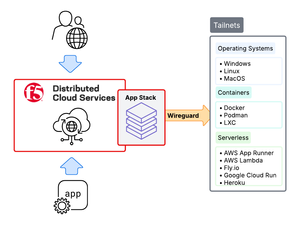
Tailscale tailnets make private networking simple, secure, and efficient. They’re quick to establish, easy to operate, and provide strong identity and network-level protection through zero-trust WireGuard mesh networking. However, while tailnets are secure, applications inside these environments still need enterprise-grade application security, especially when exposed beyond the mesh. This is where F5 Distributed Cloud (XC) App Stack comes in. As F5 XC’s Kubernetes-native platform, App Stack integrates directly with Tailscale to extend F5 ADSP into tailnets. The result is that applications inside tailnets gain the same enterprise-grade security, performance, and operational consistency as in traditional environments, while also taking full advantage of Tailscale networking.607Views4likes2CommentsExperience the power of F5 NGINX One with feature demos
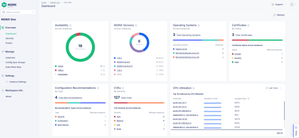
Introduction Introducing F5 NGINX One, a comprehensive solution designed to enhance business operations significantly through improved reliability and performance. At the core of NGINX One is our data plane, which is built on our world-class, lightweight, and high-performance NGINX software. This foundation provides robust traffic management solutions that are essential for modern digital businesses. These solutions include API Gateway, Content Caching, Load Balancing, and Policy Enforcement. NGINX One includes a user-friendly, SaaS-based NGINX One Console that provides essential telemetry and overseas operations without requiring custom development or infrastructure changes. This visibility empowers teams to promptly address customer experience, security vulnerabilities, network performance, and compliance concerns. NGINX One's deployment across various environments empowers businesses to enhance their operations with improved reliability and performance. It is a versatile tool for strengthening operational efficiency, security posture, and overall digital experience. le: Simplifying Application Delivery and Management NGINX One has several promising features on the horizon. Let's highlight three key features: Monitor Certificates and CVEs, Editing and Update Configurations, and Config Sync Groups. Let's delve into these in details. Monitor Certificates and CVE’s: One of NGINX One's standout features is its ability to monitor Common Vulnerabilities and Exposures (CVEs) and Certificate status. This functionality is crucial for maintaining application security integrity in a continually evolving threat landscape. The CVE and Certificate Monitoring capability of NGINX One enables teams to: Prioritize Remediation Efforts: With an accurate and up-to-date database of CVEs and a comprehensive certificate monitoring system, NGINX One assists teams in prioritizing vulnerabilities and certificate issues according to their severity, guaranteeing that essential security concerns are addressed without delay. Maintain Compliance: Continuous monitoring for CVEs and certificates ensures that applications comply with security standards and regulations, crucial for industries subject to stringent compliance mandates. Edit and Update Configurations: This feature empowers users to efficiently edit configurations and perform updates directly within the NGINX One Console interface. With Configuration Editing, you can: Make Configuration Changes: Quickly adapt to changing application demands by modifying configurations, ensuring optimal performance and security. Simplify Management: Eliminate the need to SSH directly into each instance to edit or update configurations. Reduce Errors: The intuitive interface minimizes potential errors in configuration changes, enhancing reliability by offering helpful recommendations. Enhance Automation with NGINX One SaaS Console: Integrates seamlessly into CI/CD and GitOps workflows, including GitHub, through a comprehensive set of APIs. Config Sync Groups: The Config Sync Group feature is invaluable for environments running multiple NGINX instances. This feature ensures consistent configurations across all instances, enhancing application reliability and reducing administrative overhead. The Config Sync Group capability offers: Automated Synchronization: Configurations are seamlessly synchronized across NGINX instances, guaranteeing that all applications operate with the most current and secure settings. When a configuration sync group already has a defined configuration, it will be automatically pushed to instances as they join. Scalability Support: Organizations can easily incorporate new NGINX instances without compromising configuration integrity as their infrastructure expands. Minimized Configuration Drift: This feature is crucial for maintaining consistency across environments and preventing potential application errors or vulnerabilities from configuration discrepancies. Conclusion NGINX One Cloud Console redefines digital monitoring and management by combining all the NGINX core capabilities and use cases. This all-encompassing platform is equipped with sophisticated features to simplify user interaction, drastically cut operational overhead and expenses, bolster security protocols, and broaden operational adaptability. Read our announcement blog for more details on the launch. To explore the platform’s capabilities and see it in action, we invite you to tune in to our webinar on September 25th. This is a great opportunity to witness firsthand how NGINX One can revolutionize your digital monitoring and management strategies.1KViews4likes1CommentHow I Did it - Migrating Applications to Nutanix NC2 with F5 Distributed Cloud Secure Multicloud Networking
In this edition of "How I Did it", we will explore how F5 Distributed Cloud Services (XC) enables seamless application extension and migration from an on-premises environment to Nutanix NC2 clusters.1.2KViews4likes0CommentsF5 Distributed Cloud Kubernetes Integration: Securing Services with Direct Pod Connectivity
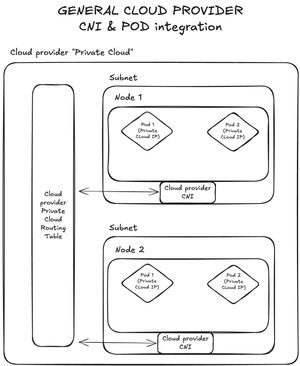
Introduction As organizations embrace Kubernetes for container orchestration, they face critical challenges in exposing services securely to external consumers while maintaining granular control over traffic management and security policies. Traditional approaches using NodePort services or basic ingress controllers often fall short in providing the advanced application delivery and security features required for production workloads. F5 Distributed Cloud (F5 XC) addresses these challenges by offering enterprise-grade application delivery and security services through its Customer Edge (CE) nodes. By establishing direct connectivity to Kubernetes pods, F5 XC can provide sophisticated load balancing, WAF protection, API security, and multi-cloud connectivity without the limitations of NodePort-based architectures. This article demonstrates how to architect and implement F5 XC CE integration with Kubernetes clusters to expose and secure services effectively, covering both managed Kubernetes platforms (AWS EKS, Azure AKS, Google GKE) and self-managed clusters using K3S with Cilium CNI. Understanding F5 XC Kubernetes Service Discovery F5 Distributed Cloud includes a native Kubernetes service discovery feature that communicates directly with Kubernetes API servers to retrieve information about services and their associated pods. This capability operates in two distinct modes: Isolated Mode In this mode, F5 XC CE nodes are isolated from the Kubernetes cluster pods and can only reach services exposed as NodePort services. While the discovery mechanism can retrieve all services, connectivity is limited to NodePort-exposed endpoints with the inherent NodePort limitations: Port Range Restrictions: Limited to ports 30000-32767 Security Concerns: Exposes services on all node IPs Performance Overhead: Additional network hops through kube-proxy Limited Load Balancing: Basic round-robin without advanced health checks Non-Isolated Mode, Direct Pod Connectivity (and why it matters) This is the focus of our implementation. In non-isolated mode, F5 XC CE nodes can reach Kubernetes pods directly using their pod IP addresses. This provides several advantages: Simplified Architecture: Eliminate NodePort complexity and port management limitation Enhanced Security: Apply WAF, DDoS protection, and API security directly at the pod level Advanced Load Balancing: Sophisticated algorithms, circuit breaking, and retry logic Architectural Patterns for Pod IP Accessibility To enable direct pod connectivity from external components like F5 XC CEs, the pod IP addresses must be routable outside the Kubernetes cluster. The implementation approach varies based on your infrastructure: Cloud Provider Managed Kubernetes Cloud providers typically handle pod IP routing through their native Container Network Interfaces (CNIs): Figure 1: Cloud providers' K8S CNI routes PODs IPs to the Cloud Provider Private Cloud Routing Table AWS EKS: Uses Amazon VPC CNI, which assigns VPC IP addresses directly to pods Azure AKS: Traditional CNI mode allocates Azure VNET IPs to pods Google GKE: VPC-native clusters provide direct pod IP routing In these environments, the cloud provider's CNI automatically updates routing tables to make pod IPs accessible within the VPC/VNET. Self-Managed Kubernetes Clusters For self-managed clusters, you need an advanced CNI that can expose the Kubernetes overlay network. The most common solutions are: Cilium: Provides eBPF-based networking with BGP support Calico: Offers flexible networking policies with BGP peering capabilities and eBPF support as well These CNIs typically use BGP to advertise pod subnets to external routers, making them accessible from outside the cluster. Figure 2: Self-managed K8S clusters use advanced CNI with BGP to expose the overlay subnet Cloud Provider Implementations AWS EKS Architecture Figure 3: AWS EKS with F5 XC CE integration using VPC CNI With AWS EKS, the VPC CNI plugin assigns real VPC IP addresses to pods, making them directly routable within the VPC without additional configuration. Azure AKS Traditional CNI Figure 4: Azure AKS with traditional CNI mode for direct pod connectivity Azure's traditional CNI mode allocates IP addresses from the VNET subnet directly to pods, enabling native Azure networking features. Google GKE VPC-Native Figure 5: Google GKE VPC-native clusters with alias IP ranges for pods GKE's VPC-native mode uses alias IP ranges to provide pods with routable IP addresses within the Google Cloud VPC. Deeper dive into the implementation Implementation Example 1: AWS EKS Integration Let's walk through a complete implementation using AWS EKS as our Kubernetes platform. Prerequisites and Architecture Network Configuration: VPC CIDR: 10.154.0.0/16 Three private subnets (one per availability zone) F5 XC CE deployed in Private Subnet 1 EKS worker nodes distributed across all three subnets Figure 6: Complete EKS implementation architecture with F5 XC CE integration Kubernetes Configuration: EKS cluster with AWS VPC CNI Sample application: microbot (simple HTTP service) Three replicas distributed across nodes What is running inside the K8S cluster? The PODs We have three PODs in the default namespace. Figure 7: The running PODs in the EKS cluster One running with POD IP 10.154.125.116, another one with POD IP 10.154.76.183 and one running with POD IP 10.154.69.183. microbot POD is a simple HTTP application that is returning the full name of the POD and an image. Figure 8: The microbot app The services Figure 9: The services running in the EKS cluster Configure F5 XC Kubernetes Service Discovery Create a K8S service discovery object. Figure 10: Kubernetes service discovery configuration In the “Access Credentials” activate the “Show Advanced Fields” slider. This is the key! Figure 11: The "advanced fields" slider Then provide the Kubeconfig file of the K8S cluster and select “Kubernetes POD reachable”. Figure 12: Kubernetes POD network reachability Then the K8S should be displayed in the “Service Discoveries”. Figure 13: The discovered PODs IPs One can see that the services are discovered by the F5 XC node and more interestingly, the PODs IPs. Are the pods reachable from the F5XC CE? Figure 14: Testing connectivity to pod 10.154.125.116 Figure 15: Testing connectivity to pod 10.154.76.183 Figure 16: Testing connectivity to pod 10.154.69.183 Yes, they are! Create Origin Pool with K8S Service Create an origin pool that references your Kubernetes service: Figure 17: Creating origin pool with Kubernetes service type Create an HTTPS Load-Balancer and test the service Just create a regular F5 XC HTTPS Load-Balancer and use the origin pool created above. Figure 18: Traffic load-balanced across the three PODs The result shows traffic being load-balanced across all EKS pods. Implementation Example 2: Self-Managed K3S with Cilium CNI One infrastructure subnet (10.154.1.0/24) in which the following components are going to be deployed: F5 XC CE single node (10.154.1.100) Two Linux Ubuntu nodes (10.154.1.10 & 10.154.1.11) On the Linux Ubuntu nodes, a Kubernetes cluster is going to be deployed using K3S (www.k3s.io) with the following specifications: PODs overlay subnet: 10.160.0.0/16 Services overlay subnet: 10.161.0.0/16 Default K3S CNI (flannel) will be disabled K3S CNI will be replaced by Cilium CNI to expose directly the PODs overlay subnet to the “external world” Figure 19: Self-managed K3S cluster with Cilium CNI and BGP peering to F5 XC CE What is running inside the K8S cluster? The PODs We have two PODs in the default namespace. Figure 20: The running PODs in the K8S cluster One running on node “k3s-1” with POD IP 10.160.0.203 and the other one running on node “k3s-2” with POD IP 10.160.1.208. microbot POD is a simple HTTP application that is returning the full name of the POD and an image. The services Figure 21: The services running in the K8S cluster Different Kubernetes services are created to expose the microbot PODs, one of type Cluster IP and the other one of type LoadBalancer. The type of service doesn’t really matter for F5XC because we are working in a full routed mode between the CE and the K8S cluster. F5XC only needs to “know” the PODs IPs, which will be discovered through the services. Configure F5 XC Kubernetes Service Discovery Steps are identical regarding what we did for EKS. And once done, services and PODs IPs are discovered by F5XC. Figure 22: The discovered PODs IPs Configure the BGP peering on F5XC CE In this example topology, BGP peerings are established directly between the K8S nodes and the F5 XC CE. Other implementations are possible, for instance, with an intermediate router. Figure 23: BGP peerings Check if the peerings are established. Figure 24: Verification of the BGP peerings Are the pods reachable from the F5XC CE? Figure 25: PODs reachability test They are! Create Origin Pool with K8S Service As we did for the EKS configuration, create an origin pool that references your Kubernetes service. Create an HTTPS Load-Balancer and test the service Just create a regular F5 XC HTTPS Load-Balancer and use the origin pool created above. Figure 26: Traffic load-balanced across the two PODs Scaling up? Let’s add another POD to the deployment to see how F5XC will handle the load-balancing after. Figure 27: Scaling up the Microbot PODs And it’s working! Load is spread automatically as soon as new PODs instances are available for the given service. Figure 28: Traffic load-balanced across the three PODs Appendix - K3S and Cilium deployment example Step 1: Install K3S without Default CNI On the master node: curl -sfL https://get.k3s.io | K3S_KUBECONFIG_MODE="644" \ INSTALL_K3S_EXEC="--flannel-backend=none \ --disable-network-policy \ --disable=traefik \ --disable servicelb \ --cluster-cidr=10.160.0.0/16 \ --service-cidr=10.161.0.0/16" sh - # Export kubeconfig export KUBECONFIG=/etc/rancher/k3s/k3s.yaml # Get token for worker nodes sudo cat /var/lib/rancher/k3s/server/node-token On worker nodes: IP_MASTER=10.154.1.10 K3S_TOKEN=<token-from-master> curl -sfL https://get.k3s.io | K3S_URL=https://${IP_MASTER}:6443 K3S_TOKEN=${K3S_TOKEN} sh - Step 2: Install and Configure Cilium On the K3S master node, please perform the following: Install Helm and Cilium CLI: # Install Helm sudo snap install helm --classic # Download Cilium CLI CILIUM_CLI_VERSION=$(curl -s https://raw.githubusercontent.com/cilium/cilium-cli/main/stable.txt) CLI_ARCH=amd64 curl -L --fail --remote-name-all https://github.com/cilium/cilium-cli/releases/download/${CILIUM_CLI_VERSION}/cilium-linux-${CLI_ARCH}.tar.gz{,.sha256sum} sha256sum --check cilium-linux-${CLI_ARCH}.tar.gz.sha256sum sudo tar xzvfC cilium-linux-${CLI_ARCH}.tar.gz /usr/local/bin Install Cilium with BGP support: helm repo add cilium https://helm.cilium.io/ helm install cilium cilium/cilium --version 1.16.5 \ --set=ipam.operator.clusterPoolIPv4PodCIDRList="10.160.0.0/16" \ --set kubeProxyReplacement=true \ --set k8sServiceHost=10.154.1.10 \ --set k8sServicePort=6443 \ --set bgpControlPlane.enabled=true \ --namespace kube-system \ --set bpf.hostLegacyRouting=false \ --set bpf.masquerade=true # Monitor installation cilium status --wait Step 3: Configure BGP Peering Label nodes for BGP: kubectl label nodes k3s-1 bgp=true kubectl label nodes k3s-2 bgp=true Create BGP configuration: # BGP Cluster Config apiVersion: cilium.io/v2alpha1 kind: CiliumBGPClusterConfig metadata: name: cilium-bgp spec: nodeSelector: matchLabels: bgp: "true" bgpInstances: - name: "k3s-instance" localASN: 65001 peers: - name: "f5xc-ce" peerASN: 65002 peerAddress: 10.154.1.100 peerConfigRef: name: "cilium-peer" --- # BGP Peer Config apiVersion: cilium.io/v2alpha1 kind: CiliumBGPPeerConfig metadata: name: cilium-peer spec: timers: holdTimeSeconds: 9 keepAliveTimeSeconds: 3 gracefulRestart: enabled: true restartTimeSeconds: 15 families: - afi: ipv4 safi: unicast advertisements: matchLabels: advertise: "bgp" --- # BGP Advertisement apiVersion: cilium.io/v2alpha1 kind: CiliumBGPAdvertisement metadata: name: bgp-advertisements labels: advertise: bgp spec: advertisements: - advertisementType: "PodCIDR"253Views3likes1CommentOverview of MITRE ATT&CK Tactic - TA0002 Execution
Introduction: Execution refers to the methods adversaries use to run malicious code on a target system. This tactic includes a range of techniques designed to execute payloads after gaining access to the network. It is a key stage in the attack lifecycle, as it allows attackers to activate their malicious actions, such as deploying malware, running scripts, or exploiting system vulnerabilities. Successful execution can lead to deeper system control, enabling attackers to perform actions like data theft, system manipulation, or establishing persistence for future exploitation. Now, let’s dive into the various techniques under the Execution tactic and explore how attackers use them. 1. T1651: Cloud Administration Command: Cloud management services can be exploited to execute commands within virtual machines. If an attacker gains administrative access to a cloud environment, they may misuse these services to run commands on the virtual machines. Furthermore, if an adversary compromises a service provider or a delegated administrator account, they could also exploit trusted relationships to execute commands on connected virtual machines. 2. T1059: Command and Scripting Interpreter The misuse of command and script interpreters allows adversaries to execute commands, scripts, or binaries. These interfaces, such as Unix shells on macOS and Linux, Windows Command Shell, and PowerShell are common across platforms and provide direct interaction with systems. Cross-platform interpreters like Python, as well as those tied to client applications (e.g., JavaScript, Visual Basic), can also be misused. Attackers may embed commands and scripts in initial access payloads or download them later via an established C2 (Command and Control) channel. Commands may also be executed via interactive shells or through remote services to enable remote execution. (.001) PowerShell: As PowerShell is already part of Windows, attackers often exploit it to execute commands discreetly without triggering alarms. It’s often used for things like finding information, moving across networks, and running malware directly in memory. This helps avoid detection because nothing is written to disk. Attackers can also execute PowerShell scripts without launching the powershell.exe program by leveraging.NET interfaces. Tools like Empire, PowerSploit, and PoshC2 make it even easier for attackers to use PowerShell for malicious purposes. Example - Remote Command Execution (.002) AppleScript: AppleScript is an macOS scripting language designed to control applications and system components through inter-application messages called AppleEvents. These AppleEvent messages can be sent by themselves or with AppleScript. They can find open windows, send keystrokes, and interact with almost any open application, either locally or remotely. AppleScript can be executed in various ways, including through the command-line interface (CLI) and built-in applications. However, it can also be abused to trigger actions that exploit both the system and the network. (.003) Windows Command Shell: The Windows Command Prompt (CMD) is a lightweight, simple shell on Windows systems, allowing control over most system aspects with varying permission levels. However, it lacks the advanced capabilities of PowerShell. CMD can be used from a distance using Remote Services. Attackers may use it to execute commands or payloads, often sending input and output through a command-and-control channel. Example - Remote Command Execution (.004) Unix Shell: Unix shells serve as the primary command-line interface on Unix-based systems. They provide control over nearly all system functions, with certain commands requiring elevated privileges. Unix shells can be used to run different commands or payloads. They can also run shell scripts to combine multiple commands as part of an attack. Example - Remote Command Execution (.005) Visual Basic: Visual Basic (VB) is a programming language developed by Microsoft, now considered a legacy technology. Visual Basic for Applications (VBA) and VBScript are derivatives of VB. Malicious actors may exploit VB payloads to execute harmful commands, with common attacks, including automating actions via VBScript or embedding VBA content (like macros) in spear-phishing attachments. (.006) Python: Attackers often use popular scripting languages, like Python, due to their interoperability, cross-platform support, and ease of use. Python can be run interactively from the command line or through scripts that can be distributed across systems. It can also be compiled into binary executables. With many built-in libraries for system interaction, such as file operations and device I/O, attackers can leverage Python to download and execute commands, scripts, and perform various malicious actions. Example - Code Injection (.007) JavaScript: JavaScript (JS) is a platform-independent scripting language, commonly used in web pages and runtime environments. Microsoft's JScript and JavaScript for Automation (JXA) on macOS are based on JS. Adversaries exploit JS to execute malicious scripts, often through Drive-by Compromise or by downloading scripts as secondary payloads. Since JS is text-based, it is often obfuscated to evade detection. Example - XSS (.008) Network Device CLI: Network devices often provide a CLI or scripting interpreter accessible via direct console connection or remotely through telnet or SSH. These interfaces allow interaction with the device for various functions. Adversaries may exploit them to alter device behavior, manipulate traffic, load malicious software by modifying configurations, or disable security features and logging to avoid detection. (.009) Cloud API: Cloud APIs offer programmatic access to nearly all aspects of a tenant, available through methods like CLIs, in-browser Cloud Shells, PowerShell modules (e.g., Azure for PowerShell), or SDKs for languages like Python. These APIs provide administrative access to major services. Malicious actors with valid credentials, often stolen, can exploit these APIs to perform malicious actions. (.010) AutoHotKey & AutoIT: AutoIT and AutoHotkey (AHK) are scripting languages used to automate Windows tasks, such as clicking buttons, entering text, and managing programs. Attackers may exploit AHK (.ahk) and AutoIT (.au3) scripts to execute malicious code, like payloads or keyloggers. These scripts can also be embedded in phishing payloads or compiled into standalone executable files (.011) Lua: Lua is a cross-platform scripting and programming language, primarily designed for embedding in applications. It can be executed via the command-line using the standalone Lua interpreter, through scripts (.lua), or within Lua-embedded programs. Adversaries may exploit Lua scripts for malicious purposes, such as abusing or replacing existing Lua interpreters to execute harmful commands at runtime. Malware examples developed using Lua include EvilBunny, Line Runner, PoetRAT, and Remsec. (.012) Hypervisor CLI: Hypervisor CLIs offer extensive functionality for managing both the hypervisor and its hosted virtual machines. On ESXi systems, tools like “esxcli” and “vim-cmd” allow administrators to configure and perform various actions. Attackers may exploit these tools to enable actions like File and Directory Discovery or Data Encrypted for Impact. Malware such as Cheerscrypt and Royal ransomware have leveraged this technique. 3. T1609: Container Administration Command Adversaries may exploit container administration services, like the Docker daemon, Kubernetes API server, or kubelet, to execute commands within containers. In Docker, attackers can specify an entry point to run a script or use docker exec to execute commands in a running container. In Kubernetes, with sufficient permissions, adversaries can gain remote execution by interacting with the API server, kubelet, or using commands like kubectl exec within the cluster. 4. T1610: Deploy Container Containers can be exploited by attackers to run malicious code or bypass security measures, often through the use of harmful processes or weak settings, such as missing network rules or user restrictions. In Kubernetes environments, attackers may deploy containers with elevated privileges or vulnerabilities to access other containers or the host node. They may also use compromised or seemingly benign images that later download malicious payloads. 5. T1675: ESXi Administration Command ESXi administration services can be exploited to execute commands on guest machines within an ESXi virtual environment. ESXi-hosted VMs can be remotely managed via persistent background services, such as the VMware Tools Daemon Service. Adversaries can perform malicious activities on VMs by executing commands through SDKs and APIs, enabling follow-on behaviors like File and Directory Discovery, Data from Local System, or OS Credential Dumping. 6. T1203: Exploitation for Client Execution Adversaries may exploit software vulnerabilities in client applications to execute malicious code. These exploits can target browsers, office applications, or common third-party software. By exploiting specific vulnerabilities, attackers can achieve arbitrary code execution. The most valuable exploits in an offensive toolkit are often those that enable remote code execution, as they provide a pathway to gain access to the target system. Example: Remote Code Execution 7. T1674: Input Injection Input Injection involves adversaries simulating keystrokes on a victim’s computer to carry out actions on their behalf. This can be achieved through several methods, such as emulating keystrokes to execute commands or scripts, or using malicious USB devices to inject keystrokes that trigger scripts or commands. For example, attackers have employed malicious USB devices to simulate keystrokes that launch PowerShell, enabling the download and execution of malware from attacker-controlled servers. 8. T1559: Inter-Process Communication Inter-Process Communication (IPC) is commonly used by processes to share data, exchange messages, or synchronize execution. It also helps prevent issues like deadlocks. However, IPC mechanisms can be abused by adversaries to execute arbitrary code or commands. The implementation of IPC varies across operating systems. Additionally, command and scripting interpreters may leverage underlying IPC mechanisms, and adversaries might exploit remote services—such as the Distributed Component Object Model (DCOM)—to enable remote IPC-based execution. (.001) Component Object Model (Windows): Component Object Model (COM) is an inter-process communication (IPC) mechanism in the Windows API that allows interaction between software objects. A client object can invoke methods on server objects via COM interfaces. Languages like C, C++, Java, and Visual Basic can be used to exploit COM interfaces for arbitrary code execution. Certain COM objects also support functions such as creating scheduled tasks, enabling fileless execution, and facilitating privilege escalation or persistence. (.002) Dynamic Data Exchange (Windows): Dynamic Data Exchange (DDE) is a client-server protocol used for one-time or continuous inter-process communication (IPC) between applications. Adversaries can exploit DDE in Microsoft Office documents—either directly or via embedded files—to execute commands without using macros. Similarly, DDE formulas in CSV files can trigger unintended operations. This technique may also be leveraged by adversaries on compromised systems where direct access to command or scripting interpreters is restricted. (.003) XPC Services(macOS): macOS uses XPC services for inter-process communication, such as between the XPC Service daemon and privileged helper tools in third-party apps. Applications define the communication protocol used with these services. Adversaries can exploit XPC services to execute malicious code, especially if the app’s XPC handler lacks proper client validation or input sanitization, potentially leading to privilege escalation. 9. T1106: Native API Native APIs provide controlled access to low-level kernel services, including those related to hardware, memory management, and process control. These APIs are used by the operating system during system boot and for routine operations. However, adversaries may abuse native API functions to carry out malicious actions. By using assembly directly or indirectly to invoke system calls, attackers can bypass user-mode security measures such as API hooks. Also, attackers may try to change or stop defensive tools that track API use by removing functions or changing sensor behavior. Many well-known exploit tools and malware families—such as Cobalt Strike, Emotet, Lazarus Group, LockBit 3.0, and Stuxnet—have leveraged Native API techniques to bypass security mechanisms, evade detection, and execute low-level malicious operations. 10. T1053: Scheduled Task/Job This technique involves adversaries abusing task scheduling features to execute malicious code at specific times or intervals. Task schedulers are available across major operating systems—including Windows, Linux, macOS, and containerized environments—and can also be used to schedule tasks on remote systems. Adversaries commonly use scheduled tasks for persistence, privilege escalation, and to run malicious payloads under the guise of trusted system processes. (.002) At: The “At” utility is available on Windows, Linux, and macOS for scheduling tasks to run at specific times. Adversaries can exploit “At” to execute programs at system startup or on a set schedule, helping them maintain persistence. It can also be misused for remote execution during lateral movement or to run processes under the context of a specific user account. In Linux environments, attackers may use “At “to break out of restricted environments, aiding in privilege escalation. (.003) Cron: The “cron” utility is a time-based job scheduler used in Unix-like operating systems. The “crontab” file contains scheduled tasks and the times at which they should run. These files are stored in system-specific file paths. Adversaries can exploit “cron” in Linux or Unix environments to execute programs at startup or on a set schedule, maintaining persistence. In ESXi environments, “cron” jobs must be created directly through the “crontab” file. (.005) Scheduled Task: Adversaries can misuse Windows Task Scheduler to run programs at startup or on a schedule, ensuring persistence. It can also be exploited for remote execution during lateral movement or to run processes under specific accounts (e.g., SYSTEM). Similar to System Binary Proxy Execution, attackers may hide one-time executions under trusted system processes. They can also create "hidden" tasks that are not visible to defender tools or manual queries. Additionally, attackers may alter registry metadata to further conceal these tasks. (.006) Systemd Timers: Systemd timers are files with a .timer extension used to control services in Linux, serving as an alternative to Cron. They can be activated remotely via the systemctl command over SSH. Each .timer file requires a corresponding .service file. Adversaries can exploit systemd timers to run malicious code at startup or on a schedule for persistence. Timers placed in privileged paths can maintain root-level persistence, while user-level timers can provide user-level persistence. (.007) Container Orchestration Job: Container orchestration jobs automate tasks at specific times, similar to cron jobs on Linux. These jobs can be configured to maintain a set number of containers, helping persist within a cluster. In Kubernetes, a CronJob schedules a Job that runs containers to perform tasks. Adversaries can exploit CronJobs to deploy Jobs that execute malicious code across multiple nodes in a cluster. 11. T1648: Serverless Execution Cloud providers offer various serverless resources such as compute functions, integration services, and web-based triggers that adversaries can exploit to execute arbitrary commands, hijack resources, or deploy functions for further compromise. Cloud events can also trigger these serverless functions, potentially enabling persistent and stealthy execution over time. An example of this is Pacu, a well-known open-source AWS exploitation framework, which leverages serverless execution techniques. 12. T1229: Shared Modules Shared modules are executable components loaded into processes to provide access to reusable code, such as custom functions or Native API calls. Adversaries can abuse this mechanism to execute arbitrary payloads by modularizing their malware into shared objects that perform various malicious functions. On Linux and macOS, the module loader can load shared objects from any local path. On Windows, the loader can load DLLs from both local paths and Universal Naming Convention (UNC) network paths. 13. T1072: Software Deployment Tools Adversaries may exploit centralized management tools to execute commands and move laterally across enterprise networks. Access to endpoint or configuration management platforms can enable remote code execution, data collection, or destructive actions like wiping systems. SaaS-based configuration management tools can also extend this control to cloud-hosted instances and on-premises systems. Similarly, configuration tools used in network infrastructure devices may be abused in the same way. The level of access required for such activity depends on the system’s configuration and security posture. 14. T1569: System Services System services and daemons can be abused to execute malicious commands or programs, whether locally or remotely. Creating or modifying services allows execution of payloads for persistence—particularly if set to run at startup—or for temporary, one-time actions. (.001) Launchctl (MacOS): launchctl interacts with launchd, the service management framework for macOS. It supports running subcommands via the command line, interactively, or from standard input. Adversaries can use launchctl to execute commands and programs as Launch Agents or Launch Daemons, either through scripts or manual commands. (.002) Service Execution (Windows): The Windows Service Control Manager (services.exe) manages services and is accessible through both the GUI and system utilities. Tools like PsExec and sc.exe can be used for remote execution by specifying remote servers. Adversaries may exploit these tools to execute malicious content by starting new or modified services. This technique is often used for persistence or privilege escalation. (.003) Systemctl (Linux): systemctl is the main interface for systemd, the Linux init system and service manager. It is typically used from a shell but can also be integrated into scripts or applications. Adversaries may exploit systemctl to execute commands or programs as systemd services. 15. T1204: User Execution Users may be tricked into running malicious code by opening a harmful file or link, often through social engineering. While this usually happens right after initial access, it can occur at other stages of an attack. Adversaries might also deceive users to enable remote access tools, run malicious scripts, or coercing users to manually download and execute malware. Tech support scams often use phishing, vishing, and fake websites, with scammers spoofing numbers or setting up fake call centers to steal access or install malware. (.001) Malicious Link: Users may be tricked into clicking on a link that triggers code execution. This could also involve exploiting a browser or application vulnerability (Exploitation for Client Execution). Additionally, links might lead users to download files that, when executed, deliver malware file. (.002) Malicious File: Users may be tricked into opening a file that leads to code execution. Adversaries often use techniques like masquerading and obfuscating files to make them appear legitimate, increasing the chances that users will open and execute the malicious file. (.003) Malicious Image: Cloud images from platforms like AWS, GCP, and Azure, as well as popular container runtimes like Docker, can be backdoored. These compromised images may be uploaded to public repositories and users might unknowingly download and deploy an instance or container, bypassing Initial Access defenses. Adversaries may also use misleading names to increase the chances of users mistakenly deploying the malicious image. (.004) Malicious Copy and Paste: Users may be deceived into copying and pasting malicious code into a Command or Scripting Interpreter. Malicious websites might display fake error messages or CAPTCHA prompts, instructing users to open a terminal or the Windows Run Dialog and run arbitrary, often obfuscated commands. Once executed, the adversary can gain access to the victim's machine. Phishing emails may also be used to trick users into performing this action. 16. T1047: Windows Management Instrumentation WMI (Windows Management Instrumentation) is a tool designed for programmers, providing a standardized way to manage and access data on Windows systems. It serves as an administrative feature that allows interaction with system components. Adversaries can exploit WMI to interact with both local and remote systems, using it to perform actions such as gathering information for discovery or executing commands and payloads. How F5 can help? F5 security solutions like WAF (Web Application Firewall), API security, and DDoS mitigation protect the applications and APIs across platforms including Clouds, Edge, On-prem or Hybrid, thereby reducing security risks. F5 bot and risk management solutions can also stop bad bots and automation. This can make your modern applications safer. The example attacks mentioned under techniques can be effectively mitigated by F5 products like Distributed Cloud, BIG-IP and NGINX. Here are a few links which explain the mitigation steps. Mitigating Cross-Site Scripting (XSS) using F5 Advanced WAF Mitigating Struts2 RCE using F5 BIG-IP For more details on the other mitigation techniques of MITRE ATT&CK Execution Tactic TA0002, please reach out to your local F5 team. Reference Links: MITRE ATT&CK® Execution, Tactic TA0002 - Enterprise | MITRE ATT&CK® MITRE ATT&CK: What It Is, How it Works, Who Uses It and Why | F5 Labs496Views3likes0CommentsIntroducing AI Assistant for F5 Distributed Cloud, F5 NGINX One and BIG-IP
This article is an introduction to AI Assistant and shows how it improves SecOps and NetOps speed across all F5 platforms (Distributed Cloud, NGINX One and BIG-IP) , by solving the complexities around configuration, analytics, log interpretation and scripting. 670Views3likes1Comment
F5 Distributed Cloud (XC) Custom Routes: Capabilities, Limitations, and Key Design Considerations
This article explores how Custom Routes work in F5 Distributed Cloud (XC), why they differ architecturally from standard Load Balancer routes, and what to watch out for in real-world deployments, covering backend abstraction, Endpoint/Cluster dependencies, and critical TLS trust and Root CA requirements.184Views2likes1Comment