siem
4 TopicsForwarding Logs to SIEM Tools via HTTP Proxy for F5 Distributed Cloud Global Log Receiver
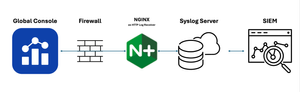
Purpose This guide provides a solution for forwarding logs to SIEM tools that support syslog but lack HTTP/HTTPS ingestion capabilities. It covers the deployment and tuning of an HTTP Proxy log receiver configured to work with F5 Distributed Cloud (XC) Global Log Receiver settings. Audience: This guide is intended for technical professionals, including SecOps teams and Solution Architects, who are responsible for integrating SIEM tools with F5 XC Global Log Receiver. Readers should have a solid understanding of HTTP communication (methods, request body, reverse proxy), syslog, and data center network architecture. Familiarity with F5 XC concepts such as namespaces, log types, events, and XC-GLR is also required. Introduction: Problem Statement: SIEM tools often support syslog ingestion but lack HTTP/HTTPS log reception capabilities. Objective: Explain how to deploy and configure an HTTP Proxy to forward logs to F5 Distributed Cloud Global Log Receiver. Solution Overview: Architecture Diagram and workflow: Configuration Steps: Configure Global Log Receiver in F5 Distributed Cloud Console Navigate to: Home → Shared Configuration → Global Log Receiver Create or edit the Global Log Receiver settings for HTTP receiver Ensure the Global Log Receiver batch size is based on the payload size expected from F5 NGINX. Example configuration snap: Set Up NGINX as an HTTP Log Receiver Install NGINX on your designated server. Configure log_format Configure NGINX to accept HTTP POST requests only and forward access logs to syslog Example configuration snippet: log_format custom_log_format_1 escape=json $request_body; # Example: include request body only server { listen 443 ssl; server_name <logreceiver_server_name>; ssl_certificate /etc/ssl/<logreceiver_server_cert>; ssl_certificate_key /etc/ssl/<logreceiver_server_key>; # Other SSL/TLS configurations (e.g., protocols, ciphers) ssl_protocols TLSv1.2 TLSv1.3; ssl_ciphers HIGH:!aNULL:!MD5; client_body_in_single_buffer on; # The directive is recommended when using the $request_body variable, to save the number of copy operations involved client_body_in_file_only off; #default client_max_body_size 32M; # based on tuning gzip on; location /log_endpoint { # Allow only POST requests for sending log data limit_except POST { deny all; } # Configure access_log to write incoming data to a file # access_log /var/log/nginx/log_receiver.log custom_log_format_1; access_log syslog:server=127.0.0.1:514,facility=local7,tag=nginx,severity=info custom_log_format_1; proxy_pass http://localhost:8091/; # This dummy Internal server required to collect request_body variable. } } # dummy internal server to respond back 200 ok server { listen 8091; server_name localhost; location / { return 200 "Log received successfully."; } } Set Up rsyslog server Install/configure rsyslog on your designated server. Configure 60-nginx.conf file in /etc/rsyslog.d/ directory Sample 60-nginx.conf file #nginx.* @@127.0.0.1:514 :syslogtag, isequal, "[nginx]" /var/log/nginx-syslog/nginx-access-log.log References: F5 Distributed Cloud Global log receiver supports many log receivers natively: F5 Distributed Cloud Technical Knowledge page on "Configure Global Log receiver" Prerequisites: An external log collection system reachable publicly. The following IP address ranges are required to be added to your firewall's allowlist: 193.16.236.64/29 185.160.8.152/29143Views5likes0Comments
Logging frontended LDAP with SNAT
Our organization frontends LDAP/LDAPS using F5 virtual servers with our DC's as nodes. We have implemented SNAT to resolve asymmetric routing to our DC's. We use an iRule to forward connection details for these VS's using HSL to a SIEM/syslog appliance. The current iRule solves a classic problem created by the SNAT--that of logging source IP addresses, which would be otherwise lost if we weren't logging from F5. Enough background--here's my question: Has anyone been able to grab other details about the LDAP authentication session such as the user account? Is there a native way to extract this data through an iRule, or some other means such as reading the packet information? Thanks.543Views0likes2Comments
ASM Signature Download logs to Remote SIEM server.
Hello Folks, Could you please help me with a specific scenario to send ASM logs to external SIEM logging? Scenario: In case ASM fails to download auto-signature database from F5's update server, it records these logs in /var/logs/asm How can I send these logs to my external SIEM logging server? Please consider that I am using 11.2.1 firmware version. Cheers! Darshan454Views0likes6Comments