management
5677 TopicsHow I did it - "F5 BIG-IP Observability with Dynatrace and F5 Telemetry Streaming"
Welcome back to another edition of “How I Did It.” It’s been a while since we looked at observability… Oh wait, I just said that. Anyway, in this post I’ll walk through how I integrated F5 Telemetry Streaming with Dynatrace. To show the results, I’ve included sample dashboards that highlight how the ingested telemetry data can be visualized effectively. Let’s dive in before I repeat myself again.262Views4likes0CommentsCertificate Automation for BIG-IP using CyberArk Certificate Manager, Self-Hosted
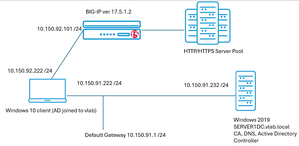
The issue of reduced lifetimes of TLS certificates is top of mind today. This topic touches upon reducing the risks associated with human day-to-day management tasks for such critical components of secure enterprise communications. Allowing a TLS certificate to expire, by simple operator error often, can preclude the bulk of human or automated transactions from ever completing. In the context of e-commerce, as only one single example, such an outage could be financially devastating. Questions abound: why are certificate lifetimes being lowered; how imminent is this change; will it affect all certificates? An industry association composed of interested parties, including many certificate authority (CA) operators, is the CA/Browser Forum. In a 29-0 vote in 2025, it was agreed public TLS certificates should rapidly evolve from the current 398 day de-facto lifetime standard to a phased arrival at a 47 day limit by March 2029. An ancillary requirement, demonstrating the domain is properly owned, known as Domain Control Validation (DCV) will drop to ten days. Although the governance of certificate lifecycles overtly pertains to public certificates, the reality is enterprise-managed, so called private CAs, likely need to fall in lock step with these requirements. Pervasive client-side software elements, such as Google Chrome, are used transparently by users with certificates that may be public or enterprise issued, and having a single set of criteria for accepting or rejecting a certificate is reasonable. Why Automated Certificate Management on BIG-IP, Now More than Ever? A principal driver for shortening certificate (cert) lifetimes; the first phase will reduce public certs to 200-day durations this coming March 15, 2026, is simply to lessen the exposure window should the cert be compromised and mis-used by an adversary. Certificates, and their corresponding private keys, can be manually maintained using human-touch. The BIG-IP TMUI interface has a click-ops path for tying certificates and keys to SSL profiles, for virtual servers that project HTTPS web sites and services to consumers. However, this requires something valuable, head count, and diligence to ensure a certificate is refreshed, perhaps through an enterprise CA solution like Microsoft Certificate Authority. It is critical this is done, always and without fail, well in advance of expiry. An automated solution that can take a “set it and forget it” approach to maintain both initial certificate deployment and the critical task of timely renewals is now more beneficial than ever. Lab Testing to Validate BIG-IP with CyberArk Trusted Protection Platform (TPP) A test bed was created that involved, at first, a BIG-IP in front of an HTTP/HTTPS server fleet, a Windows 2019 domain controller and a Windows 10 client to test BIG-IP virtual servers with. Microsoft Certificate Authority was installed on the server to allow for the issuance of enterprise certs for any of the HTTPS virtual servers created on the BIG-IP. Here is the lab layout, where virtual machines were leveraged to create the elements, including BIG-IP virtual edition (VE). The lab is straight forward; upon the Windows 2019 domain controller the Microsoft Certificate Authority component was installed. Microsoft SQL server 2019 was also installed, along with SQL Management Studio. In an enterprise production environment, these components would likely never share the domain controller host platform but are fine for this lab setup. Without an offering to shield the complexity and various manual processes of key and cert management, an operator will need to be well-versed with an enterprise CA solution like Microsoft’s. A typical launching sequence from Server Manager is shown below, with the sample lab CA and a representative list of issued certificates with various end dates. Unequipped with a solution like that from CyberArk, a typical workflow might be to install the web interface, in addition to the Microsoft CA and generate web server certificates for each virtual server (also frequently called “each application”) configured on the BIG-IP. A frequent approach is to create a unique web server template in Microsoft CA, with all certificates generated manually following the fixed, user specified certificate lifetime. As seen below, we are not installing anything but the core server role of Certificate Authority, the web interface for requesting certificates is not required and is not installed as a role. CyberArk Certificate Manager, Self-Hosted – Three High-Value Use Cases The self-hosted certificate and key management solution from CyberArk is a mature, tested offering having gained a significant user base and still may be known by previous names such as Venafi TLS Protect, or Venafi Trust Protection Platform (TPP). CyberArk acquired Venafi in 2024. Three objectives were sought in the course of the succinct proof-of-concept lab exercise that represented expected use cases: 1. Discover all existing BIG-IP virtual server TLS certificates 2. Renew certificates and change self-signed instances to enterprise PKI-issued certificates 3. Create completely new certificates and private keys and assign to BIG-IP new virtual servers The following diagram reflects the addition of CyberArk Certificate Manager, or Venafi TPP if you have long-term experience with the solution, to the Windows Server 2019 instance. Use Case One – Discover all BIG-IP Existing Certificates Already Deployed In our lab solution, to re-iterate the pivotal role of CyberArk Certificate Manager (Venafi TPP) in certificate issuance, we have created a “PolicyTree” policy called “TestingCertificates”. This will be where we will discover all of our BIG-IP virtual servers and their corresponding SSL Client and SSL server profiles. An SSL Client profile, for example, dictates how TLS will behave when a client first attempts a secure connection, including the certificate, potentially a certificate chain if signage was performed with an intermediate CA, and protocol specific features like support for TLS 1.3 and PQC NIST FIPS 203 support. Here are the original contents of the TestingCertificates folder, before running an updated discovery, notice how both F5 virtual servers (VS) are listed and the certificates used by a given VS. This is an example of the traditional CyberArk GUI look and feel. A simple workflow exists within the CyberArk platform to visually set up a virtual server and certificate discovery job, it can be run manually once, when needed, or set to operate on a regular schedule. This screenshot shows the fields required for the discovery job, and also provides an example of the evolved, streamlined approach to the user interface, referred to as the newer “Aperture” style view. Besides the enormous time savings of the first-time discovery of BIG-IP virtual servers, and certificates and keys they use in the form of SSL profiles, we can also look for new applications stood up on the BIG-IP through on-going CyberArk discovery runs. In the above example, we see a new web service implemented at the FQDN of www.twotitans.com has just been discovered. Clicking the certificate, one thing to note is the certificate is self-signed. In real enterprise environments, there may be a need to re-issue such a certificate with the enterprise CA, as part of a solid security posture. Another, even more impactful use case is when all enterprise certificates need to be easily and quickly switched from a legacy CA to a new CA the enterprise wants to move to quickly and painlessly. We see with one click on a certificate discovered that some key information is imparted. On this one screen, an operator might note that this particular certificate may warrant some improvements. It is seen that only 2048 bits are used in the certificate; the key is not making use of advanced storage and on, such as a NetHSM, and the certificate itself has not been built to support revocation mechanisms such as Content Revocation Lists (CRLs) or Online Certificate Status Protocol (OCSP). Use Case Two - Renew Certificates and Change Self-signed Instance to Enterprise PKI-Issued Certificates The automated approach of a solution like CyberArk’s likely means manual interactive certificate renewal is not going to be prevalent. However, for the purpose of our demonstration, we can examine a current certificate, alive and active on a BIG-IP supporting the application, s3.example.com. This is the “before” situation (double-click image for higher resolution). The result upon clicking the “Renew Now” button is a new policy-specific updated 12-month lifetime will be applied to a newly minted certificate. As seen in the following diagram, the certificate and its corresponding private key are automatically installed on the SSL Client Profile on the BIG-IP that houses the certificate. The s3.example.com application seamlessly continues to operate, albeit with a refreshed certificate. A tactical usage of this automatic certificate renewal and touchless installation is grabbing any virtual servers running with self-signed certificates and updating these certificates to be signed by the enterprise PKI CA or intermediate CA. Another toolkit feature now available is to switch out the entire enterprise PKI from one CA to another CA, quickly. In our lab setup, we have a Microsoft CA configured; it is named “vlab-SERVERDC1-ca”. The following certificate, ingested through discovery by CyberArk from the BIG-IP, is self-signed. Such certificates can be created directly within the BIG-IP TMUI GUI, although frequently they are quickly generated with the OpenSSL utility. Being self-signed, traffic through into this virtual will typically cause browser security risk pop-ups. They may be clicked through by users in many cases, or the certificate may even be downloaded from the browser and installed in the client’s certificate store to get around a perceived annoyance. This, however, can be troublesome in more locked-down enterprise environments where an Active Directory group policy object (GPO) can be pushed to domain clients, precluding any self-signed certificates being resolved with a few clicks around a pop-up. It is more secure and more robust to have authorized web services, vetted, and then incorporated into the enterprise PKI environment. This is the net result of using CyberArk Certificate Manager, coupled with something like the Microsoft enterprise CA, to re-issue the certificate (double-click). Use Case Three - Create Completely New Certificates and Private Keys and Assign to BIG-IP New Virtual Servers Through the CyberArk GUI, the workflows to create new certificates are intuitive. Per the following image, right-click on a policy and follow the “+Add” menu. We will add a server certificate and store it on the BIG-IP certificate and key list for future usage. A basic set of steps that were followed: Through the BIG-IP GUI, setup the application on the BIG-IP as per a normal configuration, including the origin pool, the client SSL profile, and a virtual server on port 443 that ties these elements together. Create, on CyberArk, the server certificate with the details congruent with the virtual server, such as common name, subject alternate name list, key length desired. On CyberArk, create a virtual server entry that binds the certificate just created to the values defined on the BIG-IP. The last step will look like this. Once the certificate is selected for “Renewal” the necessary elements will automatically be downloaded to the BIG-IP. As seen, the client’s SSL profile has now been updated with the new certificate and key signed by the enterprise CA. Summary This article demonstrated an approach to TLS certificate and key management for applications of all types, which harnesses the F5 BIG-IP for both secure and scalable delivery. With the rise in the number of applications that require TLS security, including advanced features enabled by BIG-IP, like TLS1.3 and PQC, coupled with the industry’s movement towards very short certificate lifecycle, the automation discussed will become indispensable to many organizations. The ability to both discover existing applications, switch out entire enterprise PKI offerings smoothly, and to agilely create new BIG-IP centered applications was touched upon.72Views3likes0CommentsACME DNS RFC-2136 Let's Encrypt certs
I've been pushing on certbot to handle CNAME entries when ordering certs, and finally given up. https://github.com/certbot/certbot/issues/6787 https://github.com/certbot/certbot/pull/9970 https://github.com/certbot/certbot/pull/7244 This repo contains scripts that: Create an ACME account with Let's Encrypt use TSIG credentials to talk to bind (RFC-2136) create TXT record in correct zone by following CNAME and SOA entries if present downloads certs installs certs on one or more F5s. The F5 credentials requires Administrator rights as Certificate Manager can't upload files. https://github.com/timriker/certmgr CNAME records are recommended to a zone with minimal or no replication and a low TTL. ie: _acme-challenge.example.com CNAME example.com._tls.example.com _acme-challenge.example.net CNAME example.net._tls.example.com _tls.example.com would have one name server and 30 second TTL or so a TSIG key would be created that only needs update access to _tls.example.com Comments welcome. JRahm I'm looking at you. 😎 More info: https://letsencrypt.org/docs/challenge-types/105Views3likes1Comment- 463Views2likes6Comments
XC Distributed Cloud and how to keep the Source IP from changing with customer edges(CE)!
Code is community submitted, community supported, and recognized as ‘Use At Your Own Risk’. Old applications sometimes do not accept a different IP address to be used by the clients during the session/connection. How can make certain the IP stays the same for a client? The best will always be the application to stop tracking users based on something primitive as an ip address and sometimes the issue is in the Load Balancer or ADC after the XC RE and then if the persistence is based on source IP address on the ADC to be changed in case it is BIG-IP to Cookie or Universal or SSL session based if the Load Balancer is doing no decryption and it is just TCP/UDP layer . As an XC Regional Edge (RE) has many ip addresses it can connect to the origin servers adding a CE for the legacy apps is a good option to keep the source IP from changing for the same client HTTP requests during the session/transaction. Before going through this article I recommend reading the links below: F5 Distributed Cloud – CE High Availability Options: A Comparative Exploration | DevCentral F5 Distributed Cloud - Customer Edge | F5 Distributed Cloud Technical Knowledge Create Two Node HA Infrastructure for Load Balancing Using Virtual Sites with Customer Edges | F5 Distributed Cloud Technical Knowledge RE to CE cluster of 3 nodes The new SNAT prefix option under the origin pool allows no mater what CE connects to the origin pool the same IP address to be seen by the origin. Be careful as if you have more than a single IP with /32 then again the client may get each time different IP address. This may cause "inet port exhaustion " ( that is what it is called in F5BIG-IP) if there are too many connections to the origin server, so be careful as the SNAT option was added primary for that use case. There was an older option called "LB source IP persistence" but better not use it as it was not so optimized and clean as this one. RE to 2 CE nodes in a virtual site The same option with SNAT pool is not allowed for a virtual site made of 2 standalone CE. For this we can use the ring hash algorithm. Why this works? Well as Kayvan explained to me the hashing of the origin is taking into account the CE name, so the same origin under 2 different CE will get the same ring hash and the same source IP address will be send to the same CE to access the Origin Server. This will not work for a single 3-node CE cluster as it all 3 nodes have the same name. I have seen 503 errors when ring hash is enabled under the HTTP LB so enable it only under the XC route object and the attached origin pool to it! CE hosted HTTP LB with Advertise policy In XC with CE you can do do HA with 3-cluster CE that can be layer2 HA based on VRRP and arp or Layer 3 persistence based bgp that can work 3 node CE cluster or 2 CE in a virtual site and it's control options like weight, as prepend or local preference options at the router level. For the Layer 2 I will just mention that you need to allow 224.0.0.8 for the VRRP if you are migrating from BIG-IP HA and that XC selects 1 CE to hold active IP that is seen in the XC logs and at the moment the selection for some reason can't be controlled. if a CE can't reach the origin servers in the origin pool it should stop advertising the HTTP LB IP address through BGP. For those options Deploying F5 Distributed Cloud (XC) Services in Cisco ACI - Layer Three Attached Deployment is a great example as it shows ECMP BGP but with the BGP attributes you can easily select one CE to be active and processing connections, so that just one ip address is seen by the origin server. When a CE gets traffic by default it does prefer to send it to the origin as by default "Local Preferred" is enabled under the origin pool. In the clouds like AWS/Azure just a cloud native LB is added In front of the 3 CE cluster and the solution there is simple as to just modify the LB to have a persistence. Public Clouds do not support ARP, so forget about Layer 2 and play with the native LB that load balances between the CE 😉 CE on Public Cloud (AWS/Azure/GCP) When deploying on a public cloud the CE can be deployed in two ways one is through the XC GUI and adding the AWS credentials but this way you have not a big freedom to be honest as you can't deploy 2 CE and make a virtual site out of them and add cloud LB in-front of them as it always will be 3-CE cluster with preconfigured cloud LB that will use all 3 LB! Using the newer "clickops" method is much better https://docs.cloud.f5.com/docs-v2/multi-cloud-network-connect/how-to/site-management/deploy-site-aws-clickops or using terraform but with manual mode and aws as a provider (not XC/volterra as it is the same as the XC GUI deployment) https://docs.cloud.f5.com/docs-v2/multi-cloud-network-connect/how-to/site-management/deploy-aws-site-terraform This way you can make the Cloud LB to use just one CE or have some client Persistence or if traffic comes from RE to CE to implement the virtual site 2 CE node! There is no Layer 2 ARP support as I mentioned in public cloud with 3-node cluster but there is NAT policy https://docs.cloud.f5.com/docs-v2/multi-cloud-network-connect/how-tos/networking/nat-policies but I haven't tried it myself to comment on it. Hope you enjoyed this article!159Views2likes0Comments
Run mkdir over iControl REST for disappearing /var/config/rest/downloads/tmp
Hello, I am currently writing the code for automating our ssl cert deployment among other things. I upload files to the Bigip device to shared/file-transfer/uploads/ This only works when the directory /var/config/rest/downloads/tmp exists. I noticed this periodically is removed again. Is there a way I can run an mkdir over REST to fix this? Regards218Views1like1Comment
Remote Logging of Log Files
I've configured F5 Big IP to send logs to a remote location. However it sends several messages. I know it is possible to configure log levels from 'Options' (critical, emergency, etc.) What I want to learn that, is it possible to configure remote logging such that sends only LTM logs (I mean logs written to /var/log/ltm file, only)?319Views1like1Comment