deployment
4144 TopicsBIG-IP Next Edge Firewall CNF for Edge workloads
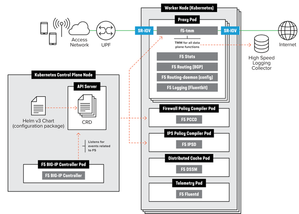
Introduction The CNF architecture aligns with cloud-native principles by enabling horizontal scaling, ensuring that applications can expand seamlessly without compromising performance. It preserves the deterministic reliability essential for telecom environments, balancing scalability with the stringent demands of real-time processing. More background information about what value CNF brings to the environment, https://community.f5.com/kb/technicalarticles/from-virtual-to-cloud-native-infrastructure-evolution/342364 Telecom service providers make use of CNFs for performance optimization, Enable efficient and secure processing of N6-LAN traffic at the edge to meet the stringent requirements of 5G networks. Optimize AI-RAN deployments with dynamic scaling and enhanced security, ensuring that AI workloads are processed efficiently and securely at the edge, improving overall network performance. Deploy advanced AI applications at the edge with the confidence of carrier-grade security and traffic management, ensuring real-time processing and analytics for a variety of edge use cases. CNF Firewall Implementation Overview Let’s start with understanding how different CRs are enabled within a CNF implementation this allows CNF to achieve more optimized performance, Capex and Opex. The traditional way of inserting services to the Kubernetes is as below, Moving to a consolidated Dataplane approach saved 60% of the Kubernetes environment’s performance The F5BigFwPolicy Custom Resource (CR) applies industry-standard firewall rules to the Traffic Management Microkernel (TMM), ensuring that only connections initiated by trusted clients will be accepted. When a new F5BigFwPolicy CR configuration is applied, the firewall rules are first sent to the Application Firewall Management (AFM) Pod, where they are compiled into Binary Large Objects (BLOBs) to enhance processing performance. Once the firewall BLOB is compiled, it is sent to the TMM Proxy Pod, which begins inspecting and filtering network packets based on the defined rules. Enabling AFM within BIG-IP Controller Let’s explore how we can enable and configure CNF Firewall. Below is an overview of the steps needed to set up the environment up until the CNF CRs installations [Enabling the AFM] Enabling AFM CR within BIG-IP Controller definition global: afm: enabled: true pccd: enabled: true f5-afm: enabled: true cert-orchestrator: enabled: true afm: pccd: enabled: true image: repository: "local.registry.com" [Configuration] Example for Firewall policy settings apiVersion: "k8s.f5net.com/v1" kind: F5BigFwPolicy metadata: name: "cnf-fw-policy" namespace: "cnf-gateway" spec: rule: - name: allow-10-20-http action: "accept" logging: true servicePolicy: "service-policy1" ipProtocol: tcp source: addresses: - "2002::10:20:0:0/96" zones: - "zone1" - "zone2" destination: ports: - "80" zones: - "zone3" - "zone4" - name: allow-10-30-ftp action: "accept" logging: true ipProtocol: tcp source: addresses: - "2002::10:30:0:0/96" zones: - "zone1" - "zone2" destination: ports: - "20" - "21" zones: - "zone3" - "zone4" - name: allow-us-traffic action: "accept" logging: true source: geos: - "US:California" destination: geos: - "MX:Baja California" - "MX:Chihuahua" - name: drop-all action: "drop" logging: true ipProtocol: any source: addresses: - "::0/0" - "0.0.0.0/0" [Logging & Monitoring] CNF firewall settings allow not only local logging but also to use HSL logging to external logging destinations. apiVersion: "k8s.f5net.com/v1" kind: F5BigLogProfile metadata: name: "cnf-log-profile" namespace: "cnf-gateway" spec: name: "cnf-logs" firewall: enabled: true network: publisher: "cnf-hsl-pub" events: aclMatchAccept: true aclMatchDrop: true tcpEvents: true translationFields: true Verifying the CNF firewall settings can be done through the sidecar container kubectl exec -it deploy/f5-tmm -c debug -n cnf-gateway – bash tmctl -d blade fw_rule_stat context_type context_name ------------ ------------------------------------------ virtual cnf-gateway-cnf-fw-policy-SecureContext_vs rule_name micro_rules counter last_hit_time action ------------------------------------ ----------- ------- ------------- ------ allow-10-20-http-firewallpolicyrule 1 2 1638572860 2 allow-10-30-ftp-firewallpolicyrule 1 5 1638573270 2 Conclusion To conclude our article, we showed how CNFs with consolidated data planes help with optimizing CNF deployments. In this article we went through the overview of BIG-IP Next Edge Firewall CNF implementation, sample configuration and monitoring capabilities. More use cases to cover different use cases to be following. Related content F5BigFwPolicy BIG-IP Next Cloud-Native Network Functions (CNFs) CNF Home109Views2likes2Comments
VIP is not responding on SYN after enabling other modules like ASM, APM and AFM.
Hi all, I have an F5 VE running 17.5.1.3 in my lab environment for learning purposes. As back-end I installed the phpauction webpage and all configuration works flawlessly if only the LTM module is enabled. This in the most simple form: Virtual server on port 80. TCP profile HTTP profile Pool Automap When I add another module, for example ASM, the vip stopped working although it's still green/up and not even a security policy has been attached to the vip. Captures show that the SYN is reaching the F5 but I do not get a response from it: tcpdump: verbose output suppressed, use -v or -vv for full protocol decode listening on any, link-type EN10MB (Ethernet), capture size 65535 bytes 16:24:51.691462 IP 192.168.1.100.64282 > 192.168.2.10.80: Flags [S], seq 5173934, win 65535, options [mss 1260,nop,wscale 8,nop,nop,sackOK], length 0 in slot1/tmm1 lis= port=1.1 trunk= 16:24:51.942738 IP 192.168.1.100.64625 > 192.168.2.10.80: Flags [S], seq 1642892817, win 65535, options [mss 1260,nop,wscale 8,nop,nop,sackOK], length 0 in slot1/tmm0 lis= port=1.1 trunk= I checked the back-end connection as well but the F5 is not sending out the SYN to the webserver. So it looks like it's blackholing my traffic. When I disable ASM and use only LTM, everything starts to work again. Even when trying with different modules like APM, the same issue happens. VIP is not responding after only enabling APM or AFM. I tried the following: - Factory reset the machine. - Upgrade to 17.5.1.3. - Enable RST CAUSE. (but there isn't any because the SYN isn't there in the first place) - Force reload config on the mcpd process. - Enabled ltm debugging without receiving any logs about the connection. - Looked into the dos and bot defense logs to see if traffic is dropped at an earlier point in the chain. - Enabled tmm debug without getting any relevant logs. - Changing the vip from standard to fastl4. - Remove http profile. I did play a lot with other modules as well like ASM, APM, AFM, SSLO, DNS, so that's why I though it was a configuration issue at first. But make the machine factory default, did not solve it. Is it possible there are some left overs during my learning path on this machine? Do you know what additional steps I can take to solve this issue? Thanks. Best regards, Mitchel108Views0likes8CommentsHow I did it.....again "High-Performance S3 Load Balancing with F5 BIG-IP"
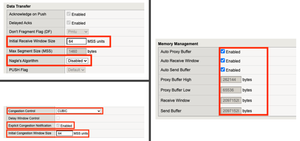
Introduction Welcome back to the "How I did it" series! In the previous installment, we explored the high‑performance S3 load balancing of Dell ObjectScale with F5 BIG‑IP. This follow‑up builds on that foundation with BIG‑IP v21.x’s S3‑focused profiles and how to apply them in the wild. We’ll also put the external monitor to work, validating health with real PUT/GET/DELETE checks so your S3-compatible backends aren’t just “up,” they’re truly dependable. New S3 Profiles for the BIG-IP…..well kind of A big part of why F5 BIG-IP excels is because of its advanced traffic profiles, like TCP and SSL/TLS. These profiles let you fine-tune connection behavior—optimizing throughput, reducing latency, and managing congestion—while enforcing strong encryption and protocol settings for secure, efficient data flow. Available with version 21.x the BIG-IP now includes new S3-specific profiles, (s3-tcp and s3-default-clientssl). These profiles are based off existing default parent profiles, (tcp and clientssl respectively) that have been customized or “tuned” to optimize s3 traffic. Let’s take a closer look. Anatomy of a TCP Profile The BIG-IP includes a number of pre-defined TCP profiles that define how the system manages TCP traffic for virtual servers, controlling aspects like connection setup, data transfer, congestion control, and buffer tuning. These profiles allow administrators to optimize performance for different network conditions by adjusting parameters such as initial congestion window, retransmission timeout, and algorithms like Nagle’s or Delayed ACK. The s3-tcp, (see below) has been tweaked with respect to data transfer and congestion window sizes as well as memory management to optimize typical S3 traffic patterns (i.e. high-throughput data transfer, varying request sizes, large payloads, etc.). Tweaking the Client SSL Profile for S3 Client SSL profiles on BIG-IP define how the system terminates and manages SSL/TLS sessions from clients at the virtual server. They specify critical parameters such as certificates, private keys, cipher suites, and supported protocol versions, enabling secure decryption for advanced traffic handling like HTTP optimization, security policies, and iRules. The s3-default-clientssl has been modified, (see below) from the default client ssl profile to optimize SSL/TLS settings for high-throughput object storage traffic, ensuring better performance and compatibility with S3-specific requirements. Advanced S3-compatible health checking with EAV Has anyone ever told you how cool BIG-IP Extended Application Verification (EAV) aka external monitors are? Okay, I suppose “coolness” is subjective, but EAVs are objectively cool. Let me prove it to you. Health monitoring of backend S3-compatible servers typically involves making an HTTP GET request to either the exposed S3 ingest/egress API endpoint or a liveness probe. Get a 200 and all's good. Wouldn’t it be cool if you could verify a backend server's health by verifying it can actually perform the operations as intended? Fortunately, we can do just that using an EAV monitor. Therefore, based on the transitive property, EAVs are cool. —mic drop The bash script located at the bottom of the page performs health checks on S3-compatible storage by executing PUT, GET, and DELETE operations on a test object. The health check creates a temporary health check file with timestamp, retrieves the file to verify read access, and removes the test file to clean up. If all three operations return the expected HTTP status code, the node is marked up otherwise the node is marked down. Installing and using the EAV health check Import the monitor script Save the bash script, (.sh) extension, (located at the bottom of this page) locally and import the file onto the BIG-IP. Log in to the BIG-IP Configuration Utility and navigate to System > File Management > External Monitor Program File List > Import. Use the file selector to navigate to and select the newly created. bash file, provide a name for the file and select 'Import'. Create a new external monitor Navigate to Local Traffic > Monitors > Create Provide a name for the monitor. Select 'External' for the type, and select the previously uploaded file for the 'External Program'. The 'Interval' and 'Timeout' settings can be modified or left at the default as desired. In addition to the backend host and port, the monitor must pass three (3) additional variables to the backend: bucket - The name of an existing bucket where the monitor can place a small text file. During the health check, the monitor will create a file, request the file and delete the file. access_key - S3-compatible access key with permissions to perform the above operations on the specified bucket. secret_key - corresponding S3-compatible secret key. Select 'Finished' to create the monitor. Associate the monitor with the pool Navigate to Local Traffic > Pools > Pool List and select the relevant backend S3 pool. Under 'Health Monitors' select the newly created monitor and move from 'Available' to the 'Active'. Select 'Update' to save the configuration. Additional Links How I did it - "High-Performance S3 Load Balancing of Dell ObjectScale with F5 BIG-IP" F5 BIG-IP v21.0 brings enhanced AI data delivery and ingestion for S3 workflows Overview of BIG-IP EAV external monitors EAV Bash Script #!/bin/bash ################################################################################ # S3 Health Check Monitor for F5 BIG-IP (External Monitor - EAV) ################################################################################ # # Description: # This script performs health checks on S3-compatible storage by # executing PUT, GET, and DELETE operations on a test object. It uses AWS # Signature Version 4 for authentication and is designed to run as a BIG-IP # External Application Verification (EAV) monitor. # # Usage: # This script is intended to be configured as an external monitor in BIG-IP. # BIG-IP automatically provides the first two arguments: # $1 - Pool member IP address (may be IPv6-mapped format: ::ffff:x.x.x.x) # $2 - Pool member port number # # Additional arguments must be configured in the monitor's "Variables" field: # bucket - S3 bucket name # access_key - Access key for authentication # secret_key - Secret key for authentication # # BIG-IP Monitor Configuration: # Type: External # External Program: /path/to/this/script.sh # Variables: # bucket="your-bucket-name" # access_key="your-access-key" # secret_key="your-secret-key" # # Health Check Logic: # 1. PUT - Creates a temporary health check file with timestamp # 2. GET - Retrieves the file to verify read access # 3. DELETE - Removes the test file to clean up # Success: All three operations return expected HTTP status codes # Failure: Any operation fails or times out # # Exit Behavior: # - Prints "UP" to stdout if all checks pass (BIG-IP marks pool member up) # - Silent exit if any check fails (BIG-IP marks pool member down) # # Requirements: # - openssl (for SHA256 hashing and HMAC signing) # - curl (for HTTP requests) # - xxd (for hex encoding) # - Standard bash utilities (date, cut, sed, awk) # # Notes: # - Handles IPv6-mapped IPv4 addresses from BIG-IP (::ffff:x.x.x.x) # - Uses AWS Signature Version 4 authentication # - Logs activity to syslog (local0.notice) # - Creates temporary files that are automatically cleaned up # # Author: [Gregory Coward/F5] # Version: 1.0 # Last Modified: 12/2025 # ################################################################################ # ===== PARAMETER CONFIGURATION ===== # BIG-IP automatically provides these HOST="$1" # Pool member IP (may include ::ffff: prefix for IPv4) PORT="$2" # Pool member port BUCKET="${bucket}" # S3 bucket name ACCESS_KEY="${access_key}" # S3 access key SECRET_KEY="${secret_key}" # S3 secret key OBJECT="${6:-healthcheck.txt}" # Test object name (default: healthcheck.txt) # Strip IPv6-mapped IPv4 prefix if present (::ffff:10.1.1.1 -> 10.1.1.1) # BIG-IP may pass IPv4 addresses in IPv6-mapped format if [[ "$HOST" =~ ^::ffff: ]]; then HOST="${HOST#::ffff:}" fi # ===== S3/AWS CONFIGURATION ===== ENDPOINT="http://$HOST:$PORT" # S3 endpoint URL SERVICE="s3" # AWS service identifier for signature REGION="" # AWS region (leave empty for S3 compatible such as MinIO/Dell) # ===== TEMPORARY FILE SETUP ===== # Create temporary file for health check upload TMP_FILE=$(mktemp) printf "Health check at %s\n" "$(date)" > "$TMP_FILE" # Ensure temp file is deleted on script exit (success or failure) trap "rm -f $TMP_FILE" EXIT # ===== CRYPTOGRAPHIC HELPER FUNCTIONS ===== # Calculate SHA256 hash and return as hex string # Input: stdin # Output: hex-encoded SHA256 hash hex_of_sha256() { openssl dgst -sha256 -hex | sed 's/^.* //' } # Sign data using HMAC-SHA256 and return hex signature # Args: $1=hex-encoded key, $2=data to sign # Output: hex-encoded signature sign_hmac_sha256_hex() { local key_hex="$1" local data="$2" printf "%s" "$data" | openssl dgst -sha256 -mac HMAC -macopt "hexkey:$key_hex" | awk '{print $2}' } # Sign data using HMAC-SHA256 and return binary as hex # Args: $1=hex-encoded key, $2=data to sign # Output: hex-encoded binary signature (for key derivation chain) sign_hmac_sha256_binary() { local key_hex="$1" local data="$2" printf "%s" "$data" | openssl dgst -sha256 -mac HMAC -macopt "hexkey:$key_hex" -binary | xxd -p -c 256 } # ===== AWS SIGNATURE VERSION 4 IMPLEMENTATION ===== # Generate AWS Signature Version 4 for S3 requests # Args: # $1 - HTTP method (PUT, GET, DELETE, etc.) # $2 - URI path (e.g., /bucket/object) # $3 - Payload hash (SHA256 of request body, or empty hash for GET/DELETE) # $4 - Content-Type header value (empty string if not applicable) # Output: pipe-delimited string "Authorization|Timestamp|Host" aws_sig_v4() { local method="$1" local uri="$2" local payload_hash="$3" local content_type="$4" # Generate timestamp in AWS format (YYYYMMDDTHHMMSSZ) local timestamp=$(date -u +"%Y%m%dT%H%M%SZ" 2>/dev/null || gdate -u +"%Y%m%dT%H%M%SZ") local datestamp=$(date -u +"%Y%m%d") # Build host header (include port if non-standard) local host_header="$HOST" if [ "$PORT" != "80" ] && [ "$PORT" != "443" ]; then host_header="$HOST:$PORT" fi # Build canonical headers and signed headers list local canonical_headers="" local signed_headers="" # Include Content-Type if provided (for PUT requests) if [ -n "$content_type" ]; then canonical_headers="content-type:${content_type}"$'\n' signed_headers="content-type;" fi # Add required headers (must be in alphabetical order) canonical_headers="${canonical_headers}host:${host_header}"$'\n' canonical_headers="${canonical_headers}x-amz-content-sha256:${payload_hash}"$'\n' canonical_headers="${canonical_headers}x-amz-date:${timestamp}" signed_headers="${signed_headers}host;x-amz-content-sha256;x-amz-date" # Build canonical request (AWS Signature V4 format) # Format: METHOD\nURI\nQUERY_STRING\nHEADERS\n\nSIGNED_HEADERS\nPAYLOAD_HASH local canonical_request="${method}"$'\n' canonical_request+="${uri}"$'\n\n' # Empty query string (double newline) canonical_request+="${canonical_headers}"$'\n\n' canonical_request+="${signed_headers}"$'\n' canonical_request+="${payload_hash}" # Hash the canonical request local canonical_hash canonical_hash=$(printf "%s" "$canonical_request" | hex_of_sha256) # Build string to sign local algorithm="AWS4-HMAC-SHA256" local credential_scope="$datestamp/$REGION/$SERVICE/aws4_request" local string_to_sign="${algorithm}"$'\n' string_to_sign+="${timestamp}"$'\n' string_to_sign+="${credential_scope}"$'\n' string_to_sign+="${canonical_hash}" # Derive signing key using HMAC-SHA256 key derivation chain # kSecret = HMAC("AWS4" + secret_key, datestamp) # kRegion = HMAC(kSecret, region) # kService = HMAC(kRegion, service) # kSigning = HMAC(kService, "aws4_request") local k_secret k_secret=$(printf "AWS4%s" "$SECRET_KEY" | xxd -p -c 256) local k_date k_date=$(sign_hmac_sha256_binary "$k_secret" "$datestamp") local k_region k_region=$(sign_hmac_sha256_binary "$k_date" "$REGION") local k_service k_service=$(sign_hmac_sha256_binary "$k_region" "$SERVICE") local k_signing k_signing=$(sign_hmac_sha256_binary "$k_service" "aws4_request") # Calculate final signature local signature signature=$(sign_hmac_sha256_hex "$k_signing" "$string_to_sign") # Return authorization header, timestamp, and host header (pipe-delimited) printf "%s|%s|%s" \ "${algorithm} Credential=${ACCESS_KEY}/${credential_scope}, SignedHeaders=${signed_headers}, Signature=${signature}" \ "$timestamp" \ "$host_header" } # ===== HTTP REQUEST FUNCTION ===== # Execute HTTP request using curl with AWS Signature V4 authentication # Args: # $1 - HTTP method (PUT, GET, DELETE) # $2 - Full URL # $3 - Authorization header value # $4 - Timestamp (x-amz-date header) # $5 - Host header value # $6 - Payload hash (x-amz-content-sha256 header) # $7 - Content-Type (optional, empty for GET/DELETE) # $8 - Data file path (optional, for PUT with body) # Output: HTTP status code (e.g., 200, 404, 500) do_request() { local method="$1" local url="$2" local auth="$3" local timestamp="$4" local host_header="$5" local payload_hash="$6" local content_type="$7" local data_file="$8" # Build curl command with required headers local cmd="curl -s -o /dev/null --connect-timeout 5 --write-out %{http_code} \"$url\"" cmd="$cmd -X $method" cmd="$cmd -H \"Host: $host_header\"" cmd="$cmd -H \"x-amz-date: $timestamp\"" cmd="$cmd -H \"x-amz-content-sha256: $payload_hash\"" # Add optional headers [ -n "$content_type" ] && cmd="$cmd -H \"Content-Type: $content_type\"" cmd="$cmd -H \"Authorization: $auth\"" [ -n "$data_file" ] && cmd="$cmd --data-binary @\"$data_file\"" # Execute request and return HTTP status code eval "$cmd" } # ===== MAIN HEALTH CHECK LOGIC ===== # ===== STEP 1: PUT (Upload Test Object) ===== # Calculate SHA256 hash of the temp file content UPLOAD_HASH=$(openssl dgst -sha256 -binary "$TMP_FILE" | xxd -p -c 256) CONTENT_TYPE="application/octet-stream" # Generate AWS Signature V4 for PUT request SIGN_OUTPUT=$(aws_sig_v4 "PUT" "/$BUCKET/$OBJECT" "$UPLOAD_HASH" "$CONTENT_TYPE") AUTH_PUT=$(cut -d'|' -f1 <<< "$SIGN_OUTPUT") DATE_PUT=$(cut -d'|' -f2 <<< "$SIGN_OUTPUT") HOST_PUT=$(cut -d'|' -f3 <<< "$SIGN_OUTPUT") # Execute PUT request (expect 200 OK) PUT_STATUS=$(do_request "PUT" "$ENDPOINT/$BUCKET/$OBJECT" "$AUTH_PUT" "$DATE_PUT" "$HOST_PUT" "$UPLOAD_HASH" "$CONTENT_TYPE" "$TMP_FILE") # ===== STEP 2: GET (Download Test Object) ===== # SHA256 hash of empty body (for GET requests with no payload) EMPTY_HASH="e3b0c44298fc1c149afbf4c8996fb92427ae41e4649b934ca495991b7852b855" # Generate AWS Signature V4 for GET request SIGN_OUTPUT=$(aws_sig_v4 "GET" "/$BUCKET/$OBJECT" "$EMPTY_HASH" "") AUTH_GET=$(cut -d'|' -f1 <<< "$SIGN_OUTPUT") DATE_GET=$(cut -d'|' -f2 <<< "$SIGN_OUTPUT") HOST_GET=$(cut -d'|' -f3 <<< "$SIGN_OUTPUT") # Execute GET request (expect 200 OK) GET_STATUS=$(do_request "GET" "$ENDPOINT/$BUCKET/$OBJECT" "$AUTH_GET" "$DATE_GET" "$HOST_GET" "$EMPTY_HASH" "" "") # ===== STEP 3: DELETE (Remove Test Object) ===== # Generate AWS Signature V4 for DELETE request SIGN_OUTPUT=$(aws_sig_v4 "DELETE" "/$BUCKET/$OBJECT" "$EMPTY_HASH" "") AUTH_DEL=$(cut -d'|' -f1 <<< "$SIGN_OUTPUT") DATE_DEL=$(cut -d'|' -f2 <<< "$SIGN_OUTPUT") HOST_DEL=$(cut -d'|' -f3 <<< "$SIGN_OUTPUT") # Execute DELETE request (expect 204 No Content) DEL_STATUS=$(do_request "DELETE" "$ENDPOINT/$BUCKET/$OBJECT" "$AUTH_DEL" "$DATE_DEL" "$HOST_DEL" "$EMPTY_HASH" "" "") # ===== LOG RESULTS ===== # Log all operation results for troubleshooting #logger -p local0.notice "S3 Monitor: PUT=$PUT_STATUS GET=$GET_STATUS DEL=$DEL_STATUS" # ===== EVALUATE HEALTH CHECK RESULT ===== # BIG-IP considers the pool member "UP" only if this script prints "UP" to stdout # Check if all operations returned expected status codes: # PUT: 200 (OK) # GET: 200 (OK) # DELETE: 204 (No Content) if [ "$PUT_STATUS" -eq 200 ] && [ "$GET_STATUS" -eq 200 ] && [ "$DEL_STATUS" -eq 204 ]; then #logger -p local0.notice "S3 Monitor: UP" echo "UP" fi # If any check fails, script exits silently (no "UP" output) # BIG-IP will mark the pool member as DOWN98Views2likes0Comments
BIG-IP VE: 40G Throughput from 4x10G physical NICs
Hello F5 Community, I'm designing a BIG-IP VE deployment and need to achieve 40G throughput from 4x10G physical NICs. After extensive research (including reading K97995640), I've created this flowchart to summarize the options. Can you verify if this understanding is correct? **My Environment:** - Physical server: 4x10G NICs - ESXi 7.0 - BIG-IP VE (Performance LTM license) - Goal: Maximize throughput for data plane **Research Findings:** From F5 K97995640: "Trunking is supported on BIG-IP VE... intended to be used with SR-IOV interfaces but not with the default vmxnet3 driver. [Need 40G to F5 VE] ┌──────┴──---------------------- ────┐ │ │ [F5 controls] [ESXi controls] (F5 does LACP) (ESXi does LACP) │ │ Only SR-IOV Link Aggregation │ │ ┌───┴───┐ ┌───┴───┐ │40G per│ │40G agg │ │ flow │ │10G/flow │ └───────┘ └───────┘Solved121Views0likes5Comments
Cisco TACACS+ Config on ISE LTM Pair
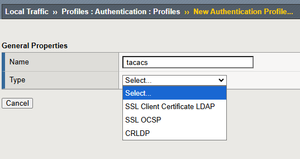
I'm trying to add TACACS+ configuration to my ISE LTMs (v17.1.3). We use Active Directory for authentication. The problem is when I try to create the profile, the "type" dropdown does not show "TACACS+". APM is not provisioned either, not if that is needed. I provisioned it on our lab, but no help.135Views0likes8CommentsAgentic AI with F5 BIG-IP v21 using Model Context Protocol and OpenShift
Introduction to Agentic AI Agentic AI is the capability of extending the Large Language Models (LLM) by means of adding tools. This allows the LLMs to interoperate with functionalities external to the LLM. Examples of these are the capability to search a flight or to push code into github. Agentic AI operates proactively, minimising human intervention and making decisions and adapting to perform complex tasks by using tools, data, and the Internet. This is done by basically giving to the LLM the knowledge of the APIs of github or the flight agency, then the reasoning of the LLM makes use of these APIs. The external (to the LLM) functionality can be run in the local computer or in network MCP servers. This article focuses in network MCP servers, which fits in the F5 AI Reference Architecture components and the insertion point indicated in green of the shown next: Introduction to Model Context Protocol Model Context Protocol (MCP) is a universal connector between LLMs and tools. Without MCP, it is needed that the LLM is programmed to support the different APIs of the different tools. This is not a scalable model because it requires a lot of effort to add all tools for a given LLM and for a tool to support several LLMs. Instead, when using MCP, the LLM (or AI application) and the tool only need to support MCP. Without further coding, the LLM model automatically is able to use any tool that exposes its functionalities through MCP. This is exhibit in the following figure: MCP example workflow In the next diagram it is exposed the basic MCP workflow using the LibreChat AI application as example. The flow is as follows: The AI application queries agents (MCP servers) which tools they provide. The agents return a list of the tools, with a description and parameters required. When the AI application makes a request to the AI model it includes in the request information about the tools available. When the AI model finds out it doesn´t have built-in what it is required to fulfil the request, it makes use of the tools. The tools are accessed through the AI application. The AI model composes a result with its local knowledge and the results from the tools. Out of the workflow above, the most interesting is step 1 which is used to retrieve the information required for the AI model to use the tools. Using the mcpLogger iRule provided in this article later on, we can see the MCP messages exchanged. Step 1a: { "method": "tools/list", "jsonrpc": "2.0", "id": 2 } Step 1b: { "jsonrpc": "2.0", "id": 2, "result": { "tools": [ { "name": "airport_search", "description": "Search for airport codes by name or city.\n\nArgs:\n query: The search term (city name, airport name, or partial code)\n\nReturns:\n List of matching airports with their codes", "inputSchema": { "properties": { "query": { "type": "string" } }, "required": [ "query" ], "type": "object" }, "outputSchema": { "properties": { "result": { "type": "string" } }, "required": [ "result" ], "type": "object", "x-fastmcp-wrap-result": 1 }, "_meta": { "_fastmcp": { "tags": [] } } } ] } } Note from the above that the AI model only requires a description of the tool in human language and a formal declaration of the input and output parameters. That´s all!. The reasoning of the AI model is what will make good use of the API described through MCP. The AI models will interpret even the error messages. For example, if the AI model miss-interprets the input parameters (typically because of wrong descriptor of the tool), the AI model might correct itself if the error message is descriptive enough and call the tool again with the right parameters. Of course, the MCP protocol is more than this but the above is necessary to understand the basis of how tools are used by LLM and how the magic works. F5 BIG-IP and MCP BIG-IP v21 introduces support for MCP, which is based on JSON-RPC. MCP protocol had several iterations. For IP based communication, initially the transport of the JSON-RPC messages used HTTP+SSE transport (now considered legacy) but this has been completely replaced by Streamable HTTP transport. This later still uses SSE when streaming multiple server messages. Regardless of the MCP version, in the F5 BIG-IP it is just needed to enable the JSON and SSE profiles in the Virtual Server for handling MCP. This is shown next: By enabling these profiles we automatically get basic protocol validation but more relevantly, we obtain the ability to handle MCP messages with JSON and SSE oriented events and functions. These allows parsing and manipulation of MCP messages but also the capability of doing traffic management (load balancing, rate limiting, etc...). Next it can be seen the parameters available for these profiles, which allow to limit the size of the various parts of the messages. Defaults are fine for most of the cases: Check the next links for information on iRules events and commands available for the JSON and SSE protocols. MCP and persistence Session persistence is optional in MCP but when the server indicates an Mcp-Session-Id it is mandatory for the client. MCP servers require persistence when they keep a context (state) for the MCP dialog. This means that the F5 BIG-IP must support handling this Mcp-Session-Id as well and it does by using UIE (Universal) persistence with this header. A sample iRule mcpPersistence is provided in the gitHub repository. Demo and gitHub repository The video below demonstrate 3 functionalities using the BIG-IP MCP functionalities, these are: Using MCP persistence Getting visibility of MCP traffic by logging remotely the JSON-RPC payloads of the request and response messages using High Speed Logging. Controlling which tools are allowed or blocked, and logging the allowed/block actions with High Speed Logging. These functionalities are implemented with iRules available in this GitHub repository and deployed in Red Hat OpenShift using the Container Ingress Services (CIS) controller which automates the deployment of the configuration using Kubernetes resources. The overall setup is shown next: In the next embedded video we can see how this is deployed and used. Conclusion and next steps F5 BIG-IP v21 introduces support for MCP protocol and thanks to F5 CIS these setups can be automated in your OpenShift cluster using the Kubernetes API. The possibilities of Agentic AI are infinite, thanks to MCP it is possible to extend the LLM models to use any tool easily. The tools can be used to query or execute actions. I suggest to take a look to repositories of MCP servers and realize the endless possibilities of Agentic AI: https://mcpservers.org/ https://www.pulsemcp.com/servers https://mcpmarket.com/server https://mcp.so/ https://github.com/punkpeye/awesome-mcp-servers 167Views2likes0Comments
Delivering Secure Application Services Anywhere with Nutanix Flow and F5 Distributed Cloud
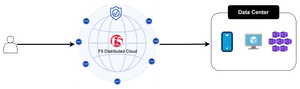
Introduction F5 Application Delivery and Security Platform (ADSP) is the premier solution for converging high-performance delivery and security for every app and API across any environment. It provides a unified platform offering granular visibility, streamlined operations, and AI-driven insights — deployable anywhere and in any form factor. The F5 ADSP Partner Ecosystem brings together a broad range of partners to deliver customer value across the entire lifecycle. This includes cohesive solutions, cloud synergies, and access to expert services that help customers maximize outcomes while simplifying operations. In this article, we’ll explore the upcoming integration between Nutanix Flow and F5 Distributed Cloud, showcasing how F5 and Nutanix collaborate to deliver secure, resilient application services across hybrid and multi-cloud environments. Integration Overview At the heart of this integration is the capability to deploy a F5 Distributed Cloud Customer Edge (CE) inside a Nutanix Flow VPC, establish BGP peering with the Nutanix Flow BGP Gateway, and inject CE-advertised BGP routes into the VPC routing table. This architecture provides us complete control over application delivery and security within the VPC. We can selectively advertise HTTP load balancers (LBs) or VIPs to designated VPCs, ensuring secure and efficient connectivity. Additionally, the integration securely simplifies network segmentation across hybrid and multi-cloud environments. By leveraging F5 Distributed Cloud to segment and extend the network to remote locations, combined with Nutanix Flow Security for microsegmentation within VPCs, we deliver comprehensive end-to-end network security. This approach enforces a consistent security posture while simplifying segmentation across environments. In this article, we’ll focus on application delivery and security, and explore segmentation in the next article. Demo Walkthrough Let’s walk through a demo to see how this integration works. The goal of this demo is to enable secure application delivery for nutanix5.f5-demo.com within the Nutanix Flow Virtual Private Cloud (VPC) named dev3. Our demo environment, dev3, is a Nutanix Flow VPC with a F5 Distributed Cloud Customer Edge (CE) named jy-nutanix-overlay-dev3 deployed inside: *Note: CE is named jy-nutanix-overlay-dev3 in the F5 Distributed Cloud Console and xc-ce-dev3 in the Nutanix Prism Central. eBGP peering is ESTABLISHED between the CE and the Nutanix Flow BGP Gateway: On the F5 Distributed Cloud Console, we created an HTTP Load Balancer named jy-nutanix-internal-5 serving the FQDN nutanix5.f5-demo.com. This load balancer distributes workloads across hybrid multicloud environments and is protected by a WAF policy named nutanix-demo: We advertised this HTTP Load Balancer with a Virtual IP (VIP) 10.10.111.175 to the CE jy-nutanix-overlay-dev3 deployed inside Nutanix Flow VPC dev3: The CE then advertised the VIP route to its peer via BGP – the Nutanix Flow BGP Gateway: The Nutanix Flow BGP Gateway received the VIP route and installed it in the VPC routing table: Finally, the VMs in dev3 can securely access nutanix5.f5-demo.com while continuing to use the VPC logical router as their default gateway: F5 Distributed Cloud Console observability provides deep visibility into applications and security events. For example, it offers comprehensive dashboards and metrics to monitor the performance and health of applications served through HTTP load balancers. These include detailed insights into traffic patterns, latency, HTTP error rates, and the status of backend services: Furthermore, the built-in AI assistant provides real-time visibility and actionable guidance on security incidents, improving situational awareness and supporting informed decision-making. This capability enables rapid threat detection and response, helping maintain a strong and resilient security posture: Conclusion The integration demonstrates how F5 Distributed Cloud and Nutanix Flow collaborate to deliver secure, resilient application services across hybrid and multi-cloud environments. Together, F5 and Nutanix enable organizations to scale with confidence, optimize application performance, and maintain robust security—empowering businesses to achieve greater agility and resilience across any environment. This integration is coming soon in CY2026. If you’re interested in early access, please contact your F5 representative. Reference URLs https://www.f5.com/products/distributed-cloud-services https://www.nutanix.com/products/flow/networking 104Views1like0Comments
F5 Distributed Cloud (XC) Custom Routes: Capabilities, Limitations, and Key Design Considerations
This article explores how Custom Routes work in F5 Distributed Cloud (XC), why they differ architecturally from standard Load Balancer routes, and what to watch out for in real-world deployments, covering backend abstraction, Endpoint/Cluster dependencies, and critical TLS trust and Root CA requirements.184Views2likes1Comment