application delivery
2287 TopicsBIG-IP Next Edge Firewall CNF for Edge workloads
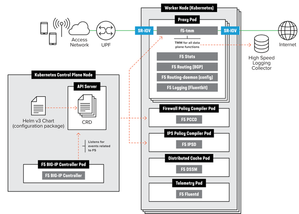
Introduction The CNF architecture aligns with cloud-native principles by enabling horizontal scaling, ensuring that applications can expand seamlessly without compromising performance. It preserves the deterministic reliability essential for telecom environments, balancing scalability with the stringent demands of real-time processing. More background information about what value CNF brings to the environment, https://community.f5.com/kb/technicalarticles/from-virtual-to-cloud-native-infrastructure-evolution/342364 Telecom service providers make use of CNFs for performance optimization, Enable efficient and secure processing of N6-LAN traffic at the edge to meet the stringent requirements of 5G networks. Optimize AI-RAN deployments with dynamic scaling and enhanced security, ensuring that AI workloads are processed efficiently and securely at the edge, improving overall network performance. Deploy advanced AI applications at the edge with the confidence of carrier-grade security and traffic management, ensuring real-time processing and analytics for a variety of edge use cases. CNF Firewall Implementation Overview Let’s start with understanding how different CRs are enabled within a CNF implementation this allows CNF to achieve more optimized performance, Capex and Opex. The traditional way of inserting services to the Kubernetes is as below, Moving to a consolidated Dataplane approach saved 60% of the Kubernetes environment’s performance The F5BigFwPolicy Custom Resource (CR) applies industry-standard firewall rules to the Traffic Management Microkernel (TMM), ensuring that only connections initiated by trusted clients will be accepted. When a new F5BigFwPolicy CR configuration is applied, the firewall rules are first sent to the Application Firewall Management (AFM) Pod, where they are compiled into Binary Large Objects (BLOBs) to enhance processing performance. Once the firewall BLOB is compiled, it is sent to the TMM Proxy Pod, which begins inspecting and filtering network packets based on the defined rules. Enabling AFM within BIG-IP Controller Let’s explore how we can enable and configure CNF Firewall. Below is an overview of the steps needed to set up the environment up until the CNF CRs installations [Enabling the AFM] Enabling AFM CR within BIG-IP Controller definition global: afm: enabled: true pccd: enabled: true f5-afm: enabled: true cert-orchestrator: enabled: true afm: pccd: enabled: true image: repository: "local.registry.com" [Configuration] Example for Firewall policy settings apiVersion: "k8s.f5net.com/v1" kind: F5BigFwPolicy metadata: name: "cnf-fw-policy" namespace: "cnf-gateway" spec: rule: - name: allow-10-20-http action: "accept" logging: true servicePolicy: "service-policy1" ipProtocol: tcp source: addresses: - "2002::10:20:0:0/96" zones: - "zone1" - "zone2" destination: ports: - "80" zones: - "zone3" - "zone4" - name: allow-10-30-ftp action: "accept" logging: true ipProtocol: tcp source: addresses: - "2002::10:30:0:0/96" zones: - "zone1" - "zone2" destination: ports: - "20" - "21" zones: - "zone3" - "zone4" - name: allow-us-traffic action: "accept" logging: true source: geos: - "US:California" destination: geos: - "MX:Baja California" - "MX:Chihuahua" - name: drop-all action: "drop" logging: true ipProtocol: any source: addresses: - "::0/0" - "0.0.0.0/0" [Logging & Monitoring] CNF firewall settings allow not only local logging but also to use HSL logging to external logging destinations. apiVersion: "k8s.f5net.com/v1" kind: F5BigLogProfile metadata: name: "cnf-log-profile" namespace: "cnf-gateway" spec: name: "cnf-logs" firewall: enabled: true network: publisher: "cnf-hsl-pub" events: aclMatchAccept: true aclMatchDrop: true tcpEvents: true translationFields: true Verifying the CNF firewall settings can be done through the sidecar container kubectl exec -it deploy/f5-tmm -c debug -n cnf-gateway – bash tmctl -d blade fw_rule_stat context_type context_name ------------ ------------------------------------------ virtual cnf-gateway-cnf-fw-policy-SecureContext_vs rule_name micro_rules counter last_hit_time action ------------------------------------ ----------- ------- ------------- ------ allow-10-20-http-firewallpolicyrule 1 2 1638572860 2 allow-10-30-ftp-firewallpolicyrule 1 5 1638573270 2 Conclusion To conclude our article, we showed how CNFs with consolidated data planes help with optimizing CNF deployments. In this article we went through the overview of BIG-IP Next Edge Firewall CNF implementation, sample configuration and monitoring capabilities. More use cases to cover different use cases to be following. Related content F5BigFwPolicy BIG-IP Next Cloud-Native Network Functions (CNFs) CNF Home109Views2likes2CommentsHow I did it.....again "High-Performance S3 Load Balancing with F5 BIG-IP"
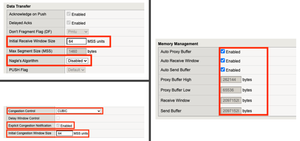
Introduction Welcome back to the "How I did it" series! In the previous installment, we explored the high‑performance S3 load balancing of Dell ObjectScale with F5 BIG‑IP. This follow‑up builds on that foundation with BIG‑IP v21.x’s S3‑focused profiles and how to apply them in the wild. We’ll also put the external monitor to work, validating health with real PUT/GET/DELETE checks so your S3-compatible backends aren’t just “up,” they’re truly dependable. New S3 Profiles for the BIG-IP…..well kind of A big part of why F5 BIG-IP excels is because of its advanced traffic profiles, like TCP and SSL/TLS. These profiles let you fine-tune connection behavior—optimizing throughput, reducing latency, and managing congestion—while enforcing strong encryption and protocol settings for secure, efficient data flow. Available with version 21.x the BIG-IP now includes new S3-specific profiles, (s3-tcp and s3-default-clientssl). These profiles are based off existing default parent profiles, (tcp and clientssl respectively) that have been customized or “tuned” to optimize s3 traffic. Let’s take a closer look. Anatomy of a TCP Profile The BIG-IP includes a number of pre-defined TCP profiles that define how the system manages TCP traffic for virtual servers, controlling aspects like connection setup, data transfer, congestion control, and buffer tuning. These profiles allow administrators to optimize performance for different network conditions by adjusting parameters such as initial congestion window, retransmission timeout, and algorithms like Nagle’s or Delayed ACK. The s3-tcp, (see below) has been tweaked with respect to data transfer and congestion window sizes as well as memory management to optimize typical S3 traffic patterns (i.e. high-throughput data transfer, varying request sizes, large payloads, etc.). Tweaking the Client SSL Profile for S3 Client SSL profiles on BIG-IP define how the system terminates and manages SSL/TLS sessions from clients at the virtual server. They specify critical parameters such as certificates, private keys, cipher suites, and supported protocol versions, enabling secure decryption for advanced traffic handling like HTTP optimization, security policies, and iRules. The s3-default-clientssl has been modified, (see below) from the default client ssl profile to optimize SSL/TLS settings for high-throughput object storage traffic, ensuring better performance and compatibility with S3-specific requirements. Advanced S3-compatible health checking with EAV Has anyone ever told you how cool BIG-IP Extended Application Verification (EAV) aka external monitors are? Okay, I suppose “coolness” is subjective, but EAVs are objectively cool. Let me prove it to you. Health monitoring of backend S3-compatible servers typically involves making an HTTP GET request to either the exposed S3 ingest/egress API endpoint or a liveness probe. Get a 200 and all's good. Wouldn’t it be cool if you could verify a backend server's health by verifying it can actually perform the operations as intended? Fortunately, we can do just that using an EAV monitor. Therefore, based on the transitive property, EAVs are cool. —mic drop The bash script located at the bottom of the page performs health checks on S3-compatible storage by executing PUT, GET, and DELETE operations on a test object. The health check creates a temporary health check file with timestamp, retrieves the file to verify read access, and removes the test file to clean up. If all three operations return the expected HTTP status code, the node is marked up otherwise the node is marked down. Installing and using the EAV health check Import the monitor script Save the bash script, (.sh) extension, (located at the bottom of this page) locally and import the file onto the BIG-IP. Log in to the BIG-IP Configuration Utility and navigate to System > File Management > External Monitor Program File List > Import. Use the file selector to navigate to and select the newly created. bash file, provide a name for the file and select 'Import'. Create a new external monitor Navigate to Local Traffic > Monitors > Create Provide a name for the monitor. Select 'External' for the type, and select the previously uploaded file for the 'External Program'. The 'Interval' and 'Timeout' settings can be modified or left at the default as desired. In addition to the backend host and port, the monitor must pass three (3) additional variables to the backend: bucket - The name of an existing bucket where the monitor can place a small text file. During the health check, the monitor will create a file, request the file and delete the file. access_key - S3-compatible access key with permissions to perform the above operations on the specified bucket. secret_key - corresponding S3-compatible secret key. Select 'Finished' to create the monitor. Associate the monitor with the pool Navigate to Local Traffic > Pools > Pool List and select the relevant backend S3 pool. Under 'Health Monitors' select the newly created monitor and move from 'Available' to the 'Active'. Select 'Update' to save the configuration. Additional Links How I did it - "High-Performance S3 Load Balancing of Dell ObjectScale with F5 BIG-IP" F5 BIG-IP v21.0 brings enhanced AI data delivery and ingestion for S3 workflows Overview of BIG-IP EAV external monitors EAV Bash Script #!/bin/bash ################################################################################ # S3 Health Check Monitor for F5 BIG-IP (External Monitor - EAV) ################################################################################ # # Description: # This script performs health checks on S3-compatible storage by # executing PUT, GET, and DELETE operations on a test object. It uses AWS # Signature Version 4 for authentication and is designed to run as a BIG-IP # External Application Verification (EAV) monitor. # # Usage: # This script is intended to be configured as an external monitor in BIG-IP. # BIG-IP automatically provides the first two arguments: # $1 - Pool member IP address (may be IPv6-mapped format: ::ffff:x.x.x.x) # $2 - Pool member port number # # Additional arguments must be configured in the monitor's "Variables" field: # bucket - S3 bucket name # access_key - Access key for authentication # secret_key - Secret key for authentication # # BIG-IP Monitor Configuration: # Type: External # External Program: /path/to/this/script.sh # Variables: # bucket="your-bucket-name" # access_key="your-access-key" # secret_key="your-secret-key" # # Health Check Logic: # 1. PUT - Creates a temporary health check file with timestamp # 2. GET - Retrieves the file to verify read access # 3. DELETE - Removes the test file to clean up # Success: All three operations return expected HTTP status codes # Failure: Any operation fails or times out # # Exit Behavior: # - Prints "UP" to stdout if all checks pass (BIG-IP marks pool member up) # - Silent exit if any check fails (BIG-IP marks pool member down) # # Requirements: # - openssl (for SHA256 hashing and HMAC signing) # - curl (for HTTP requests) # - xxd (for hex encoding) # - Standard bash utilities (date, cut, sed, awk) # # Notes: # - Handles IPv6-mapped IPv4 addresses from BIG-IP (::ffff:x.x.x.x) # - Uses AWS Signature Version 4 authentication # - Logs activity to syslog (local0.notice) # - Creates temporary files that are automatically cleaned up # # Author: [Gregory Coward/F5] # Version: 1.0 # Last Modified: 12/2025 # ################################################################################ # ===== PARAMETER CONFIGURATION ===== # BIG-IP automatically provides these HOST="$1" # Pool member IP (may include ::ffff: prefix for IPv4) PORT="$2" # Pool member port BUCKET="${bucket}" # S3 bucket name ACCESS_KEY="${access_key}" # S3 access key SECRET_KEY="${secret_key}" # S3 secret key OBJECT="${6:-healthcheck.txt}" # Test object name (default: healthcheck.txt) # Strip IPv6-mapped IPv4 prefix if present (::ffff:10.1.1.1 -> 10.1.1.1) # BIG-IP may pass IPv4 addresses in IPv6-mapped format if [[ "$HOST" =~ ^::ffff: ]]; then HOST="${HOST#::ffff:}" fi # ===== S3/AWS CONFIGURATION ===== ENDPOINT="http://$HOST:$PORT" # S3 endpoint URL SERVICE="s3" # AWS service identifier for signature REGION="" # AWS region (leave empty for S3 compatible such as MinIO/Dell) # ===== TEMPORARY FILE SETUP ===== # Create temporary file for health check upload TMP_FILE=$(mktemp) printf "Health check at %s\n" "$(date)" > "$TMP_FILE" # Ensure temp file is deleted on script exit (success or failure) trap "rm -f $TMP_FILE" EXIT # ===== CRYPTOGRAPHIC HELPER FUNCTIONS ===== # Calculate SHA256 hash and return as hex string # Input: stdin # Output: hex-encoded SHA256 hash hex_of_sha256() { openssl dgst -sha256 -hex | sed 's/^.* //' } # Sign data using HMAC-SHA256 and return hex signature # Args: $1=hex-encoded key, $2=data to sign # Output: hex-encoded signature sign_hmac_sha256_hex() { local key_hex="$1" local data="$2" printf "%s" "$data" | openssl dgst -sha256 -mac HMAC -macopt "hexkey:$key_hex" | awk '{print $2}' } # Sign data using HMAC-SHA256 and return binary as hex # Args: $1=hex-encoded key, $2=data to sign # Output: hex-encoded binary signature (for key derivation chain) sign_hmac_sha256_binary() { local key_hex="$1" local data="$2" printf "%s" "$data" | openssl dgst -sha256 -mac HMAC -macopt "hexkey:$key_hex" -binary | xxd -p -c 256 } # ===== AWS SIGNATURE VERSION 4 IMPLEMENTATION ===== # Generate AWS Signature Version 4 for S3 requests # Args: # $1 - HTTP method (PUT, GET, DELETE, etc.) # $2 - URI path (e.g., /bucket/object) # $3 - Payload hash (SHA256 of request body, or empty hash for GET/DELETE) # $4 - Content-Type header value (empty string if not applicable) # Output: pipe-delimited string "Authorization|Timestamp|Host" aws_sig_v4() { local method="$1" local uri="$2" local payload_hash="$3" local content_type="$4" # Generate timestamp in AWS format (YYYYMMDDTHHMMSSZ) local timestamp=$(date -u +"%Y%m%dT%H%M%SZ" 2>/dev/null || gdate -u +"%Y%m%dT%H%M%SZ") local datestamp=$(date -u +"%Y%m%d") # Build host header (include port if non-standard) local host_header="$HOST" if [ "$PORT" != "80" ] && [ "$PORT" != "443" ]; then host_header="$HOST:$PORT" fi # Build canonical headers and signed headers list local canonical_headers="" local signed_headers="" # Include Content-Type if provided (for PUT requests) if [ -n "$content_type" ]; then canonical_headers="content-type:${content_type}"$'\n' signed_headers="content-type;" fi # Add required headers (must be in alphabetical order) canonical_headers="${canonical_headers}host:${host_header}"$'\n' canonical_headers="${canonical_headers}x-amz-content-sha256:${payload_hash}"$'\n' canonical_headers="${canonical_headers}x-amz-date:${timestamp}" signed_headers="${signed_headers}host;x-amz-content-sha256;x-amz-date" # Build canonical request (AWS Signature V4 format) # Format: METHOD\nURI\nQUERY_STRING\nHEADERS\n\nSIGNED_HEADERS\nPAYLOAD_HASH local canonical_request="${method}"$'\n' canonical_request+="${uri}"$'\n\n' # Empty query string (double newline) canonical_request+="${canonical_headers}"$'\n\n' canonical_request+="${signed_headers}"$'\n' canonical_request+="${payload_hash}" # Hash the canonical request local canonical_hash canonical_hash=$(printf "%s" "$canonical_request" | hex_of_sha256) # Build string to sign local algorithm="AWS4-HMAC-SHA256" local credential_scope="$datestamp/$REGION/$SERVICE/aws4_request" local string_to_sign="${algorithm}"$'\n' string_to_sign+="${timestamp}"$'\n' string_to_sign+="${credential_scope}"$'\n' string_to_sign+="${canonical_hash}" # Derive signing key using HMAC-SHA256 key derivation chain # kSecret = HMAC("AWS4" + secret_key, datestamp) # kRegion = HMAC(kSecret, region) # kService = HMAC(kRegion, service) # kSigning = HMAC(kService, "aws4_request") local k_secret k_secret=$(printf "AWS4%s" "$SECRET_KEY" | xxd -p -c 256) local k_date k_date=$(sign_hmac_sha256_binary "$k_secret" "$datestamp") local k_region k_region=$(sign_hmac_sha256_binary "$k_date" "$REGION") local k_service k_service=$(sign_hmac_sha256_binary "$k_region" "$SERVICE") local k_signing k_signing=$(sign_hmac_sha256_binary "$k_service" "aws4_request") # Calculate final signature local signature signature=$(sign_hmac_sha256_hex "$k_signing" "$string_to_sign") # Return authorization header, timestamp, and host header (pipe-delimited) printf "%s|%s|%s" \ "${algorithm} Credential=${ACCESS_KEY}/${credential_scope}, SignedHeaders=${signed_headers}, Signature=${signature}" \ "$timestamp" \ "$host_header" } # ===== HTTP REQUEST FUNCTION ===== # Execute HTTP request using curl with AWS Signature V4 authentication # Args: # $1 - HTTP method (PUT, GET, DELETE) # $2 - Full URL # $3 - Authorization header value # $4 - Timestamp (x-amz-date header) # $5 - Host header value # $6 - Payload hash (x-amz-content-sha256 header) # $7 - Content-Type (optional, empty for GET/DELETE) # $8 - Data file path (optional, for PUT with body) # Output: HTTP status code (e.g., 200, 404, 500) do_request() { local method="$1" local url="$2" local auth="$3" local timestamp="$4" local host_header="$5" local payload_hash="$6" local content_type="$7" local data_file="$8" # Build curl command with required headers local cmd="curl -s -o /dev/null --connect-timeout 5 --write-out %{http_code} \"$url\"" cmd="$cmd -X $method" cmd="$cmd -H \"Host: $host_header\"" cmd="$cmd -H \"x-amz-date: $timestamp\"" cmd="$cmd -H \"x-amz-content-sha256: $payload_hash\"" # Add optional headers [ -n "$content_type" ] && cmd="$cmd -H \"Content-Type: $content_type\"" cmd="$cmd -H \"Authorization: $auth\"" [ -n "$data_file" ] && cmd="$cmd --data-binary @\"$data_file\"" # Execute request and return HTTP status code eval "$cmd" } # ===== MAIN HEALTH CHECK LOGIC ===== # ===== STEP 1: PUT (Upload Test Object) ===== # Calculate SHA256 hash of the temp file content UPLOAD_HASH=$(openssl dgst -sha256 -binary "$TMP_FILE" | xxd -p -c 256) CONTENT_TYPE="application/octet-stream" # Generate AWS Signature V4 for PUT request SIGN_OUTPUT=$(aws_sig_v4 "PUT" "/$BUCKET/$OBJECT" "$UPLOAD_HASH" "$CONTENT_TYPE") AUTH_PUT=$(cut -d'|' -f1 <<< "$SIGN_OUTPUT") DATE_PUT=$(cut -d'|' -f2 <<< "$SIGN_OUTPUT") HOST_PUT=$(cut -d'|' -f3 <<< "$SIGN_OUTPUT") # Execute PUT request (expect 200 OK) PUT_STATUS=$(do_request "PUT" "$ENDPOINT/$BUCKET/$OBJECT" "$AUTH_PUT" "$DATE_PUT" "$HOST_PUT" "$UPLOAD_HASH" "$CONTENT_TYPE" "$TMP_FILE") # ===== STEP 2: GET (Download Test Object) ===== # SHA256 hash of empty body (for GET requests with no payload) EMPTY_HASH="e3b0c44298fc1c149afbf4c8996fb92427ae41e4649b934ca495991b7852b855" # Generate AWS Signature V4 for GET request SIGN_OUTPUT=$(aws_sig_v4 "GET" "/$BUCKET/$OBJECT" "$EMPTY_HASH" "") AUTH_GET=$(cut -d'|' -f1 <<< "$SIGN_OUTPUT") DATE_GET=$(cut -d'|' -f2 <<< "$SIGN_OUTPUT") HOST_GET=$(cut -d'|' -f3 <<< "$SIGN_OUTPUT") # Execute GET request (expect 200 OK) GET_STATUS=$(do_request "GET" "$ENDPOINT/$BUCKET/$OBJECT" "$AUTH_GET" "$DATE_GET" "$HOST_GET" "$EMPTY_HASH" "" "") # ===== STEP 3: DELETE (Remove Test Object) ===== # Generate AWS Signature V4 for DELETE request SIGN_OUTPUT=$(aws_sig_v4 "DELETE" "/$BUCKET/$OBJECT" "$EMPTY_HASH" "") AUTH_DEL=$(cut -d'|' -f1 <<< "$SIGN_OUTPUT") DATE_DEL=$(cut -d'|' -f2 <<< "$SIGN_OUTPUT") HOST_DEL=$(cut -d'|' -f3 <<< "$SIGN_OUTPUT") # Execute DELETE request (expect 204 No Content) DEL_STATUS=$(do_request "DELETE" "$ENDPOINT/$BUCKET/$OBJECT" "$AUTH_DEL" "$DATE_DEL" "$HOST_DEL" "$EMPTY_HASH" "" "") # ===== LOG RESULTS ===== # Log all operation results for troubleshooting #logger -p local0.notice "S3 Monitor: PUT=$PUT_STATUS GET=$GET_STATUS DEL=$DEL_STATUS" # ===== EVALUATE HEALTH CHECK RESULT ===== # BIG-IP considers the pool member "UP" only if this script prints "UP" to stdout # Check if all operations returned expected status codes: # PUT: 200 (OK) # GET: 200 (OK) # DELETE: 204 (No Content) if [ "$PUT_STATUS" -eq 200 ] && [ "$GET_STATUS" -eq 200 ] && [ "$DEL_STATUS" -eq 204 ]; then #logger -p local0.notice "S3 Monitor: UP" echo "UP" fi # If any check fails, script exits silently (no "UP" output) # BIG-IP will mark the pool member as DOWN97Views2likes0CommentsDistributed Cloud for App Delivery & Security for Hybrid Environments
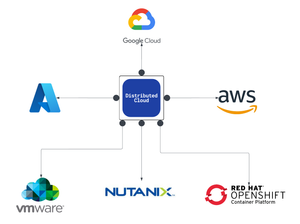
As enterprises modernize and expand their digital services, they increasingly deploy multiple instances of the same applications across diverse infrastructure environments—such as VMware, OpenShift, and Nutanix—to support distributed teams, regional data sovereignty, redundancy, or environment-specific compliance needs. These application instances often integrate into service chains that span across clouds and data centers, introducing both scale and operational complexity. F5 Distributed Cloud provides a unified solution for secure, consistent application delivery and security across hybrid and multi-cloud environments. It enables organizations to add workloads seamlessly—whether for scaling, redundancy, or localization—without sacrificing visibility, security, or performance.377Views4likes0CommentsWhat’s New in the NGINX Plus R36 Native OIDC Module
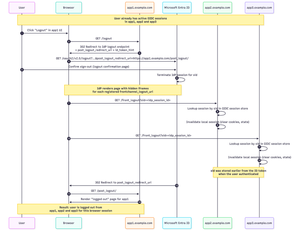
NGINX Plus R36 is out, and with it we hit a really important milestone for the native `ngx_http_oidc_module`, which now supports a broad set of OpenID Connect (OIDC) features commonly relied on in production environments. In this release, we add: Support for OIDC Front‑Channel Logout 1.0, enabling proper single sign‑out across multiple apps Built‑in PKCE (Proof Key for Code Exchange) support Support for the `client_secret_post` client authentication method at the token endpoint R35 gave the native module RP‑initiated logout and a UserInfo integration, R36 builds on that and closes several important gaps. In this post I’ll walk through all the new features in detail, using Microsoft’s Entra ID as the concrete example IdP. Front‑Channel Logout: Real Single Sign‑Out Why RP‑initiated logout alone isn’t enough Until now, `ngx_http_oidc_module` supported only RP‑initiated logout (per OpenID Connect RP‑Initiated Logout 1.0). That gave us a standards‑compliant “logout button”: when the user clicks “Logout” in your app, Nginx Plus sends them to the IdP’s logout endpoint, and the IdP tears down its own session. The catch is that RP‑initiated logout only reliably logs you out of: The current application (the RP that initiated the logout), and The IdP session itself Other applications that share the same IdP session typically stay logged in unless they also have a custom logout flow that goes through the IdP. That’s not what most people think of as “single sign‑out”. Imagine you borrow your partner’s personal laptop, log into a few internal apps that are all protected by NGINX Plus, finish your work, and hit “Logout” in one of them. You really want to be sure you’re logged out of all of those apps, not just the one where you pressed the button. That’s exactly what front‑channel logout is for. What front‑channel logout does The OpenID Connect Front‑Channel Logout 1.0 spec defines a way for the OP (the OpenID Provider) to notify all RPs that share a user’s session that the user has logged out. At a high level: The user logs out (either from an app using RP‑initiated logout, or directly on the IdP). The OP figures out which RPs are part of that single sign‑on session. The OP renders a page with one `<iframe>` per RP, each pointing at the RP’s `frontchannel_logout_uri`. Each RP receives a front‑channel logout request in its own back‑end and clears its local session. The browser coordinates this via iframes, but the session termination logic lives entirely in Nginx Plus, see diagram below: Configuring Front‑Channel Logout in NGINX Plus Let’s start with the NGINX Plus configuration. The change is intentionally minimal: you only need to add one directive to your existing `oidc_provider` block: oidc_provider entra_app1 { issuer https://login.microsoftonline.com/<tenant_id>/v2.0; client_id your_client_id; client_secret your_client_secret; logout_uri /logout; post_logout_uri /post_logout/; logout_token_hint on; frontchannel_logout_uri /front_logout; # Enables front-channel logout userinfo on; } That’s all that’s required on the NGINX Plus side to enable a single logout for this provider: `logout_uri` - path in your app that starts RP‑initiated logout `post_logout_uri` - where the IdP will send the browser after logout `logout_token_hint on;` - instructs NGINX Plus to send `id_token_hint` when calling the IdP’s logout endpoint `frontchannel_logout_uri` - path that will receive front‑channel logout requests from the IdP You’ll repeat that pattern for every app/provider block that should participate in single sign‑out. Configuring Front‑Channel Logout in Microsoft Entra ID On the Microsoft Entra ID side, you need to register a Front‑channel logout URL for each application. For each app: Go to Microsoft Entra admin center -> App registrations -> Your application -> Authentication. In Front‑channel logout URL, enter the URL that corresponds to your NGINX configuration, for example: `https://app1.example.com/front_logout`. This must match the URI you configured with `frontchannel_logout_uri` in `oidc_provider` configuration. Repeat for `app2.example.com`, `app3.example.com`, and any other RP that should take part in single sign‑out. End‑to‑End Flow with Three Apps Assume you have three apps configured the same way: https://app1.example.com https://app2.example.com https://app3.example.com All of them: Use `ngx_http_oidc_module` with the same Microsoft Entra tenant Have `frontchannel_logout_uri` configured in Nginx Have the same URL registered as Front‑channel logout URL in Entra ID User signs in to multiple apps The user navigates to `app1.example.com` and gets redirected to Microsoft’s Entra ID for authentication. After a successful login, NGINX Plus establishes a local OIDC session, and the user can access app1. They then repeat this process for app2 and app3. At this point, the user has active sessions in all three apps: User clicks `Logout` in app1 -> HTTP GET `https://app1.example.com/logout` Nginx redirects to Entra logout endpoint -> HTTP GET `https://login.microsoftonline.com/<tenant_id>/oauth2/v2.0/logout?...` User confirms logout at Microsoft IdP renders iframes that call all registered `frontchannel_logout_uri` values: GET `https://app1.example.com/front_logout?sid=...` GET `https://app2.example.com/front_logout?sid=...` GET `https://app3.example.com/front_logout?sid=...` `ngx_http_oidc_module` maps these `sid` values to Nginx sessions and deletes them IdP redirects browser back to https://app1.example.com/post_logout/ How Nginx Maps a sid to a Session? So how does the module know which session to terminate when it receives a front‑channel logout request like: GET /front_logout?sid=ec91a1f3-... HTTP/1.1 Host: app2.example.com The key is the `sid` claim in the ID token. Per the Front‑Channel Logout spec, when an OP supports session‑based logout it: Includes a `sid` claim in ID tokens May send `sid` (and `iss`) as query parameters to the `frontchannel_logout_uri` When `ngx_http_oidc_module` authenticates a user, it: Obtains an ID token from the provider. Extracts the sid claim (if present). Stores that sid alongside the rest of the session data in the module’s session store. Later, when a front‑channel logout request arrives: The module inspects the `sid` query parameter. It looks up any active session in its session store that matches this `sid` for the current provider. If it finds a matching active session, it terminates that session (clears cookies, removes data). If there’s no match, it ignores the request. This makes the module resilient to bogus or replayed logout requests: a random `sid` that doesn’t match any active session is simply discarded. Where is the iss Parameter? If you’ve studied the Front‑Channel Logout spec carefully, you might be wondering: where is `iss` (issuer)? The spec says: The OP MAY add `iss` and `sid` query parameters when rendering the logout URI, and if either is included, both MUST be. The reason is that the `sid` value is only guaranteed to be unique per issuer, combining `iss + sid` makes the pair globally unique. In practice, though, reality is messy. For example, Microsoft Entra ID sends a sid in front‑channel logout requests but does not send iss, even though its discovery document advertises `frontchannel_logout_session_supported: true`. This behavior has been reported publicly and has been acknowledged by Microsoft. If `ngx_http_oidc_module` strictly required iss, you simply couldn’t use front‑channel logout with Entra ID and some other providers. Instead, the module takes a pragmatic approach: It does not require iss in the logout request It already knows which provider it’s dealing with (from the `oidc_provider` context) It stores sid values per provider, so sid collisions across providers can’t happen inside that context So while this is technically looser than what the spec recommends for general‑purpose RPs, it’s safe given how the module scopes sessions and it makes the feature usable with real‑world IdPs. Cookie‑Only Front‑Channel Logout (and why you probably don’t want it) Front‑channel logout has another mode that doesn’t rely on sid at all. The spec allows an OP to call the RP’s `frontchannel_logout_uri` without any query parameters and relies entirely on the browser sending the RP’s session cookie. The RP then just checks, “do I have a session cookie?” and if yes, logs that user out. ngx_http_oidc_module supports this. However, modern browser behavior makes this approach very fragile: Recent browser versions treat cookies without a SameSite attribute as SameSite=Lax. Front‑channel logout uses iframes, which are third‑party / cross‑site contexts. SameSite=Lax cookies do not get sent on these sub‑requests, so your RP will never see its own session cookie in the front‑channel iframe request. To make cookie‑only front‑channel logout work, your session cookie would need: Set-Cookie: NGX_OIDC_SESSION=...; SameSite=None; Secure …and that has some serious downsides: SameSite=None opens you up to cross‑site request forgery (CSRF). The current version of `ngx_http_oidc_module` does not expose a way to set `SameSite=None` on its session cookie directly. Even if you tweak cookies at a lower level, you might not want to weaken your CSRF posture just to accommodate this logout variant. Because of that, the recommended and practical approach is the sid‑based mechanism: It doesn’t rely on third‑party cookies. It works in modern browsers with strict SameSite behaviors. It’s easy to reason about and debug. Is Relying on sid Secure Enough? It’s a fair question: if you no longer rely on your own session cookie, how safe is it to accept a logout request based solely on a sid received from the IdP? A few points to keep in mind: The spec defines `sid` as an opaque, high-entropy session identifier generated by the IdP. Implementations are expected to use cryptographically strong randomness with enough entropy to prevent guessing or brute force. Even if an attacker somehow learned a valid sid and sent a fake front‑channel logout request, the worst they can do is log a user out of your application. Providers like Microsoft Entra ID treat sid as a session‑scoped identifier. New sessions get new sid values, and sessions expire over time. `ngx_http_oidc_module` validates that the sid from the logout request matches an active session in its session store for that provider. A random or stale sid that doesn’t match anything is ignored. Taken together, a sid‑based front‑channel logout is a very reasonable trade‑off: you get robust single sign‑out without weakening cookie security, and the remaining risks are small and easy to understand. Front‑Channel Logout Troubleshooting If you’ve wired everything up and a single logout still doesn’t work as expected, here’s a quick checklist. Confirm that your IdP actually issues front‑channel requests Make sure: The provider’s discovery document (.well-known/openid-configuration) includes `frontchannel_logout_supported: true`. You have configured the Front‑channel logout URL for each application in your IdP. If Entra ID doesn’t send requests to your `frontchannel_logout_uri`, the RP will never know that it should log out the user. Ensure the ID token contains a sid claim Many IdPs, including Microsoft Entra ID, don’t include sid in ID tokens by default, even if they support front‑channel logout. For Entra ID you typically need to: Open your app registration -> go to Token configuration -> click add optional claim -> select Token type: ID, then select sid and add it. After that, new ID tokens will carry a sid claim, which ngx_http_oidc_module can store and later match on logout. Check what the IdP actually sends on front‑channel logout If you rely on the sid‑based mechanism, inspect the HTTP requests your app receives at frontchannel_logout_uri: Do you see a sid and iss query parameter? Does your provider also advertise `frontchannel_logout_session_supported: true` in the metadata? If all of the above is in place, front‑channel logout should “just work.” PKCE Support in ngx_http_oidc_module In earlier versions of the `ngx_http_oidc_module`, we did not support PKCE because it is not required for confidential clients, such as nginx, which are able to securely store and transmit a client_secret. However, as the module gained popularity and with the release of the OAuth 2.1 draft specification recommending the use of PKCE for all client types, we decided to add PKCE support to ngx_http_oidc_module. PKCE is an extension to OAuth 2.0 that adds an additional layer of security to the authorization code flow. The core idea is that the client generates a random code_verifier and derives a code_challenge from it, which is sent with the authorization request. When the client later exchanges the authorization code for tokens, it must send back the original code_verifier. The authorization server validates that the code_verifier matches the previously supplied code_challenge, preventing attacks such as authorization code interception. This is a brief overview of PKCE. If you’d like to learn more, I recommend reviewing the official RFC 7636 specification: https://datatracker.ietf.org/doc/html/rfc7636. How is PKCE support implemented in the ngx_http_oidc_module? The implementation of PKCE support in ngx_http_oidc_module is straightforward and intuitive. Moreover, if your identity provider supports PKCE and includes the parameter `code_challenge_methods_supported = S256` in its OIDC metadata, the module automatically enables PKCE with no configuration changes required. When initiating the authorization flow, the module generates a random code_verifier and derives a code_challenge from it using the S256 method. These parameters are sent with the authorization request. When the module later receives the authorization code, it sends the original code_verifier when requesting tokens, ensuring the authorization code exchange remains secure. If your identity provider does not support automatic PKCE discovery, you can explicitly enable PKCE in your provider configuration by adding the `pkce on;` directive inside the oidc_provider block. For example: oidc_provider entra_app2 { issuer https://login.microsoftonline.com/<tenant_id>/v2.0; client_id your_client_id; client_secret your_client_secret; pkce on; # <- this directive enables PKCE support } That is all you need to do to enable PKCE support in the ngx_http_oidc_module. client_secret_post Client Authentication Another important enhancement in the ngx_http_oidc_module is the addition of support for the client_secret_post client authentication method. Previously, the module supported only client_secret_basic, which requires sending the client_id and client_secret in the Authorization header. According to the OAuth 2.0 specification, all providers must support client_secret_basic; however, for some providers, the use of client_secret_basic may be restricted due to security or policy considerations. For this reason, we added support for client_secret_post. This method allows sending the client_id and client_secret in the body of the POST request when exchanging the authorization code for tokens. To use the client_secret_post method in ngx_http_oidc_module, you don’t need to do anything at all - the module automatically determines which method to use based on the identity provider’s metadata. If the provider indicates that it supports only client_secret_post, the module will use this method when exchanging authorization codes for tokens. If the provider supports both client_secret_basic and client_secret_post, the module will use client_secret_basic by default. Verifying this is simple - check the value of `token_endpoint_auth_methods_supported` in the provider’s OIDC metadata: $ curl https://login.microsoftonline.com/<tenant_id>/v2.0/.well-known/openid-configuration | jq { ... "token_endpoint_auth_methods_supported": [ "client_secret_post", "private_key_jwt", "client_secret_basic", "self_signed_tls_client_auth" ], ... } In this example, Microsoft Entra ID supports both methods, so the module will use client_secret_basic by default. Wrapping Up As you can see, in this release, we have significantly expanded the functionality of the ngx_http_oidc_module by adding support for front-channel logout, PKCE, and the client_secret_post client authentication method. These enhancements make the module more flexible and secure, enabling better integration with various OpenID Connect providers and offering a higher level of security for your applications. I hope this overview was useful and informative for you! See you soon!53Views1like0CommentsAgentic AI with F5 BIG-IP v21 using Model Context Protocol and OpenShift
Introduction to Agentic AI Agentic AI is the capability of extending the Large Language Models (LLM) by means of adding tools. This allows the LLMs to interoperate with functionalities external to the LLM. Examples of these are the capability to search a flight or to push code into github. Agentic AI operates proactively, minimising human intervention and making decisions and adapting to perform complex tasks by using tools, data, and the Internet. This is done by basically giving to the LLM the knowledge of the APIs of github or the flight agency, then the reasoning of the LLM makes use of these APIs. The external (to the LLM) functionality can be run in the local computer or in network MCP servers. This article focuses in network MCP servers, which fits in the F5 AI Reference Architecture components and the insertion point indicated in green of the shown next: Introduction to Model Context Protocol Model Context Protocol (MCP) is a universal connector between LLMs and tools. Without MCP, it is needed that the LLM is programmed to support the different APIs of the different tools. This is not a scalable model because it requires a lot of effort to add all tools for a given LLM and for a tool to support several LLMs. Instead, when using MCP, the LLM (or AI application) and the tool only need to support MCP. Without further coding, the LLM model automatically is able to use any tool that exposes its functionalities through MCP. This is exhibit in the following figure: MCP example workflow In the next diagram it is exposed the basic MCP workflow using the LibreChat AI application as example. The flow is as follows: The AI application queries agents (MCP servers) which tools they provide. The agents return a list of the tools, with a description and parameters required. When the AI application makes a request to the AI model it includes in the request information about the tools available. When the AI model finds out it doesn´t have built-in what it is required to fulfil the request, it makes use of the tools. The tools are accessed through the AI application. The AI model composes a result with its local knowledge and the results from the tools. Out of the workflow above, the most interesting is step 1 which is used to retrieve the information required for the AI model to use the tools. Using the mcpLogger iRule provided in this article later on, we can see the MCP messages exchanged. Step 1a: { "method": "tools/list", "jsonrpc": "2.0", "id": 2 } Step 1b: { "jsonrpc": "2.0", "id": 2, "result": { "tools": [ { "name": "airport_search", "description": "Search for airport codes by name or city.\n\nArgs:\n query: The search term (city name, airport name, or partial code)\n\nReturns:\n List of matching airports with their codes", "inputSchema": { "properties": { "query": { "type": "string" } }, "required": [ "query" ], "type": "object" }, "outputSchema": { "properties": { "result": { "type": "string" } }, "required": [ "result" ], "type": "object", "x-fastmcp-wrap-result": 1 }, "_meta": { "_fastmcp": { "tags": [] } } } ] } } Note from the above that the AI model only requires a description of the tool in human language and a formal declaration of the input and output parameters. That´s all!. The reasoning of the AI model is what will make good use of the API described through MCP. The AI models will interpret even the error messages. For example, if the AI model miss-interprets the input parameters (typically because of wrong descriptor of the tool), the AI model might correct itself if the error message is descriptive enough and call the tool again with the right parameters. Of course, the MCP protocol is more than this but the above is necessary to understand the basis of how tools are used by LLM and how the magic works. F5 BIG-IP and MCP BIG-IP v21 introduces support for MCP, which is based on JSON-RPC. MCP protocol had several iterations. For IP based communication, initially the transport of the JSON-RPC messages used HTTP+SSE transport (now considered legacy) but this has been completely replaced by Streamable HTTP transport. This later still uses SSE when streaming multiple server messages. Regardless of the MCP version, in the F5 BIG-IP it is just needed to enable the JSON and SSE profiles in the Virtual Server for handling MCP. This is shown next: By enabling these profiles we automatically get basic protocol validation but more relevantly, we obtain the ability to handle MCP messages with JSON and SSE oriented events and functions. These allows parsing and manipulation of MCP messages but also the capability of doing traffic management (load balancing, rate limiting, etc...). Next it can be seen the parameters available for these profiles, which allow to limit the size of the various parts of the messages. Defaults are fine for most of the cases: Check the next links for information on iRules events and commands available for the JSON and SSE protocols. MCP and persistence Session persistence is optional in MCP but when the server indicates an Mcp-Session-Id it is mandatory for the client. MCP servers require persistence when they keep a context (state) for the MCP dialog. This means that the F5 BIG-IP must support handling this Mcp-Session-Id as well and it does by using UIE (Universal) persistence with this header. A sample iRule mcpPersistence is provided in the gitHub repository. Demo and gitHub repository The video below demonstrate 3 functionalities using the BIG-IP MCP functionalities, these are: Using MCP persistence Getting visibility of MCP traffic by logging remotely the JSON-RPC payloads of the request and response messages using High Speed Logging. Controlling which tools are allowed or blocked, and logging the allowed/block actions with High Speed Logging. These functionalities are implemented with iRules available in this GitHub repository and deployed in Red Hat OpenShift using the Container Ingress Services (CIS) controller which automates the deployment of the configuration using Kubernetes resources. The overall setup is shown next: In the next embedded video we can see how this is deployed and used. Conclusion and next steps F5 BIG-IP v21 introduces support for MCP protocol and thanks to F5 CIS these setups can be automated in your OpenShift cluster using the Kubernetes API. The possibilities of Agentic AI are infinite, thanks to MCP it is possible to extend the LLM models to use any tool easily. The tools can be used to query or execute actions. I suggest to take a look to repositories of MCP servers and realize the endless possibilities of Agentic AI: https://mcpservers.org/ https://www.pulsemcp.com/servers https://mcpmarket.com/server https://mcp.so/ https://github.com/punkpeye/awesome-mcp-servers 167Views2likes0Comments
Delivering Secure Application Services Anywhere with Nutanix Flow and F5 Distributed Cloud
Introduction F5 Application Delivery and Security Platform (ADSP) is the premier solution for converging high-performance delivery and security for every app and API across any environment. It provides a unified platform offering granular visibility, streamlined operations, and AI-driven insights — deployable anywhere and in any form factor. The F5 ADSP Partner Ecosystem brings together a broad range of partners to deliver customer value across the entire lifecycle. This includes cohesive solutions, cloud synergies, and access to expert services that help customers maximize outcomes while simplifying operations. In this article, we’ll explore the upcoming integration between Nutanix Flow and F5 Distributed Cloud, showcasing how F5 and Nutanix collaborate to deliver secure, resilient application services across hybrid and multi-cloud environments. Integration Overview At the heart of this integration is the capability to deploy a F5 Distributed Cloud Customer Edge (CE) inside a Nutanix Flow VPC, establish BGP peering with the Nutanix Flow BGP Gateway, and inject CE-advertised BGP routes into the VPC routing table. This architecture provides us complete control over application delivery and security within the VPC. We can selectively advertise HTTP load balancers (LBs) or VIPs to designated VPCs, ensuring secure and efficient connectivity. Additionally, the integration securely simplifies network segmentation across hybrid and multi-cloud environments. By leveraging F5 Distributed Cloud to segment and extend the network to remote locations, combined with Nutanix Flow Security for microsegmentation within VPCs, we deliver comprehensive end-to-end network security. This approach enforces a consistent security posture while simplifying segmentation across environments. In this article, we’ll focus on application delivery and security, and explore segmentation in the next article. Demo Walkthrough Let’s walk through a demo to see how this integration works. The goal of this demo is to enable secure application delivery for nutanix5.f5-demo.com within the Nutanix Flow Virtual Private Cloud (VPC) named dev3. Our demo environment, dev3, is a Nutanix Flow VPC with a F5 Distributed Cloud Customer Edge (CE) named jy-nutanix-overlay-dev3 deployed inside: *Note: CE is named jy-nutanix-overlay-dev3 in the F5 Distributed Cloud Console and xc-ce-dev3 in the Nutanix Prism Central. eBGP peering is ESTABLISHED between the CE and the Nutanix Flow BGP Gateway: On the F5 Distributed Cloud Console, we created an HTTP Load Balancer named jy-nutanix-internal-5 serving the FQDN nutanix5.f5-demo.com. This load balancer distributes workloads across hybrid multicloud environments and is protected by a WAF policy named nutanix-demo: We advertised this HTTP Load Balancer with a Virtual IP (VIP) 10.10.111.175 to the CE jy-nutanix-overlay-dev3 deployed inside Nutanix Flow VPC dev3: The CE then advertised the VIP route to its peer via BGP – the Nutanix Flow BGP Gateway: The Nutanix Flow BGP Gateway received the VIP route and installed it in the VPC routing table: Finally, the VMs in dev3 can securely access nutanix5.f5-demo.com while continuing to use the VPC logical router as their default gateway: F5 Distributed Cloud Console observability provides deep visibility into applications and security events. For example, it offers comprehensive dashboards and metrics to monitor the performance and health of applications served through HTTP load balancers. These include detailed insights into traffic patterns, latency, HTTP error rates, and the status of backend services: Furthermore, the built-in AI assistant provides real-time visibility and actionable guidance on security incidents, improving situational awareness and supporting informed decision-making. This capability enables rapid threat detection and response, helping maintain a strong and resilient security posture: Conclusion The integration demonstrates how F5 Distributed Cloud and Nutanix Flow collaborate to deliver secure, resilient application services across hybrid and multi-cloud environments. Together, F5 and Nutanix enable organizations to scale with confidence, optimize application performance, and maintain robust security—empowering businesses to achieve greater agility and resilience across any environment. This integration is coming soon in CY2026. If you’re interested in early access, please contact your F5 representative. Reference URLs https://www.f5.com/products/distributed-cloud-services https://www.nutanix.com/products/flow/networking 104Views1like0Comments
File Permissions Errors When Installing F5 Application Study Tool? Here’s Why.
F5 Application Study Tool is a powerful utility for monitoring and observing your BIG-IP ecosystem. It provides valuable insights into the performance of your BIG-IPs, the applications it delivers, potential threats, and traffic patterns. In my work with my own customers and those of my colleagues, we have sometimes run into permissions errors when initially launching the tool post-installation. This generally prevents the tool from working correctly and, in some cases, from running at all. I tend to see this more in RHEL installations, but the problem can occur with any modern Linux distribution. In this blog, I go through the most common causes, the underlying reasons, and how to fix it. Signs that You Have a File Permissions Issue These issues can appear as empty dashboard panels in Grafana, dashboards with errors in each panel (pink squares with white warning triangles, as seen in the image below), or the Grafana dashboard not loading at all. This image shows the Grafana dashboard with errors in each panel. When diving deeper, we see at least one of the three containers are down or continuously restarting. In the below example, the Prometheus container is continuously restarting: ubuntu@ubuntu:~$ docker ps CONTAINER ID IMAGE COMMAND CREATED STATUS PORTS NAMES 59a5e474ce36 prom/prometheus "/bin/prometheus --c…" 2 minutes ago Restarting (2) 18 seconds ago prometheus c494909b8317 grafana/grafana "/run.sh" 2 minutes ago Up 2 minutes 0.0.0.0:3000->3000/tcp, :::3000->3000/tcp grafana eb3d25ff00b3 ghcr.io/f5devcentral/application-stu... "/otelcol-custom --c…" 2 minutes ago Up 2 minutes 4317/tcp, 55679-55680/tcp application-study-tool_otel-collector_1 A look at the container’s logs shows a file permissions error: ubuntu@ubuntu:~$ docker logs 59a5e474ce36 ts=2025-10-09T21:41:25.341Z caller=main.go:184 level=info msg="Experimental OTLP write receiver enabled" ts=2025-10-09T21:41:25.341Z caller=main.go:537 level=error msg="Error loading config (--config.file=/etc/prometheus/prometheus.yml)" file=/etc/prometheus/prometheus.yml err="open /etc/prometheus/prometheus.yml: permission denied" Note that the path, “/etc/prometheus/prometheus.yml”, is the path of the file within the container, not the actual location on the host. There are several ways to get the file’s actual location on the host. One easy method is to view the docker-compose.yaml file. Within the prometheus service, in the volumes section, you will find the following line: - ./services/prometheus/prometheus.yml:/etc/prometheus/prometheus.yml” This indicates the file is located at “./services/prometheus/prometheus.yml” on the host. If we look at its permissions, we see that the user, “other” (represented by the three right-most characters in the permissions information to the left of the filename) are all dashes (“-“). This means the permissions are unset (they are disabled) for this user for reading, writing, or executing the file: ubuntu@ubuntu:~$ ls -l services/prometheus/prometheus.yml -rw-rw---- 1 ubuntu ubuntu 270 Aug 10 21:16 services/prometheus/prometheus.yml For a description of default user roles in Linux and file permissions, see Red Hat’s guide, “Managing file system permissions”. Since all containers in the Application Study Tool run as “other” by default, they will not have any access to this file. At minimum, they require read permissions. Without this, you will see the error above. The Fix! Once you figure out the problem lies in file permissions, it’s usually straightforward to fix it. A simple “chmod o+r” (or “chmod 664” for those who like numbers) on the file, followed by a restart of Docker Compose, will get you back up and running most of the time. For example: ubuntu@ubuntu:~$ ls -l services/prometheus/prometheus.yml -rw-rw---- 1 ubuntu ubuntu 270 Aug 10 21:16 services/prometheus/prometheus.yml ubuntu@ubuntu:~$ chmod o+r services/prometheus/prometheus.yml ubuntu@ubuntu:~$ ls -l services/prometheus/prometheus.yml -rw-rw-r-- 1 ubuntu ubuntu 270 Aug 10 21:16 services/prometheus/prometheus.yml ubuntu@ubuntu:~$ docker-compose down ubuntu@ubuntu:~$ docker-compose up -d The above is sufficient when read permission issues only impact in a few specific files. To ensure read permissions are enabled for "other" for all files in the services directory tree (which is where the AST containers read from), you can recursively set these permissions with the following commands: cd services chmod -R o+r . For AST to work, all containing directories also need to be executable by "other", or the tool will not be able to traverse these directories and reach the files. In this case, you will continue to see permissions errors. If that is the case, you can set execute permission recursively, just like the read permission setting performed above. To do this only for the services directory (which is the only place you should need it), run the following commands: # If you just ran the steps in the previous command section, you will still be in the services/ subdirectory. In the case, run "cd .." before running the following commands. chmod o+x services cd services chmod -R o+X . Notes: The dot (".") must be included at the end of the command. This tells chmod to start with the current working directory. The "-R" tells it to recursively act on all subdirectories. The "X" in "o+X" must capitalized to tell chmod to only operate on directories, not regular files. Execute permission is not needed for regular files in AST. For a good description of how directory permissions work in Linux, see https://linuxvox.com/blog/understanding-linux-directory-permissions-reasoning/ But Why Does this Happen? While the above discussion will fix file permissions issues after they've occurred, I wanted to understand what was actually causing this. Until recently, I had just chalked this up to some odd behavior in certain Red Hat installations (RHEL was the only place I had seen this) that modifies file permissions when they are pulled from GitHub repos. However, there is a better explanation. Many organizations have specific hardening practices when configuring new Linux machines. This sometimes involves the use of “umask” to set default file permissions for new files. Certain umask settings, such as 0007 and 0027 (anything ending with 7) will remove all permissions for “other”. This only affects newly created files, such as those pulled from a Git repo. It does not alter existing files. This example shows how the newly created file, testfile, gets created without read permissions for "other" when the umask is set to 0007. ubuntu@ubuntu:~$ umask 0007 ubuntu@ubuntu:~$ umask 0007 ubuntu@ubuntu:~$ touch testfile ubuntu@ubuntu:~$ ls -l testfile -rw-rw---- 1 ubuntu ubuntu 0 Oct 9 22:34 testfile Notes: In the above command block, note the last three characters in the permissions information, "-rw-rw----". These are all dashes ("-"), indicating the permission is disabled for user "other". The umask setting is available in any modern Linux distribution, but I see it more often on RHEL. Also, if you are curious, this post offers a good explanation of how umask works: What is "umask" and how does it work? To prevent permissions problems in the first place, you can run “umask” on the command line to check the setting before cloning the GitHub repo. If it ends in a 7, modify it (assuming your user account has permissions to do this) to something like “0002” or “0022”. This removes write permissions from “other”, or “group” and “other”, respectively, but does not modify read or execute permissions for anyone. You can also set it to “0000” which will cause it to make no changes to the file permissions of any new files. Alternatively, you can take a reactive approach, installing and launching AST as you normally would and only modifying file permissions when you encounter permission errors. If your umask is set to strip out read and/or execute permissions for "other", this will take more work than setting umask ahead of time. However, you can facilitate this by running the recursive "chmod -R o+r ." and "chmod -R o+X ." commands, as discussed above, to give "other" read permissions for all files and execute permissions for all subdirectories in the directory tree. (Note that this will also enable read permissions on all files, including those where it is not needed, so consider this before selecting this approach.) For a more in-depth discussion of file permissions, see Red Hat’s guide, “Managing file system permissions”. Hope this is helpful when you run into this type of error. Feel free to post questions below.53Views1like0CommentsHands-On Quantum-Safe PKI: A Practical Post-Quantum Cryptography Implementation Guide
Is your Public Key Infrastructure quantum-ready? Remember waaay back when we built the PQC CNSA 2.0 Implementation guide in October 2025? So long ago! Due to popular request, we've expanded the lab to cover the more widely needed NIST FIPS 203/204/205 quantum standards. The below GitHub lab guide will still walk you through building a quantum resistant certificate authority using OpenSSL but we've made some fun adjustments to reflect more real world scenarios. This guide currently covers: Building quantum safe certificate authority for FIPS 203/204/205 use cases Building quantum safe certificate authority for CNSA 2.0 use cases OpenSSL 3.5 parallel install for PQC-specific use cases OpenSSL 3.x + OQS library installation when you cannot update to 3.5.x. Why learn and implement post-quantum cryptography (PQC) now? While quantum computing is a fascinating area of science, all technological advancements can be misused. Nefarious people and nation-states are extracting encrypted data to decrypt at a later date when quantum computers become available, a practice you better know by now called "harvest now, decrypt later." Close your post-quantum cryptographic knowledge gap so you can get secured sooner and reduce the impact(s) that might not surface until later. Ignorance is not bliss when it comes to cryptography and regulatory fines, so let's get started. The GitHub lab provides step-by-step instructions to create: Quantum-resistant Root CA using ML-DSA-87 (FIPS and CNSA 2.0) Algorithm flexibility based on your compliance needs Quantum-safe server and client certificates OCSP and CRL revocation for quantum-resistant certificates Access the Complete Lab Guide on GitHub → At A Glance: OpenSSL Quantum-Resistant CA Learning Paths This repository currently offers two learning tracks. Select the path that aligns with your organization's requirements: FIPS 203/204/205 Path CNSA 2.0 Path Target Audience Commercial organizations, compliance needs Government contractors, classified systems Compliance Standard NIST Quantum Safe FIPS standards NSA Commercial National Security Algorithm Suite 2.0 Algorithm Flexibility Full FIPS algorithm suites (ML-DSA-44/65/87, SLH-DSA) Restricted to CNSA 2.0 approved (ML-DSA-65/87 only) Use Case General quantum-resistant infrastructure National security systems, defense contracts What This Lab Guide Achieves Complete PKI Hierarchy Implementation The lab walks through building an internal PKI infrastructure from scratch, including: Root Certificate Authority: Using ML-DSA-87 providing the highest quantum-ready NIST security level Intermediate Certificate Authority: Intermediate CA using ML-DSA-65 for operational certificate issuance End-Entity Certificates: Server and user certificates with comprehensive Subject Alternative Names (SANs) for real-world applications Revocation Infrastructure: Both Certificate Revocation Lists (CRL) and Online Certificate Status Protocol (OCSP) implementation Security Best Practices: Restrictive Unix file permissions, secure key storage, and backup procedures throughout, preferred practices for lab and internal testing scenarios Key Takeaways After completing one or more of the labs, you will: Understand Quantum Threats: Grasp why current RSA/ECDSA cryptography is vulnerable and how quantum-resistant algorithms provide protection Master ML-DSA Cryptography: Gain hands-on experience with both ML-DSA-65 (Level 3 security) and ML-DSA-87 (Level 5 security) algorithms Configure Modern PKI Features: Implement SANs with DNS, IP, email, and URI entries, plus both CRL and OCSP revocation mechanisms Troubleshoot Effectively: Learn to diagnose and resolve common issues with quantum-resistant certificates Prepare for Migration: Understand the practical steps needed to transition existing PKI infrastructure to quantum-resistant algorithms Who Should Read This Guide Enterprise Security Teams migrating to quantum-resistant algorithms Government Contractors requiring CNSA 2.0 compliance for classified systems Financial Institutions protecting long-term transaction records from quantum threats Healthcare Organizations securing patient data with regulatory requirements Cloud Service Providers implementing quantum-safe infrastructure for customers PKI Consultants preparing for post-quantum migration projects DevOps Engineers building quantum-ready CI/CD certificate pipelines Crossfit Trainers Find something interesting for once to yell at random intervals to anyone within earshot Access the Complete Lab Guide on GitHub → About This Guide We built the first guide for NSA Suite B in the distant past (2017) to learn ECC and modern cipher requirements. We built more recent second guide for CNSA 2.0 but it's quite specific for US federal audiences. That lead us to build a NIST FIPS PQC guide which should apply to more practical use cases. In the spirit of Learn Python the Hard Way, it focuses on manual repetition, hands-on interactions and real-world scenarios. It provides the practical experiences needed to implement quantum-resistant PKI in production environments. By building it on GitHub, other PKI fans can help where we may have missed something; or simply to expand on it with additional modules or forks. Have at it! Frequently Asked Questions (FAQS) Q: What is CNSA 2.0? A: CNSA 2.0 (Commercial National Security Algorithm Suite 2.0) is the NSA's updated cryptographic standard requiring quantum-resistant algorithms. Q: When do I need to implement quantum-resistant cryptography? A: The NSA and NIST mandate CNSA 2.0 and FIPS 20X implementation by 2030. Organizations should begin now due to "harvest now, decrypt later" attacks where adversaries collect encrypted data today for future quantum decryption. Q: What is ML-DSA (Dilithium)? A: ML-DSA (Module-Lattice Digital Signature Algorithm), formerly known as Dilithium, is a NIST-standardized quantum-resistant digital signature algorithm specified in FIPS 204, available in OpenSSL through the OQS provider. Q: What is ML-KEM (Kyber)? A: Kyber is an IND-CCA2-secure key encapsulation mechanism (KEM), whose security is based on the hardness of solving the learning-with-errors (LWE) problem over module lattices. Kyber-512 aims at security roughly equivalent to AES-128, Kyber-768 aims at security roughly equivalent to AES-192, and Kyber-1024 aims at security roughly equivalent to AES-256. But quantumy (it's a word). Q: Is this guide suitable for production use? A: NOPE. While the guide teaches production-ready techniques and CNSA 2.0 compliance, always use Hardware Security Modules (HSMs) and air-gapped systems for production Root CAs (cold storage too). The lab is great for internal environments or test harnesses where you may need to test against new quantum-resistant signatures and such. ALWAYS rely on trusted public PKI infrastructure for production cryptography. Reference Links NIST Post-Quantum Cryptography Standards - Official NIST PQC project page with FIPS 204 (ML-DSA) specifications NSA CNSA 2.0 Algorithm Requirements - NSA's official CNSA 2.0 announcement and requirements Open Quantum Safe Project - Home of the OQS provider enabling quantum-resistant algorithms in OpenSSL OQS Provider for OpenSSL 3 - GitHub repository for the OQS provider with installation instructions RFC 5280: Internet X.509 PKI - Essential standard for X.509 certificate and CRL profiles OpenSSL 3.0 Documentation - Comprehensive OpenSSL documentation for understanding commands and options FIPS 204: ML-DSA Standard - The official Module-Lattice-Based Digital Signature Standard215Views2likes0CommentsCertificate Automation for BIG-IP using CyberArk Certificate Manager, Self-Hosted
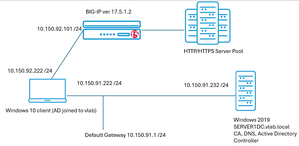
The issue of reduced lifetimes of TLS certificates is top of mind today. This topic touches upon reducing the risks associated with human day-to-day management tasks for such critical components of secure enterprise communications. Allowing a TLS certificate to expire, by simple operator error often, can preclude the bulk of human or automated transactions from ever completing. In the context of e-commerce, as only one single example, such an outage could be financially devastating. Questions abound: why are certificate lifetimes being lowered; how imminent is this change; will it affect all certificates? An industry association composed of interested parties, including many certificate authority (CA) operators, is the CA/Browser Forum. In a 29-0 vote in 2025, it was agreed public TLS certificates should rapidly evolve from the current 398 day de-facto lifetime standard to a phased arrival at a 47 day limit by March 2029. An ancillary requirement, demonstrating the domain is properly owned, known as Domain Control Validation (DCV) will drop to ten days. Although the governance of certificate lifecycles overtly pertains to public certificates, the reality is enterprise-managed, so called private CAs, likely need to fall in lock step with these requirements. Pervasive client-side software elements, such as Google Chrome, are used transparently by users with certificates that may be public or enterprise issued, and having a single set of criteria for accepting or rejecting a certificate is reasonable. Why Automated Certificate Management on BIG-IP, Now More than Ever? A principal driver for shortening certificate (cert) lifetimes; the first phase will reduce public certs to 200-day durations this coming March 15, 2026, is simply to lessen the exposure window should the cert be compromised and mis-used by an adversary. Certificates, and their corresponding private keys, can be manually maintained using human-touch. The BIG-IP TMUI interface has a click-ops path for tying certificates and keys to SSL profiles, for virtual servers that project HTTPS web sites and services to consumers. However, this requires something valuable, head count, and diligence to ensure a certificate is refreshed, perhaps through an enterprise CA solution like Microsoft Certificate Authority. It is critical this is done, always and without fail, well in advance of expiry. An automated solution that can take a “set it and forget it” approach to maintain both initial certificate deployment and the critical task of timely renewals is now more beneficial than ever. Lab Testing to Validate BIG-IP with CyberArk Trusted Protection Platform (TPP) A test bed was created that involved, at first, a BIG-IP in front of an HTTP/HTTPS server fleet, a Windows 2019 domain controller and a Windows 10 client to test BIG-IP virtual servers with. Microsoft Certificate Authority was installed on the server to allow for the issuance of enterprise certs for any of the HTTPS virtual servers created on the BIG-IP. Here is the lab layout, where virtual machines were leveraged to create the elements, including BIG-IP virtual edition (VE). The lab is straight forward; upon the Windows 2019 domain controller the Microsoft Certificate Authority component was installed. Microsoft SQL server 2019 was also installed, along with SQL Management Studio. In an enterprise production environment, these components would likely never share the domain controller host platform but are fine for this lab setup. Without an offering to shield the complexity and various manual processes of key and cert management, an operator will need to be well-versed with an enterprise CA solution like Microsoft’s. A typical launching sequence from Server Manager is shown below, with the sample lab CA and a representative list of issued certificates with various end dates. Unequipped with a solution like that from CyberArk, a typical workflow might be to install the web interface, in addition to the Microsoft CA and generate web server certificates for each virtual server (also frequently called “each application”) configured on the BIG-IP. A frequent approach is to create a unique web server template in Microsoft CA, with all certificates generated manually following the fixed, user specified certificate lifetime. As seen below, we are not installing anything but the core server role of Certificate Authority, the web interface for requesting certificates is not required and is not installed as a role. CyberArk Certificate Manager, Self-Hosted – Three High-Value Use Cases The self-hosted certificate and key management solution from CyberArk is a mature, tested offering having gained a significant user base and still may be known by previous names such as Venafi TLS Protect, or Venafi Trust Protection Platform (TPP). CyberArk acquired Venafi in 2024. Three objectives were sought in the course of the succinct proof-of-concept lab exercise that represented expected use cases: 1. Discover all existing BIG-IP virtual server TLS certificates 2. Renew certificates and change self-signed instances to enterprise PKI-issued certificates 3. Create completely new certificates and private keys and assign to BIG-IP new virtual servers The following diagram reflects the addition of CyberArk Certificate Manager, or Venafi TPP if you have long-term experience with the solution, to the Windows Server 2019 instance. Use Case One – Discover all BIG-IP Existing Certificates Already Deployed In our lab solution, to re-iterate the pivotal role of CyberArk Certificate Manager (Venafi TPP) in certificate issuance, we have created a “PolicyTree” policy called “TestingCertificates”. This will be where we will discover all of our BIG-IP virtual servers and their corresponding SSL Client and SSL server profiles. An SSL Client profile, for example, dictates how TLS will behave when a client first attempts a secure connection, including the certificate, potentially a certificate chain if signage was performed with an intermediate CA, and protocol specific features like support for TLS 1.3 and PQC NIST FIPS 203 support. Here are the original contents of the TestingCertificates folder, before running an updated discovery, notice how both F5 virtual servers (VS) are listed and the certificates used by a given VS. This is an example of the traditional CyberArk GUI look and feel. A simple workflow exists within the CyberArk platform to visually set up a virtual server and certificate discovery job, it can be run manually once, when needed, or set to operate on a regular schedule. This screenshot shows the fields required for the discovery job, and also provides an example of the evolved, streamlined approach to the user interface, referred to as the newer “Aperture” style view. Besides the enormous time savings of the first-time discovery of BIG-IP virtual servers, and certificates and keys they use in the form of SSL profiles, we can also look for new applications stood up on the BIG-IP through on-going CyberArk discovery runs. In the above example, we see a new web service implemented at the FQDN of www.twotitans.com has just been discovered. Clicking the certificate, one thing to note is the certificate is self-signed. In real enterprise environments, there may be a need to re-issue such a certificate with the enterprise CA, as part of a solid security posture. Another, even more impactful use case is when all enterprise certificates need to be easily and quickly switched from a legacy CA to a new CA the enterprise wants to move to quickly and painlessly. We see with one click on a certificate discovered that some key information is imparted. On this one screen, an operator might note that this particular certificate may warrant some improvements. It is seen that only 2048 bits are used in the certificate; the key is not making use of advanced storage and on, such as a NetHSM, and the certificate itself has not been built to support revocation mechanisms such as Content Revocation Lists (CRLs) or Online Certificate Status Protocol (OCSP). Use Case Two - Renew Certificates and Change Self-signed Instance to Enterprise PKI-Issued Certificates The automated approach of a solution like CyberArk’s likely means manual interactive certificate renewal is not going to be prevalent. However, for the purpose of our demonstration, we can examine a current certificate, alive and active on a BIG-IP supporting the application, s3.example.com. This is the “before” situation (double-click image for higher resolution). The result upon clicking the “Renew Now” button is a new policy-specific updated 12-month lifetime will be applied to a newly minted certificate. As seen in the following diagram, the certificate and its corresponding private key are automatically installed on the SSL Client Profile on the BIG-IP that houses the certificate. The s3.example.com application seamlessly continues to operate, albeit with a refreshed certificate. A tactical usage of this automatic certificate renewal and touchless installation is grabbing any virtual servers running with self-signed certificates and updating these certificates to be signed by the enterprise PKI CA or intermediate CA. Another toolkit feature now available is to switch out the entire enterprise PKI from one CA to another CA, quickly. In our lab setup, we have a Microsoft CA configured; it is named “vlab-SERVERDC1-ca”. The following certificate, ingested through discovery by CyberArk from the BIG-IP, is self-signed. Such certificates can be created directly within the BIG-IP TMUI GUI, although frequently they are quickly generated with the OpenSSL utility. Being self-signed, traffic through into this virtual will typically cause browser security risk pop-ups. They may be clicked through by users in many cases, or the certificate may even be downloaded from the browser and installed in the client’s certificate store to get around a perceived annoyance. This, however, can be troublesome in more locked-down enterprise environments where an Active Directory group policy object (GPO) can be pushed to domain clients, precluding any self-signed certificates being resolved with a few clicks around a pop-up. It is more secure and more robust to have authorized web services, vetted, and then incorporated into the enterprise PKI environment. This is the net result of using CyberArk Certificate Manager, coupled with something like the Microsoft enterprise CA, to re-issue the certificate (double-click). Use Case Three - Create Completely New Certificates and Private Keys and Assign to BIG-IP New Virtual Servers Through the CyberArk GUI, the workflows to create new certificates are intuitive. Per the following image, right-click on a policy and follow the “+Add” menu. We will add a server certificate and store it on the BIG-IP certificate and key list for future usage. A basic set of steps that were followed: Through the BIG-IP GUI, setup the application on the BIG-IP as per a normal configuration, including the origin pool, the client SSL profile, and a virtual server on port 443 that ties these elements together. Create, on CyberArk, the server certificate with the details congruent with the virtual server, such as common name, subject alternate name list, key length desired. On CyberArk, create a virtual server entry that binds the certificate just created to the values defined on the BIG-IP. The last step will look like this. Once the certificate is selected for “Renewal” the necessary elements will automatically be downloaded to the BIG-IP. As seen, the client’s SSL profile has now been updated with the new certificate and key signed by the enterprise CA. Summary This article demonstrated an approach to TLS certificate and key management for applications of all types, which harnesses the F5 BIG-IP for both secure and scalable delivery. With the rise in the number of applications that require TLS security, including advanced features enabled by BIG-IP, like TLS1.3 and PQC, coupled with the industry’s movement towards very short certificate lifecycle, the automation discussed will become indispensable to many organizations. The ability to both discover existing applications, switch out entire enterprise PKI offerings smoothly, and to agilely create new BIG-IP centered applications was touched upon.72Views3likes0CommentsF5 BIG-IP and NetApp StorageGRID - Providing Fast and Scalable S3 API for AI apps
F5 BIG-IP, an industry-leading ADC solution, can provide load balancing services for HTTPS servers, with full security applied in-flight and performance levels to meet any enterprise’s capacity targets. Specific to the S3 API, the object storage and retrieval protocol that rides upon HTTPS, an aligned partnering solution exists from NetApp, which allows a large-scale set of S3 API targets to ingest and provide objects. Automatic backend synchronization allows any node to be offered up as a target by a server load balancer like BIG-IP. This allows overall storage node utilization to be optimized across the node set, and scaled performance to reach the highest S3 API bandwidth levels, all while offering high availability to S3 API consumers. If one node fails or is undergoing maintenance, the overall service continues. S3 compatible storage is becoming popular for AI applications due to its superior performance over traditional protocols such as NFS or CIFS, as well as enabling repatriation of data from the cloud to on-prem. These are scenarios where the amount of data faced is large, this drives the requirement for new levels of scalability and performance; S3 compatible object storages such as NetApp StorageGRID are purpose-built to reach such levels. Sample BIG-IP and StorageGRID Configuration This document is based upon tests and measurements using the following lab configuration. All devices in the lab were virtual machine-based offerings. The S3 service to be projected to the outside world, depicted in the above diagram and delivered to the client via the external network, will use a BIG-IP virtual server (VS) which is tied to an origin pool of three large-capacity StorageGRID nodes. The BIG-IP maintains the integrity of the NetApp nodes by frequent HTTP-based health checks. Should an unhealthy node be detected, it will be dropped from the list of active pool members. When content is written via the S3 protocol to any node in the pool, the other members are synchronized to serve up content should they be selected by BIG-IP for future read requests. The key recommendations and observations in building the lab include: Setup a local certificate authority such that all nodes can be trusted by the BIG-IP. Typically the local CA-signed certificate will incorporate every node’s FQDN and IP address within the listed subject alternate names (SAN) to make the backend solution streamlined with one single certificate. Different F5 profiles, such as FastL4 or FastHTTP, can be selected to reach the right tradeoff between the absolute capacity of stateful traffic load-balanced versus rich layer 7 functions like iRules or authentication. Modern techniques such as multi-part uploads or using HTTP Ranges for downloads can take large objects, and concurrently move smaller pieces across the load balancer, lowering total transaction times, and spreading work over more CPU cores. The S3 protocol, at its core, is a set of REST API calls. To facilitate testing, the widely used S3Browser (www.s3browser.com) was used to quickly and intuitively create S3 buckets on the NetApp offering and send/retrieve objects (files) through the BIG-IP load balancer. Setup the BIG-IP and StorageGrid Systems The StorageGrid solution is an array of storage nodes, provisioned with the help of an administrative host, the “Grid Manager”. For interactive users, no thick client is required as on-board web services allow a streamlined experience all through an Internet browser. The following is an example of Grid Manager, taken from a Chrome browser; one sees the three Storage Nodes setup have been successfully added. The load balancer, in our case the BIG-IP, is set up with a virtual server to support HTTPS traffic and distributed that traffic, which is S3 object storage traffic, to the three StorageGRID nodes. The following screenshot demonstrates that the BIG-IP is setup in a standard HA (active-passive pair) configuration and the three pool members are healthy (green, health checks are fine) and receiving/sending S3 traffic, as the byte counts are seen in the image to be non-zero. On the internal side of the BIG-IP, TCP port 18082 is being used for S3 traffic. To do testing of the solution, including features such as multi-part uploads and downloads, a popular S3 tool, S3Browser, was downloaded and used. The following shows the entirety of the S3Browser setup. Simply create an account (StorageGRID-Account-01 in our example) and point the REST API endpoint at the BIG-IP Virtual Server that is acting as the secure front door for our pool of NetApp nodes. The S3 Access Key ID and Secret values are generated at turn-up time of the NetApp appliances. All S3 traffic will, of course, be SSL/TLS encrypted. BIG-IP will intercept the SSL traffic (high-speed decrypt) and then re-encrypt when proxying the traffic to a selected origin pool member. Other valid load balancer setups exist; one might include an “off load” approach to SSL, whereby the S3 nodes safely co-located in a data center may prefer to receive non-SSL HTTP S3 traffic. This may see an overall performance improvement in terms of peak bandwidth per storage node, but this comes at the tradeoff of security considerations. Experimenting with S3 Protocol and Load Balancing With all the elements in place to start understanding the behavior of S3 and spreading traffic across NetApp nodes, a quick test involved creating a S3 bucket and placing some objects in that new bucket. Buckets are logical collections of objects, conceptually not that different from folders or directories in file systems. In fact, a S3 bucket could even be mounted as a folder in an operating system such as Linux. In their simplest form, most commonly, buckets can simply serve as high-capacity, performant storage and retrieval targets for similarly themed structured or unstructured data. In the first test, we created a new bucket (“audio-clip-bucket”) and uploaded four sample files to the new bucket using S3Browser. We then zeroed the statistics for each pool member on the BIG-IP, to see if even this small upload would spread S3 traffic across more than a single NetApp device. Immediately after the upload, the counters reflect that two StorageGRID nodes were selected to receive S3 transactions. Richly detailed, per-transaction visibility can be obtained by leveraging the F5 SSL Orchestrator (SSLO) feature on the BIG-IP, whereby copies of the bi-directional S3 traffic decrypted within the load balancer can be sent to packet loggers, analytics tools, or even protocol analyzers like Wireshark. The BIG-IP also has an onboard analytics tool, Application Visibility and Reporting (AVR) which can provide some details on the nuances of the S3 traffic being proxied. AVR demonstrates the following characteristics of the above traffic, a simple bucket creation and upload of 4 objects. With AVR, one can see the URL values used by S3, which include the bucket name itself as well as transactions incorporating the object names as URLs. Also, the HTTP methods used included both GETS and PUTS. The use of HTTP PUT is expected when creating a new bucket. S3 is not governed by a typical standards body document, such as an IETF Request for Comment (RFC), but rather has evolved out of AWS and their use of S3 since 2006. For details around S3 API characteristics and nomenclature, this site can be referenced. For example, the expected syntax for creating a bucket is provided, including the fact that it should be an HTTP PUT to the root (/) URL target, with the bucket configuration parameters including name provided within the HTTP transaction body. Achieving High Performance S3 with BIG-IP and StorageGRID A common concern with protocols, such as HTTP, is head-of-line blocking, where one large, lengthy transaction blocks subsequent desired, and now queued transactions. This is one of the reasons for parallelism in HTTP 1.X, where loading 30 or more objects to paint a web page will often utilize two, four, or even more concurrent TCP sessions. Another performance issue when dealing with very large transactions is, without parallelism, even those most performant networks will see an established TCP session reach a maximum congestion window (CWND) where no more segments may be in put inflight until new TCP ACKs arrive back. Advanced TCP options like TCP exponential windowing or TCP SACK can help, but regardless of this, the achievable bandwidth of any one TCP session is bounded and may also frequently task only one core in multi-core CPUs. With the BIG-IP serving as the intermediary, large S3 transactions may default to “multi-part” uploads and downloads. The larger objects become a series of smaller objects that conveniently can be load-balanced by BIG-IP across the entire cluster of NetApp nodes. As displayed in the following diagram, we are asking for multi-part uploads to kick in for objects larger than 5 megabytes. After uploading a 20-megabyte file (technically, 20,000,000 bytes) the BIG-IP shows the traffic distributed across multiple NetApp nodes to the tune of 160.9 million bits. The incoming bits, incoming from the perspective of the origin pool members, confirm the delivery of the object with a small amount of protocol overhead (bits divided by eight to reach bytes). The value of load balancing manageable chunks of very large objects will pay dividends over time with faster overall transaction completion times due to the spreading of traffic across NetApp nodes, more TCP sessions reaching high congestion window values, and no single-core bottle necks in multicore equipment. Tuning BIG-IP for High Performance S3 Service Delivery The F5 BIG-IP offers a set of different profiles it can run its Local Traffic Manager (LTM) module in accordance with; LTM is the heart of the server load balancing function. The most performant profile in terms of attainable traffic load is the “FastL4” profile. This, and other profiles such as “OneConnect” or “FastHTTP”, can be tied to a virtual server, and details around each profile can be found here within the BIG-IP GUI: The FastL4 profile can increase virtual server performance and throughput for supported platforms by using the embedded Packet Velocity Acceleration (ePVA) chip to accelerate traffic. The ePVA chip is a hardware acceleration field programmable gate array (FPGA) that delivers high-performance L4 throughput by offloading traffic processing to the hardware acceleration chip. The BIG-IP makes flow acceleration decisions in software and then offloads eligible flows to the ePVA chip for that acceleration. For platforms that do not contain the ePVA chip, the system performs acceleration actions in software. Software-only solutions can increase performance in direct relationship to the hardware offered by the underlying host. As examples of BIG-IP virtual edition (VE) software running on mid-grade hardware platforms, results with Dell can be found here and similar experiences with HPE Proliant platforms are here. One thing to note about FastL4 as the profile to underpin a performance mode BIG-IP virtual server is that it is layer 4 oriented. For certain features that involve layer 7 HTTP related fields, such as using iRules to swap HTTP headers or perform HTTP authentication, a different profile might be more suitable. A bonus of FastL4 are some interesting specific performance features catering to it. In the BIG-IP version 17 release train, there is a feature to quickly tear down, with no delay, TCP sessions no longer required. Most TCP stacks implement TCP “2MSL” rules, where upon receiving and sending TCP FIN messages, the socket enters a lengthy TCP “TIME_WAIT” state, often minutes long. This stems back to historically bad packet loss environments of the very early Internet. A concern was high latency and packet loss might see incoming packets arrive at a target very late, and the TCP state machine would be confused if no record of the socket still existed. As such, the lengthy TIME_WAIT period was adopted even though this is consuming on-board resources to maintain the state. With FastL4, the “fast” close with TCP reset option now exists, such that any incoming TCP FIN message observed by BIG-IP will result in TCP RESETS being sent to both endpoints, normally bypassing TIME_WAIT penalties. OneConnect and FastHTTP Profiles As mentioned, other traffic profiles on BIG-IP are directed towards Layer 7 and HTTP features. One interesting profile is F5’s “OneConnect”. The OneConnect feature set works with HTTP Keep-Alives, which allows the BIG-IP system to minimize the number of server-side TCP connections by making existing connections available for reuse by other clients. This reduces, among other things, excessive TCP 3-way handshakes (Syn, Syn-Ack, Ack) and mitigates the small TCP congestion windows that new TCP sessions start with and only increases with successful traffic delivery. Persistent server-side TCP connections ameliorate this. When a new connection is initiated to the virtual server, if an existing server-side flow to the pool member is idle, the BIG-IP system applies the OneConnect source mask to the IP address in the request to determine whether it is eligible to reuse the existing idle connection. If it is eligible, the BIG-IP system marks the connection as non-idle and sends a client request over it. If the request is not eligible for reuse, or an idle server-side flow is not found, the BIG-IP system creates a new server-side TCP connection and sends client requests over it. The last profile considered is the “Fast HTTP” profile. The Fast HTTP profile is designed to speed up certain types of HTTP connections and again strives to reduce the number of connections opened to the back-end HTTP servers. This is accomplished by combining features from the TCP, HTTP, and OneConnect profiles into a single profile that is optimized for network performance. A resulting high performance HTTP virtual server processes connections on a packet-by-packet basis and buffers only enough data to parse packet headers. The performance HTTP virtual server TCP behavior operates as follows: the BIG-IP system establishes server-side flows by opening TCP connections to pool members. When a client makes a connection to the performance HTTP virtual server, if an existing server-side flow to the pool member is idle, the BIG-IP LTM system marks the connection as non-idle and sends a client request over the connection. Summary The NetApp StorageGRID multi-node S3 compatible object storage solution fits well with a high-performance server load balancer, thus making the F5 BIG-IP a good fit. S3 protocol can itself be adjusted to improve transaction response times, such as through the use of multi-part uploads and downloads, amplifying the default load balancing to now spread even more traffic chunks over many NetApp nodes. BIG-IP has numerous approaches to configuring virtual servers, from highest performance L4-focused profiles to similar offerings that retain L7 HTTP awareness. Lab testing was accomplished using the S3Browser utility and results of traffic flows were confirmed with both the standard BIG-IP GUI and the additional AVR analytics module, which provides additional protocol insight.1.4KViews3likes0Comments