application delivery
43158 Topics
VIP in https that redirect to another vip in https
Hi, I have a VIP in https with a certificate that have a policy LTM attached. In the policy, if the path is /prova, i'm trying to redirect to another VIP in https, but this doesn't work. Usually I redirect the calls only to VIPs in HTTP. There's a solution for use all the VIPS in HTTPS? Thanks102Views0likes5CommentsBIG-IP Next Edge Firewall CNF for Edge workloads
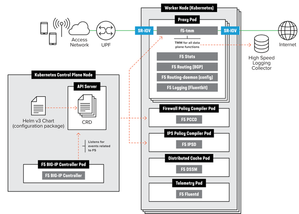
Introduction The CNF architecture aligns with cloud-native principles by enabling horizontal scaling, ensuring that applications can expand seamlessly without compromising performance. It preserves the deterministic reliability essential for telecom environments, balancing scalability with the stringent demands of real-time processing. More background information about what value CNF brings to the environment, https://community.f5.com/kb/technicalarticles/from-virtual-to-cloud-native-infrastructure-evolution/342364 Telecom service providers make use of CNFs for performance optimization, Enable efficient and secure processing of N6-LAN traffic at the edge to meet the stringent requirements of 5G networks. Optimize AI-RAN deployments with dynamic scaling and enhanced security, ensuring that AI workloads are processed efficiently and securely at the edge, improving overall network performance. Deploy advanced AI applications at the edge with the confidence of carrier-grade security and traffic management, ensuring real-time processing and analytics for a variety of edge use cases. CNF Firewall Implementation Overview Let’s start with understanding how different CRs are enabled within a CNF implementation this allows CNF to achieve more optimized performance, Capex and Opex. The traditional way of inserting services to the Kubernetes is as below, Moving to a consolidated Dataplane approach saved 60% of the Kubernetes environment’s performance The F5BigFwPolicy Custom Resource (CR) applies industry-standard firewall rules to the Traffic Management Microkernel (TMM), ensuring that only connections initiated by trusted clients will be accepted. When a new F5BigFwPolicy CR configuration is applied, the firewall rules are first sent to the Application Firewall Management (AFM) Pod, where they are compiled into Binary Large Objects (BLOBs) to enhance processing performance. Once the firewall BLOB is compiled, it is sent to the TMM Proxy Pod, which begins inspecting and filtering network packets based on the defined rules. Enabling AFM within BIG-IP Controller Let’s explore how we can enable and configure CNF Firewall. Below is an overview of the steps needed to set up the environment up until the CNF CRs installations [Enabling the AFM] Enabling AFM CR within BIG-IP Controller definition global: afm: enabled: true pccd: enabled: true f5-afm: enabled: true cert-orchestrator: enabled: true afm: pccd: enabled: true image: repository: "local.registry.com" [Configuration] Example for Firewall policy settings apiVersion: "k8s.f5net.com/v1" kind: F5BigFwPolicy metadata: name: "cnf-fw-policy" namespace: "cnf-gateway" spec: rule: - name: allow-10-20-http action: "accept" logging: true servicePolicy: "service-policy1" ipProtocol: tcp source: addresses: - "2002::10:20:0:0/96" zones: - "zone1" - "zone2" destination: ports: - "80" zones: - "zone3" - "zone4" - name: allow-10-30-ftp action: "accept" logging: true ipProtocol: tcp source: addresses: - "2002::10:30:0:0/96" zones: - "zone1" - "zone2" destination: ports: - "20" - "21" zones: - "zone3" - "zone4" - name: allow-us-traffic action: "accept" logging: true source: geos: - "US:California" destination: geos: - "MX:Baja California" - "MX:Chihuahua" - name: drop-all action: "drop" logging: true ipProtocol: any source: addresses: - "::0/0" - "0.0.0.0/0" [Logging & Monitoring] CNF firewall settings allow not only local logging but also to use HSL logging to external logging destinations. apiVersion: "k8s.f5net.com/v1" kind: F5BigLogProfile metadata: name: "cnf-log-profile" namespace: "cnf-gateway" spec: name: "cnf-logs" firewall: enabled: true network: publisher: "cnf-hsl-pub" events: aclMatchAccept: true aclMatchDrop: true tcpEvents: true translationFields: true Verifying the CNF firewall settings can be done through the sidecar container kubectl exec -it deploy/f5-tmm -c debug -n cnf-gateway – bash tmctl -d blade fw_rule_stat context_type context_name ------------ ------------------------------------------ virtual cnf-gateway-cnf-fw-policy-SecureContext_vs rule_name micro_rules counter last_hit_time action ------------------------------------ ----------- ------- ------------- ------ allow-10-20-http-firewallpolicyrule 1 2 1638572860 2 allow-10-30-ftp-firewallpolicyrule 1 5 1638573270 2 Conclusion To conclude our article, we showed how CNFs with consolidated data planes help with optimizing CNF deployments. In this article we went through the overview of BIG-IP Next Edge Firewall CNF implementation, sample configuration and monitoring capabilities. More use cases to cover different use cases to be following. Related content F5BigFwPolicy BIG-IP Next Cloud-Native Network Functions (CNFs) CNF Home109Views2likes2Comments
VIP is not responding on SYN after enabling other modules like ASM, APM and AFM.
Hi all, I have an F5 VE running 17.5.1.3 in my lab environment for learning purposes. As back-end I installed the phpauction webpage and all configuration works flawlessly if only the LTM module is enabled. This in the most simple form: Virtual server on port 80. TCP profile HTTP profile Pool Automap When I add another module, for example ASM, the vip stopped working although it's still green/up and not even a security policy has been attached to the vip. Captures show that the SYN is reaching the F5 but I do not get a response from it: tcpdump: verbose output suppressed, use -v or -vv for full protocol decode listening on any, link-type EN10MB (Ethernet), capture size 65535 bytes 16:24:51.691462 IP 192.168.1.100.64282 > 192.168.2.10.80: Flags [S], seq 5173934, win 65535, options [mss 1260,nop,wscale 8,nop,nop,sackOK], length 0 in slot1/tmm1 lis= port=1.1 trunk= 16:24:51.942738 IP 192.168.1.100.64625 > 192.168.2.10.80: Flags [S], seq 1642892817, win 65535, options [mss 1260,nop,wscale 8,nop,nop,sackOK], length 0 in slot1/tmm0 lis= port=1.1 trunk= I checked the back-end connection as well but the F5 is not sending out the SYN to the webserver. So it looks like it's blackholing my traffic. When I disable ASM and use only LTM, everything starts to work again. Even when trying with different modules like APM, the same issue happens. VIP is not responding after only enabling APM or AFM. I tried the following: - Factory reset the machine. - Upgrade to 17.5.1.3. - Enable RST CAUSE. (but there isn't any because the SYN isn't there in the first place) - Force reload config on the mcpd process. - Enabled ltm debugging without receiving any logs about the connection. - Looked into the dos and bot defense logs to see if traffic is dropped at an earlier point in the chain. - Enabled tmm debug without getting any relevant logs. - Changing the vip from standard to fastl4. - Remove http profile. I did play a lot with other modules as well like ASM, APM, AFM, SSLO, DNS, so that's why I though it was a configuration issue at first. But make the machine factory default, did not solve it. Is it possible there are some left overs during my learning path on this machine? Do you know what additional steps I can take to solve this issue? Thanks. Best regards, Mitchel108Views0likes8CommentsHow I did it.....again "High-Performance S3 Load Balancing with F5 BIG-IP"
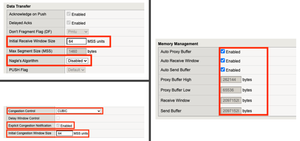
Introduction Welcome back to the "How I did it" series! In the previous installment, we explored the high‑performance S3 load balancing of Dell ObjectScale with F5 BIG‑IP. This follow‑up builds on that foundation with BIG‑IP v21.x’s S3‑focused profiles and how to apply them in the wild. We’ll also put the external monitor to work, validating health with real PUT/GET/DELETE checks so your S3-compatible backends aren’t just “up,” they’re truly dependable. New S3 Profiles for the BIG-IP…..well kind of A big part of why F5 BIG-IP excels is because of its advanced traffic profiles, like TCP and SSL/TLS. These profiles let you fine-tune connection behavior—optimizing throughput, reducing latency, and managing congestion—while enforcing strong encryption and protocol settings for secure, efficient data flow. Available with version 21.x the BIG-IP now includes new S3-specific profiles, (s3-tcp and s3-default-clientssl). These profiles are based off existing default parent profiles, (tcp and clientssl respectively) that have been customized or “tuned” to optimize s3 traffic. Let’s take a closer look. Anatomy of a TCP Profile The BIG-IP includes a number of pre-defined TCP profiles that define how the system manages TCP traffic for virtual servers, controlling aspects like connection setup, data transfer, congestion control, and buffer tuning. These profiles allow administrators to optimize performance for different network conditions by adjusting parameters such as initial congestion window, retransmission timeout, and algorithms like Nagle’s or Delayed ACK. The s3-tcp, (see below) has been tweaked with respect to data transfer and congestion window sizes as well as memory management to optimize typical S3 traffic patterns (i.e. high-throughput data transfer, varying request sizes, large payloads, etc.). Tweaking the Client SSL Profile for S3 Client SSL profiles on BIG-IP define how the system terminates and manages SSL/TLS sessions from clients at the virtual server. They specify critical parameters such as certificates, private keys, cipher suites, and supported protocol versions, enabling secure decryption for advanced traffic handling like HTTP optimization, security policies, and iRules. The s3-default-clientssl has been modified, (see below) from the default client ssl profile to optimize SSL/TLS settings for high-throughput object storage traffic, ensuring better performance and compatibility with S3-specific requirements. Advanced S3-compatible health checking with EAV Has anyone ever told you how cool BIG-IP Extended Application Verification (EAV) aka external monitors are? Okay, I suppose “coolness” is subjective, but EAVs are objectively cool. Let me prove it to you. Health monitoring of backend S3-compatible servers typically involves making an HTTP GET request to either the exposed S3 ingest/egress API endpoint or a liveness probe. Get a 200 and all's good. Wouldn’t it be cool if you could verify a backend server's health by verifying it can actually perform the operations as intended? Fortunately, we can do just that using an EAV monitor. Therefore, based on the transitive property, EAVs are cool. —mic drop The bash script located at the bottom of the page performs health checks on S3-compatible storage by executing PUT, GET, and DELETE operations on a test object. The health check creates a temporary health check file with timestamp, retrieves the file to verify read access, and removes the test file to clean up. If all three operations return the expected HTTP status code, the node is marked up otherwise the node is marked down. Installing and using the EAV health check Import the monitor script Save the bash script, (.sh) extension, (located at the bottom of this page) locally and import the file onto the BIG-IP. Log in to the BIG-IP Configuration Utility and navigate to System > File Management > External Monitor Program File List > Import. Use the file selector to navigate to and select the newly created. bash file, provide a name for the file and select 'Import'. Create a new external monitor Navigate to Local Traffic > Monitors > Create Provide a name for the monitor. Select 'External' for the type, and select the previously uploaded file for the 'External Program'. The 'Interval' and 'Timeout' settings can be modified or left at the default as desired. In addition to the backend host and port, the monitor must pass three (3) additional variables to the backend: bucket - The name of an existing bucket where the monitor can place a small text file. During the health check, the monitor will create a file, request the file and delete the file. access_key - S3-compatible access key with permissions to perform the above operations on the specified bucket. secret_key - corresponding S3-compatible secret key. Select 'Finished' to create the monitor. Associate the monitor with the pool Navigate to Local Traffic > Pools > Pool List and select the relevant backend S3 pool. Under 'Health Monitors' select the newly created monitor and move from 'Available' to the 'Active'. Select 'Update' to save the configuration. Additional Links How I did it - "High-Performance S3 Load Balancing of Dell ObjectScale with F5 BIG-IP" F5 BIG-IP v21.0 brings enhanced AI data delivery and ingestion for S3 workflows Overview of BIG-IP EAV external monitors EAV Bash Script #!/bin/bash ################################################################################ # S3 Health Check Monitor for F5 BIG-IP (External Monitor - EAV) ################################################################################ # # Description: # This script performs health checks on S3-compatible storage by # executing PUT, GET, and DELETE operations on a test object. It uses AWS # Signature Version 4 for authentication and is designed to run as a BIG-IP # External Application Verification (EAV) monitor. # # Usage: # This script is intended to be configured as an external monitor in BIG-IP. # BIG-IP automatically provides the first two arguments: # $1 - Pool member IP address (may be IPv6-mapped format: ::ffff:x.x.x.x) # $2 - Pool member port number # # Additional arguments must be configured in the monitor's "Variables" field: # bucket - S3 bucket name # access_key - Access key for authentication # secret_key - Secret key for authentication # # BIG-IP Monitor Configuration: # Type: External # External Program: /path/to/this/script.sh # Variables: # bucket="your-bucket-name" # access_key="your-access-key" # secret_key="your-secret-key" # # Health Check Logic: # 1. PUT - Creates a temporary health check file with timestamp # 2. GET - Retrieves the file to verify read access # 3. DELETE - Removes the test file to clean up # Success: All three operations return expected HTTP status codes # Failure: Any operation fails or times out # # Exit Behavior: # - Prints "UP" to stdout if all checks pass (BIG-IP marks pool member up) # - Silent exit if any check fails (BIG-IP marks pool member down) # # Requirements: # - openssl (for SHA256 hashing and HMAC signing) # - curl (for HTTP requests) # - xxd (for hex encoding) # - Standard bash utilities (date, cut, sed, awk) # # Notes: # - Handles IPv6-mapped IPv4 addresses from BIG-IP (::ffff:x.x.x.x) # - Uses AWS Signature Version 4 authentication # - Logs activity to syslog (local0.notice) # - Creates temporary files that are automatically cleaned up # # Author: [Gregory Coward/F5] # Version: 1.0 # Last Modified: 12/2025 # ################################################################################ # ===== PARAMETER CONFIGURATION ===== # BIG-IP automatically provides these HOST="$1" # Pool member IP (may include ::ffff: prefix for IPv4) PORT="$2" # Pool member port BUCKET="${bucket}" # S3 bucket name ACCESS_KEY="${access_key}" # S3 access key SECRET_KEY="${secret_key}" # S3 secret key OBJECT="${6:-healthcheck.txt}" # Test object name (default: healthcheck.txt) # Strip IPv6-mapped IPv4 prefix if present (::ffff:10.1.1.1 -> 10.1.1.1) # BIG-IP may pass IPv4 addresses in IPv6-mapped format if [[ "$HOST" =~ ^::ffff: ]]; then HOST="${HOST#::ffff:}" fi # ===== S3/AWS CONFIGURATION ===== ENDPOINT="http://$HOST:$PORT" # S3 endpoint URL SERVICE="s3" # AWS service identifier for signature REGION="" # AWS region (leave empty for S3 compatible such as MinIO/Dell) # ===== TEMPORARY FILE SETUP ===== # Create temporary file for health check upload TMP_FILE=$(mktemp) printf "Health check at %s\n" "$(date)" > "$TMP_FILE" # Ensure temp file is deleted on script exit (success or failure) trap "rm -f $TMP_FILE" EXIT # ===== CRYPTOGRAPHIC HELPER FUNCTIONS ===== # Calculate SHA256 hash and return as hex string # Input: stdin # Output: hex-encoded SHA256 hash hex_of_sha256() { openssl dgst -sha256 -hex | sed 's/^.* //' } # Sign data using HMAC-SHA256 and return hex signature # Args: $1=hex-encoded key, $2=data to sign # Output: hex-encoded signature sign_hmac_sha256_hex() { local key_hex="$1" local data="$2" printf "%s" "$data" | openssl dgst -sha256 -mac HMAC -macopt "hexkey:$key_hex" | awk '{print $2}' } # Sign data using HMAC-SHA256 and return binary as hex # Args: $1=hex-encoded key, $2=data to sign # Output: hex-encoded binary signature (for key derivation chain) sign_hmac_sha256_binary() { local key_hex="$1" local data="$2" printf "%s" "$data" | openssl dgst -sha256 -mac HMAC -macopt "hexkey:$key_hex" -binary | xxd -p -c 256 } # ===== AWS SIGNATURE VERSION 4 IMPLEMENTATION ===== # Generate AWS Signature Version 4 for S3 requests # Args: # $1 - HTTP method (PUT, GET, DELETE, etc.) # $2 - URI path (e.g., /bucket/object) # $3 - Payload hash (SHA256 of request body, or empty hash for GET/DELETE) # $4 - Content-Type header value (empty string if not applicable) # Output: pipe-delimited string "Authorization|Timestamp|Host" aws_sig_v4() { local method="$1" local uri="$2" local payload_hash="$3" local content_type="$4" # Generate timestamp in AWS format (YYYYMMDDTHHMMSSZ) local timestamp=$(date -u +"%Y%m%dT%H%M%SZ" 2>/dev/null || gdate -u +"%Y%m%dT%H%M%SZ") local datestamp=$(date -u +"%Y%m%d") # Build host header (include port if non-standard) local host_header="$HOST" if [ "$PORT" != "80" ] && [ "$PORT" != "443" ]; then host_header="$HOST:$PORT" fi # Build canonical headers and signed headers list local canonical_headers="" local signed_headers="" # Include Content-Type if provided (for PUT requests) if [ -n "$content_type" ]; then canonical_headers="content-type:${content_type}"$'\n' signed_headers="content-type;" fi # Add required headers (must be in alphabetical order) canonical_headers="${canonical_headers}host:${host_header}"$'\n' canonical_headers="${canonical_headers}x-amz-content-sha256:${payload_hash}"$'\n' canonical_headers="${canonical_headers}x-amz-date:${timestamp}" signed_headers="${signed_headers}host;x-amz-content-sha256;x-amz-date" # Build canonical request (AWS Signature V4 format) # Format: METHOD\nURI\nQUERY_STRING\nHEADERS\n\nSIGNED_HEADERS\nPAYLOAD_HASH local canonical_request="${method}"$'\n' canonical_request+="${uri}"$'\n\n' # Empty query string (double newline) canonical_request+="${canonical_headers}"$'\n\n' canonical_request+="${signed_headers}"$'\n' canonical_request+="${payload_hash}" # Hash the canonical request local canonical_hash canonical_hash=$(printf "%s" "$canonical_request" | hex_of_sha256) # Build string to sign local algorithm="AWS4-HMAC-SHA256" local credential_scope="$datestamp/$REGION/$SERVICE/aws4_request" local string_to_sign="${algorithm}"$'\n' string_to_sign+="${timestamp}"$'\n' string_to_sign+="${credential_scope}"$'\n' string_to_sign+="${canonical_hash}" # Derive signing key using HMAC-SHA256 key derivation chain # kSecret = HMAC("AWS4" + secret_key, datestamp) # kRegion = HMAC(kSecret, region) # kService = HMAC(kRegion, service) # kSigning = HMAC(kService, "aws4_request") local k_secret k_secret=$(printf "AWS4%s" "$SECRET_KEY" | xxd -p -c 256) local k_date k_date=$(sign_hmac_sha256_binary "$k_secret" "$datestamp") local k_region k_region=$(sign_hmac_sha256_binary "$k_date" "$REGION") local k_service k_service=$(sign_hmac_sha256_binary "$k_region" "$SERVICE") local k_signing k_signing=$(sign_hmac_sha256_binary "$k_service" "aws4_request") # Calculate final signature local signature signature=$(sign_hmac_sha256_hex "$k_signing" "$string_to_sign") # Return authorization header, timestamp, and host header (pipe-delimited) printf "%s|%s|%s" \ "${algorithm} Credential=${ACCESS_KEY}/${credential_scope}, SignedHeaders=${signed_headers}, Signature=${signature}" \ "$timestamp" \ "$host_header" } # ===== HTTP REQUEST FUNCTION ===== # Execute HTTP request using curl with AWS Signature V4 authentication # Args: # $1 - HTTP method (PUT, GET, DELETE) # $2 - Full URL # $3 - Authorization header value # $4 - Timestamp (x-amz-date header) # $5 - Host header value # $6 - Payload hash (x-amz-content-sha256 header) # $7 - Content-Type (optional, empty for GET/DELETE) # $8 - Data file path (optional, for PUT with body) # Output: HTTP status code (e.g., 200, 404, 500) do_request() { local method="$1" local url="$2" local auth="$3" local timestamp="$4" local host_header="$5" local payload_hash="$6" local content_type="$7" local data_file="$8" # Build curl command with required headers local cmd="curl -s -o /dev/null --connect-timeout 5 --write-out %{http_code} \"$url\"" cmd="$cmd -X $method" cmd="$cmd -H \"Host: $host_header\"" cmd="$cmd -H \"x-amz-date: $timestamp\"" cmd="$cmd -H \"x-amz-content-sha256: $payload_hash\"" # Add optional headers [ -n "$content_type" ] && cmd="$cmd -H \"Content-Type: $content_type\"" cmd="$cmd -H \"Authorization: $auth\"" [ -n "$data_file" ] && cmd="$cmd --data-binary @\"$data_file\"" # Execute request and return HTTP status code eval "$cmd" } # ===== MAIN HEALTH CHECK LOGIC ===== # ===== STEP 1: PUT (Upload Test Object) ===== # Calculate SHA256 hash of the temp file content UPLOAD_HASH=$(openssl dgst -sha256 -binary "$TMP_FILE" | xxd -p -c 256) CONTENT_TYPE="application/octet-stream" # Generate AWS Signature V4 for PUT request SIGN_OUTPUT=$(aws_sig_v4 "PUT" "/$BUCKET/$OBJECT" "$UPLOAD_HASH" "$CONTENT_TYPE") AUTH_PUT=$(cut -d'|' -f1 <<< "$SIGN_OUTPUT") DATE_PUT=$(cut -d'|' -f2 <<< "$SIGN_OUTPUT") HOST_PUT=$(cut -d'|' -f3 <<< "$SIGN_OUTPUT") # Execute PUT request (expect 200 OK) PUT_STATUS=$(do_request "PUT" "$ENDPOINT/$BUCKET/$OBJECT" "$AUTH_PUT" "$DATE_PUT" "$HOST_PUT" "$UPLOAD_HASH" "$CONTENT_TYPE" "$TMP_FILE") # ===== STEP 2: GET (Download Test Object) ===== # SHA256 hash of empty body (for GET requests with no payload) EMPTY_HASH="e3b0c44298fc1c149afbf4c8996fb92427ae41e4649b934ca495991b7852b855" # Generate AWS Signature V4 for GET request SIGN_OUTPUT=$(aws_sig_v4 "GET" "/$BUCKET/$OBJECT" "$EMPTY_HASH" "") AUTH_GET=$(cut -d'|' -f1 <<< "$SIGN_OUTPUT") DATE_GET=$(cut -d'|' -f2 <<< "$SIGN_OUTPUT") HOST_GET=$(cut -d'|' -f3 <<< "$SIGN_OUTPUT") # Execute GET request (expect 200 OK) GET_STATUS=$(do_request "GET" "$ENDPOINT/$BUCKET/$OBJECT" "$AUTH_GET" "$DATE_GET" "$HOST_GET" "$EMPTY_HASH" "" "") # ===== STEP 3: DELETE (Remove Test Object) ===== # Generate AWS Signature V4 for DELETE request SIGN_OUTPUT=$(aws_sig_v4 "DELETE" "/$BUCKET/$OBJECT" "$EMPTY_HASH" "") AUTH_DEL=$(cut -d'|' -f1 <<< "$SIGN_OUTPUT") DATE_DEL=$(cut -d'|' -f2 <<< "$SIGN_OUTPUT") HOST_DEL=$(cut -d'|' -f3 <<< "$SIGN_OUTPUT") # Execute DELETE request (expect 204 No Content) DEL_STATUS=$(do_request "DELETE" "$ENDPOINT/$BUCKET/$OBJECT" "$AUTH_DEL" "$DATE_DEL" "$HOST_DEL" "$EMPTY_HASH" "" "") # ===== LOG RESULTS ===== # Log all operation results for troubleshooting #logger -p local0.notice "S3 Monitor: PUT=$PUT_STATUS GET=$GET_STATUS DEL=$DEL_STATUS" # ===== EVALUATE HEALTH CHECK RESULT ===== # BIG-IP considers the pool member "UP" only if this script prints "UP" to stdout # Check if all operations returned expected status codes: # PUT: 200 (OK) # GET: 200 (OK) # DELETE: 204 (No Content) if [ "$PUT_STATUS" -eq 200 ] && [ "$GET_STATUS" -eq 200 ] && [ "$DEL_STATUS" -eq 204 ]; then #logger -p local0.notice "S3 Monitor: UP" echo "UP" fi # If any check fails, script exits silently (no "UP" output) # BIG-IP will mark the pool member as DOWN97Views2likes0Comments
BIG-IP VE: 40G Throughput from 4x10G physical NICs
Hello F5 Community, I'm designing a BIG-IP VE deployment and need to achieve 40G throughput from 4x10G physical NICs. After extensive research (including reading K97995640), I've created this flowchart to summarize the options. Can you verify if this understanding is correct? **My Environment:** - Physical server: 4x10G NICs - ESXi 7.0 - BIG-IP VE (Performance LTM license) - Goal: Maximize throughput for data plane **Research Findings:** From F5 K97995640: "Trunking is supported on BIG-IP VE... intended to be used with SR-IOV interfaces but not with the default vmxnet3 driver. [Need 40G to F5 VE] ┌──────┴──---------------------- ────┐ │ │ [F5 controls] [ESXi controls] (F5 does LACP) (ESXi does LACP) │ │ Only SR-IOV Link Aggregation │ │ ┌───┴───┐ ┌───┴───┐ │40G per│ │40G agg │ │ flow │ │10G/flow │ └───────┘ └───────┘Solved121Views0likes5CommentsDistributed Cloud for App Delivery & Security for Hybrid Environments
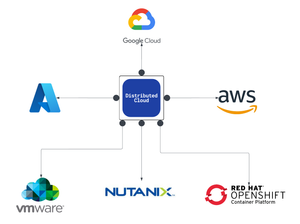
As enterprises modernize and expand their digital services, they increasingly deploy multiple instances of the same applications across diverse infrastructure environments—such as VMware, OpenShift, and Nutanix—to support distributed teams, regional data sovereignty, redundancy, or environment-specific compliance needs. These application instances often integrate into service chains that span across clouds and data centers, introducing both scale and operational complexity. F5 Distributed Cloud provides a unified solution for secure, consistent application delivery and security across hybrid and multi-cloud environments. It enables organizations to add workloads seamlessly—whether for scaling, redundancy, or localization—without sacrificing visibility, security, or performance.377Views4likes0CommentsWhat’s New in the NGINX Plus R36 Native OIDC Module
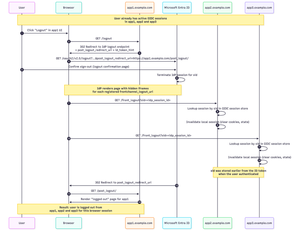
NGINX Plus R36 is out, and with it we hit a really important milestone for the native `ngx_http_oidc_module`, which now supports a broad set of OpenID Connect (OIDC) features commonly relied on in production environments. In this release, we add: Support for OIDC Front‑Channel Logout 1.0, enabling proper single sign‑out across multiple apps Built‑in PKCE (Proof Key for Code Exchange) support Support for the `client_secret_post` client authentication method at the token endpoint R35 gave the native module RP‑initiated logout and a UserInfo integration, R36 builds on that and closes several important gaps. In this post I’ll walk through all the new features in detail, using Microsoft’s Entra ID as the concrete example IdP. Front‑Channel Logout: Real Single Sign‑Out Why RP‑initiated logout alone isn’t enough Until now, `ngx_http_oidc_module` supported only RP‑initiated logout (per OpenID Connect RP‑Initiated Logout 1.0). That gave us a standards‑compliant “logout button”: when the user clicks “Logout” in your app, Nginx Plus sends them to the IdP’s logout endpoint, and the IdP tears down its own session. The catch is that RP‑initiated logout only reliably logs you out of: The current application (the RP that initiated the logout), and The IdP session itself Other applications that share the same IdP session typically stay logged in unless they also have a custom logout flow that goes through the IdP. That’s not what most people think of as “single sign‑out”. Imagine you borrow your partner’s personal laptop, log into a few internal apps that are all protected by NGINX Plus, finish your work, and hit “Logout” in one of them. You really want to be sure you’re logged out of all of those apps, not just the one where you pressed the button. That’s exactly what front‑channel logout is for. What front‑channel logout does The OpenID Connect Front‑Channel Logout 1.0 spec defines a way for the OP (the OpenID Provider) to notify all RPs that share a user’s session that the user has logged out. At a high level: The user logs out (either from an app using RP‑initiated logout, or directly on the IdP). The OP figures out which RPs are part of that single sign‑on session. The OP renders a page with one `<iframe>` per RP, each pointing at the RP’s `frontchannel_logout_uri`. Each RP receives a front‑channel logout request in its own back‑end and clears its local session. The browser coordinates this via iframes, but the session termination logic lives entirely in Nginx Plus, see diagram below: Configuring Front‑Channel Logout in NGINX Plus Let’s start with the NGINX Plus configuration. The change is intentionally minimal: you only need to add one directive to your existing `oidc_provider` block: oidc_provider entra_app1 { issuer https://login.microsoftonline.com/<tenant_id>/v2.0; client_id your_client_id; client_secret your_client_secret; logout_uri /logout; post_logout_uri /post_logout/; logout_token_hint on; frontchannel_logout_uri /front_logout; # Enables front-channel logout userinfo on; } That’s all that’s required on the NGINX Plus side to enable a single logout for this provider: `logout_uri` - path in your app that starts RP‑initiated logout `post_logout_uri` - where the IdP will send the browser after logout `logout_token_hint on;` - instructs NGINX Plus to send `id_token_hint` when calling the IdP’s logout endpoint `frontchannel_logout_uri` - path that will receive front‑channel logout requests from the IdP You’ll repeat that pattern for every app/provider block that should participate in single sign‑out. Configuring Front‑Channel Logout in Microsoft Entra ID On the Microsoft Entra ID side, you need to register a Front‑channel logout URL for each application. For each app: Go to Microsoft Entra admin center -> App registrations -> Your application -> Authentication. In Front‑channel logout URL, enter the URL that corresponds to your NGINX configuration, for example: `https://app1.example.com/front_logout`. This must match the URI you configured with `frontchannel_logout_uri` in `oidc_provider` configuration. Repeat for `app2.example.com`, `app3.example.com`, and any other RP that should take part in single sign‑out. End‑to‑End Flow with Three Apps Assume you have three apps configured the same way: https://app1.example.com https://app2.example.com https://app3.example.com All of them: Use `ngx_http_oidc_module` with the same Microsoft Entra tenant Have `frontchannel_logout_uri` configured in Nginx Have the same URL registered as Front‑channel logout URL in Entra ID User signs in to multiple apps The user navigates to `app1.example.com` and gets redirected to Microsoft’s Entra ID for authentication. After a successful login, NGINX Plus establishes a local OIDC session, and the user can access app1. They then repeat this process for app2 and app3. At this point, the user has active sessions in all three apps: User clicks `Logout` in app1 -> HTTP GET `https://app1.example.com/logout` Nginx redirects to Entra logout endpoint -> HTTP GET `https://login.microsoftonline.com/<tenant_id>/oauth2/v2.0/logout?...` User confirms logout at Microsoft IdP renders iframes that call all registered `frontchannel_logout_uri` values: GET `https://app1.example.com/front_logout?sid=...` GET `https://app2.example.com/front_logout?sid=...` GET `https://app3.example.com/front_logout?sid=...` `ngx_http_oidc_module` maps these `sid` values to Nginx sessions and deletes them IdP redirects browser back to https://app1.example.com/post_logout/ How Nginx Maps a sid to a Session? So how does the module know which session to terminate when it receives a front‑channel logout request like: GET /front_logout?sid=ec91a1f3-... HTTP/1.1 Host: app2.example.com The key is the `sid` claim in the ID token. Per the Front‑Channel Logout spec, when an OP supports session‑based logout it: Includes a `sid` claim in ID tokens May send `sid` (and `iss`) as query parameters to the `frontchannel_logout_uri` When `ngx_http_oidc_module` authenticates a user, it: Obtains an ID token from the provider. Extracts the sid claim (if present). Stores that sid alongside the rest of the session data in the module’s session store. Later, when a front‑channel logout request arrives: The module inspects the `sid` query parameter. It looks up any active session in its session store that matches this `sid` for the current provider. If it finds a matching active session, it terminates that session (clears cookies, removes data). If there’s no match, it ignores the request. This makes the module resilient to bogus or replayed logout requests: a random `sid` that doesn’t match any active session is simply discarded. Where is the iss Parameter? If you’ve studied the Front‑Channel Logout spec carefully, you might be wondering: where is `iss` (issuer)? The spec says: The OP MAY add `iss` and `sid` query parameters when rendering the logout URI, and if either is included, both MUST be. The reason is that the `sid` value is only guaranteed to be unique per issuer, combining `iss + sid` makes the pair globally unique. In practice, though, reality is messy. For example, Microsoft Entra ID sends a sid in front‑channel logout requests but does not send iss, even though its discovery document advertises `frontchannel_logout_session_supported: true`. This behavior has been reported publicly and has been acknowledged by Microsoft. If `ngx_http_oidc_module` strictly required iss, you simply couldn’t use front‑channel logout with Entra ID and some other providers. Instead, the module takes a pragmatic approach: It does not require iss in the logout request It already knows which provider it’s dealing with (from the `oidc_provider` context) It stores sid values per provider, so sid collisions across providers can’t happen inside that context So while this is technically looser than what the spec recommends for general‑purpose RPs, it’s safe given how the module scopes sessions and it makes the feature usable with real‑world IdPs. Cookie‑Only Front‑Channel Logout (and why you probably don’t want it) Front‑channel logout has another mode that doesn’t rely on sid at all. The spec allows an OP to call the RP’s `frontchannel_logout_uri` without any query parameters and relies entirely on the browser sending the RP’s session cookie. The RP then just checks, “do I have a session cookie?” and if yes, logs that user out. ngx_http_oidc_module supports this. However, modern browser behavior makes this approach very fragile: Recent browser versions treat cookies without a SameSite attribute as SameSite=Lax. Front‑channel logout uses iframes, which are third‑party / cross‑site contexts. SameSite=Lax cookies do not get sent on these sub‑requests, so your RP will never see its own session cookie in the front‑channel iframe request. To make cookie‑only front‑channel logout work, your session cookie would need: Set-Cookie: NGX_OIDC_SESSION=...; SameSite=None; Secure …and that has some serious downsides: SameSite=None opens you up to cross‑site request forgery (CSRF). The current version of `ngx_http_oidc_module` does not expose a way to set `SameSite=None` on its session cookie directly. Even if you tweak cookies at a lower level, you might not want to weaken your CSRF posture just to accommodate this logout variant. Because of that, the recommended and practical approach is the sid‑based mechanism: It doesn’t rely on third‑party cookies. It works in modern browsers with strict SameSite behaviors. It’s easy to reason about and debug. Is Relying on sid Secure Enough? It’s a fair question: if you no longer rely on your own session cookie, how safe is it to accept a logout request based solely on a sid received from the IdP? A few points to keep in mind: The spec defines `sid` as an opaque, high-entropy session identifier generated by the IdP. Implementations are expected to use cryptographically strong randomness with enough entropy to prevent guessing or brute force. Even if an attacker somehow learned a valid sid and sent a fake front‑channel logout request, the worst they can do is log a user out of your application. Providers like Microsoft Entra ID treat sid as a session‑scoped identifier. New sessions get new sid values, and sessions expire over time. `ngx_http_oidc_module` validates that the sid from the logout request matches an active session in its session store for that provider. A random or stale sid that doesn’t match anything is ignored. Taken together, a sid‑based front‑channel logout is a very reasonable trade‑off: you get robust single sign‑out without weakening cookie security, and the remaining risks are small and easy to understand. Front‑Channel Logout Troubleshooting If you’ve wired everything up and a single logout still doesn’t work as expected, here’s a quick checklist. Confirm that your IdP actually issues front‑channel requests Make sure: The provider’s discovery document (.well-known/openid-configuration) includes `frontchannel_logout_supported: true`. You have configured the Front‑channel logout URL for each application in your IdP. If Entra ID doesn’t send requests to your `frontchannel_logout_uri`, the RP will never know that it should log out the user. Ensure the ID token contains a sid claim Many IdPs, including Microsoft Entra ID, don’t include sid in ID tokens by default, even if they support front‑channel logout. For Entra ID you typically need to: Open your app registration -> go to Token configuration -> click add optional claim -> select Token type: ID, then select sid and add it. After that, new ID tokens will carry a sid claim, which ngx_http_oidc_module can store and later match on logout. Check what the IdP actually sends on front‑channel logout If you rely on the sid‑based mechanism, inspect the HTTP requests your app receives at frontchannel_logout_uri: Do you see a sid and iss query parameter? Does your provider also advertise `frontchannel_logout_session_supported: true` in the metadata? If all of the above is in place, front‑channel logout should “just work.” PKCE Support in ngx_http_oidc_module In earlier versions of the `ngx_http_oidc_module`, we did not support PKCE because it is not required for confidential clients, such as nginx, which are able to securely store and transmit a client_secret. However, as the module gained popularity and with the release of the OAuth 2.1 draft specification recommending the use of PKCE for all client types, we decided to add PKCE support to ngx_http_oidc_module. PKCE is an extension to OAuth 2.0 that adds an additional layer of security to the authorization code flow. The core idea is that the client generates a random code_verifier and derives a code_challenge from it, which is sent with the authorization request. When the client later exchanges the authorization code for tokens, it must send back the original code_verifier. The authorization server validates that the code_verifier matches the previously supplied code_challenge, preventing attacks such as authorization code interception. This is a brief overview of PKCE. If you’d like to learn more, I recommend reviewing the official RFC 7636 specification: https://datatracker.ietf.org/doc/html/rfc7636. How is PKCE support implemented in the ngx_http_oidc_module? The implementation of PKCE support in ngx_http_oidc_module is straightforward and intuitive. Moreover, if your identity provider supports PKCE and includes the parameter `code_challenge_methods_supported = S256` in its OIDC metadata, the module automatically enables PKCE with no configuration changes required. When initiating the authorization flow, the module generates a random code_verifier and derives a code_challenge from it using the S256 method. These parameters are sent with the authorization request. When the module later receives the authorization code, it sends the original code_verifier when requesting tokens, ensuring the authorization code exchange remains secure. If your identity provider does not support automatic PKCE discovery, you can explicitly enable PKCE in your provider configuration by adding the `pkce on;` directive inside the oidc_provider block. For example: oidc_provider entra_app2 { issuer https://login.microsoftonline.com/<tenant_id>/v2.0; client_id your_client_id; client_secret your_client_secret; pkce on; # <- this directive enables PKCE support } That is all you need to do to enable PKCE support in the ngx_http_oidc_module. client_secret_post Client Authentication Another important enhancement in the ngx_http_oidc_module is the addition of support for the client_secret_post client authentication method. Previously, the module supported only client_secret_basic, which requires sending the client_id and client_secret in the Authorization header. According to the OAuth 2.0 specification, all providers must support client_secret_basic; however, for some providers, the use of client_secret_basic may be restricted due to security or policy considerations. For this reason, we added support for client_secret_post. This method allows sending the client_id and client_secret in the body of the POST request when exchanging the authorization code for tokens. To use the client_secret_post method in ngx_http_oidc_module, you don’t need to do anything at all - the module automatically determines which method to use based on the identity provider’s metadata. If the provider indicates that it supports only client_secret_post, the module will use this method when exchanging authorization codes for tokens. If the provider supports both client_secret_basic and client_secret_post, the module will use client_secret_basic by default. Verifying this is simple - check the value of `token_endpoint_auth_methods_supported` in the provider’s OIDC metadata: $ curl https://login.microsoftonline.com/<tenant_id>/v2.0/.well-known/openid-configuration | jq { ... "token_endpoint_auth_methods_supported": [ "client_secret_post", "private_key_jwt", "client_secret_basic", "self_signed_tls_client_auth" ], ... } In this example, Microsoft Entra ID supports both methods, so the module will use client_secret_basic by default. Wrapping Up As you can see, in this release, we have significantly expanded the functionality of the ngx_http_oidc_module by adding support for front-channel logout, PKCE, and the client_secret_post client authentication method. These enhancements make the module more flexible and secure, enabling better integration with various OpenID Connect providers and offering a higher level of security for your applications. I hope this overview was useful and informative for you! See you soon!53Views1like0Comments
TLS handshake failure from BIG-IP to backend – Fatal Alert: Decode Error (Server SSL)
Hello DevCentral Team, I am troubleshooting a server-side TLS issue where BIG-IP intermittently fails to establish a TLS connection to a backend service. Observed behavior: Client to BIG-IP TLS handshake completes successfully. BIG-IP to backend TLS handshake fails. Backend responds with a TLS alert: Level Fatal, Description Decode Error. Failure occurs very early in the handshake, immediately after ClientHello. Configuration details (sanitized): Backend service listens on HTTPS using TLS 1.2. BIG-IP is operating in full-proxy mode. The default serverssl profile has been removed. A custom Server SSL profile is attached with an explicit server-name configured and server-side SNI enabled. No client certificate authentication is required by the backend. Validation already performed: Direct openssl s_client testing from BIG-IP to the backend succeeds. TLS version and cipher suites are compatible. Backend certificate chain appears valid when tested outside BIG-IP. The issue appears specific to BIG-IP initiated server-side TLS. Questions: Can a backend return a fatal decode_error even when BIG-IP sends SNI correctly? Are there known cases where certain TLS extensions sent by BIG-IP but not by OpenSSL trigger this error? Are there Server SSL settings commonly associated with decode_error responses? Any recommended BIG-IP specific debugging steps beyond tcpdump and ssldump? Thanks in advance for any guidance or similar experiences.92Views0likes2Comments
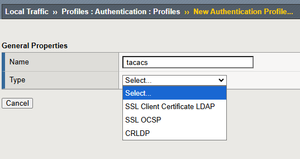
Cisco TACACS+ Config on ISE LTM Pair
I'm trying to add TACACS+ configuration to my ISE LTMs (v17.1.3). We use Active Directory for authentication. The problem is when I try to create the profile, the "type" dropdown does not show "TACACS+". APM is not provisioned either, not if that is needed. I provisioned it on our lab, but no help.135Views0likes8Comments