R36
2 TopicsF5 NGINX Plus R36 Release Now Available
We’re thrilled to announce the availability of F5 NGINX Plus Release 36 (R36). NGINX Plus R36 adds advanced capabilities like an HTTP CONNECT forward proxy, richer OpenID Connect (OIDC) abilities, expanded ACME options, and new container images packaged with popular modules. In addition, NGINX Plus inherits all the latest capabilities from NGINX Open Source, the only all-in-one software web server, load balancer, reverse proxy, content cache, and API gateway. Here’s a summary of the most important updates in R36: HTTP CONNECT Forward Proxy NGINX Plus can now tunnel HTTP traffic via the HTTP CONNECT method, making it easy to centralize egress policies through a trusted NGINX Plus server. Advanced features enable capabilities that limit proxied traffic to specific origin clients, ports, or destination hosts and networks. Native OIDC Support for PKCE, Front-Channel Logout, and POST Client Authentication We’ve made additional enhancements to the popular OpenID Connect module by adding support for PKCE enforcement, the ability to log out of all applications a client was signed in to, and support for authenticating the OIDC client using the client_secret_post method. ACME Enhancements for Certificate Automation Certificate automation capabilities are more powerful than ever, as we continue to make improvements to the ACME (Automatic Certificate Management Environment) module. New features include support for the TLS-ALPN-01 challenge method, the ability to select a specific certificate chain, IP-based certificates, ACME profiles, and external account bindings. TLS Certificate Compression High-volume or high-latency connections can now benefit from a new capability that optimizes TLS handshakes by compressing certificates and associated CA chains. Container Images with Popular Modules Container images now include our most popular modules, making it even easier to deploy NGINX Plus in container environments. Alongside the previously included njs module, images now ship with the ACME, OpenTelemetry Tracing, and Prometheus Exporter modules. Key features inherited from NGINX Open Source include: Support for 0-RTT in QUIC Inheritance control for headers and trailers Support for OpenSSL 3.5 New Features in Detail HTTP CONNECT Forward Proxy NGINX Plus R36 adds native HTTP CONNECT support via a new ngx_http_tunnel_module that enables NGINX Plus to operate as a forward proxy for outbound HTTP/HTTPS traffic. You can restrict clients, ports, and hosts, as well as which networks are reachable via centralized egress policies. This new capability allows you to monitor outbound connections through one or more NGINX Plus instances instead of relying on separate proxy products or DIY open source projects. Why it matters Enforces consistent egress policies without introducing another proxy to your stack. Centralizes proxy rules and threat monitoring for outbound connections. Reduces the need for custom modules or sidecar proxies to tunnel outbound TLS. Who it helps Platform and network teams that must route all outbound traffic through a controlled proxy. Security teams that want a single place to enforce and audit egress rules. Operators consolidating L7 functions (inbound and outbound) on NGINX Plus. The following is a sample forward proxy configuration that filters ports, destination hosts and networks. Note the requirement to specify a DNS resolver. For simplicity, we've configured a popular, publicly available DNS. However, doing so is not recommended for certain production environments, due to access limitations and unpredictable availability. num_map $request_port $allowed_ports { 443 1; 8440-8445 1; } geo $upstream_last_addr $allowed_nets { 52.58.199.0/24 1; 3.125.197.172/24 1; } map $host $allowed_hosts { hostnames; nginx.org 1; *.nginx.org 1; } server { listen 3128; resolver 1.1.1.1; # unsafe tunnel_allow_upstream $allowed_nets $allowed_ports $allowed_hosts; tunnel_pass; } Native OpenID Connect Support for PKCE, Front-Channel Logout, and POST Client Authentication R36 extends the native OIDC features introduced in R34 with PKCE enforcement, front-channel logout, and support for authenticating clients via the client_secret_post method. PKCE for authorization code flow can now be auto-enabled for a configured Identity Provider when S256 is advertised for “code_challenge_methods_supported” in federated metadata. Alternatively, it can be explicitly toggled with a simple directive: pkce on; # force PKCE even if the OP does not advertise it pkce off; # disable PKCE even if the OP advertises S256 A new front-channel logout endpoint lets an Identity Provider trigger a browser-based sign-out of all applications that a client is signed in to. oidc_provider okta_app { issuer https://dev.okta.com/oauth2/default; client_id <client_id>; client_secret <client_secret>; logout_uri /logout; logout_token_hint on; frontchannel_logout_uri /front_logout; userinfo on; } Support for client_secret_post improves compatibility with identity providers that require POST-based client authentication per OpenID Connect Core 1.0. Why it matters Brings NGINX Plus in line with modern identity provider expectations that treat PKCE as a best practice for all authorization code flows. Enables reliable logout across multiple applications from a single identity provider trigger. Makes NGINX Plus easier to integrate with providers that insist on POST-based client authentication. Who it helps Identity access management and security teams standardizing on OIDC and PKCE. Application and API owners who need consistent login and logout behavior across many services. Architects integrating with cloud identity providers (Entra ID, Okta, etc.) that require specific OIDC patterns. ACME Enhancements for Certificate Automation Building on the ACME support shipped in our previous release, NGINX Plus R36 incorporates new features from the nginx acme project, including: TLS-ALPN-01 challenge support Selection of a specific certificate chain IP-based certificates ACME profiles External account bindings These capabilities align NGINX Plus with what is available in NGINX Open Source via the ngx_http_acme_module. Why it matters Lets you keep more of the certificate lifecycle inside NGINX instead of relying on external tooling. Makes it easier to comply with CA policies and organizational PKI standards. Supports more complex environments such as IP-only endpoints and specific chain requirements. Who it helps SRE and platform teams running large fleets that rely on automated certificate renewal. Security and PKI teams that need tighter control over certificate chains, profiles, and CA bindings. Operators who want to standardize on a single ACME implementation across NGINX Plus and NGINX Open Source. TLS Certificate Compression TLS certificate compression introduced in NGINX Open Source 1.29.1 is now available in NGINX Plus R36. The ssl_certificate_compression directive controls certificate compression during TLS handshakes, which remains off by default and must be explicitly enabled. Why it matters Reduces the size of TLS handshakes when certificate chains are large. Can optimize performance in high connection volume or high-latency environments. Offers incremental performance optimization without changing application behavior. Who it helps Performance-focused operators running services with many short-lived TLS connections. Teams supporting mobile or high-latency clients where every byte in the handshake matters. Operators who want to experiment with handshake optimizations while retaining control via explicit configuration. Container Images with Popular Modules Included Finally, NGINX Plus R36 introduces container images that bundle NGINX Plus with commonly requested first-party modules such as OpenTelemetry (OTel) Tracing, ACME, Prometheus Exporter, and NGINX JavaScript (njs). Options include images with or without F5 NGINX Agent and those running NGINX in privileged or unprivileged mode. Additionally, a slim NGINX Plus–only image will be made available for teams who prefer to build bespoke custom containers. Additional Enhancements Available in NGINX Plus R36 Upstream-specific request headers Dynamically assigned proxy_bind pools Changes Inherited from NGINX Open Source NGINX Plus R36 is based on the NGINX 1.29.3 mainline release and inherits all functional changes, features, and bug fixes made since NGINX Plus R35 was released (which was based on the 1.29.0 mainline release). For the full list of new changes, features, bug fixes, and workarounds inherited from recent releases, see the NGINX changes . Changes to Platform Support Added Platforms Support for the following platforms has been added: Debian 13 Rocky Linux 10 SUSE Linux Enterprise Server 16 Removed Platforms Support for the following platforms has been removed: Alpine Linux 3.19 – Reached End of Support in November 2025 Deprecated Platforms Support for the following platforms will be removed in a future release: Alpine Linux 3.20 Important Warning NGINX Plus is built on the latest minor release of each supported operating system platform. In many cases, the latest revisions of these operating systems are adapting their platforms to support OpenSSL 3.5 (e.g. RHEL 9.7 and 10.1). In these situations, NGINX Plus requires that OpenSSL 3.5.0 or later is installed for proper operation. F5 NGINX in F5’s Application Delivery & Security Platform NGINX One is part of F5’s Application Delivery & Security Platform. It helps organizations deliver, improve, and secure new applications and APIs. This platform is a unified solution designed to ensure reliable performance, robust security, and seamless scalability for applications deployed across cloud, hybrid, and edge architectures. NGINX One is the all-in-one, subscription-based package that unifies all of NGINX’s capabilities. NGINX One brings together the features of NGINX Plus, F5 NGINX App Protect, and NGINX Kubernetes and management solutions into a single, easy-to-consume package. NGINX Plus, a key component of NGINX One, adds features to NGINX Open Source that are designed for enterprise-grade performance, scalability, and security. Follow this guide for more information on installing and deploying NGINX Plus R36 or NGINX Open Source.498Views1like0CommentsWhat’s New in the NGINX Plus R36 Native OIDC Module
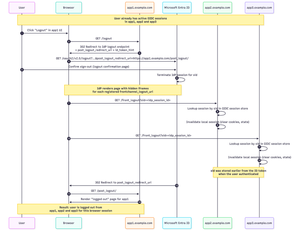
NGINX Plus R36 is out, and with it we hit a really important milestone for the native `ngx_http_oidc_module`, which now supports a broad set of OpenID Connect (OIDC) features commonly relied on in production environments. In this release, we add: Support for OIDC Front‑Channel Logout 1.0, enabling proper single sign‑out across multiple apps Built‑in PKCE (Proof Key for Code Exchange) support Support for the `client_secret_post` client authentication method at the token endpoint R35 gave the native module RP‑initiated logout and a UserInfo integration, R36 builds on that and closes several important gaps. In this post I’ll walk through all the new features in detail, using Microsoft’s Entra ID as the concrete example IdP. Front‑Channel Logout: Real Single Sign‑Out Why RP‑initiated logout alone isn’t enough Until now, `ngx_http_oidc_module` supported only RP‑initiated logout (per OpenID Connect RP‑Initiated Logout 1.0). That gave us a standards‑compliant “logout button”: when the user clicks “Logout” in your app, Nginx Plus sends them to the IdP’s logout endpoint, and the IdP tears down its own session. The catch is that RP‑initiated logout only reliably logs you out of: The current application (the RP that initiated the logout), and The IdP session itself Other applications that share the same IdP session typically stay logged in unless they also have a custom logout flow that goes through the IdP. That’s not what most people think of as “single sign‑out”. Imagine you borrow your partner’s personal laptop, log into a few internal apps that are all protected by NGINX Plus, finish your work, and hit “Logout” in one of them. You really want to be sure you’re logged out of all of those apps, not just the one where you pressed the button. That’s exactly what front‑channel logout is for. What front‑channel logout does The OpenID Connect Front‑Channel Logout 1.0 spec defines a way for the OP (the OpenID Provider) to notify all RPs that share a user’s session that the user has logged out. At a high level: The user logs out (either from an app using RP‑initiated logout, or directly on the IdP). The OP figures out which RPs are part of that single sign‑on session. The OP renders a page with one `<iframe>` per RP, each pointing at the RP’s `frontchannel_logout_uri`. Each RP receives a front‑channel logout request in its own back‑end and clears its local session. The browser coordinates this via iframes, but the session termination logic lives entirely in Nginx Plus, see diagram below: Configuring Front‑Channel Logout in NGINX Plus Let’s start with the NGINX Plus configuration. The change is intentionally minimal: you only need to add one directive to your existing `oidc_provider` block: oidc_provider entra_app1 { issuer https://login.microsoftonline.com/<tenant_id>/v2.0; client_id your_client_id; client_secret your_client_secret; logout_uri /logout; post_logout_uri /post_logout/; logout_token_hint on; frontchannel_logout_uri /front_logout; # Enables front-channel logout userinfo on; } That’s all that’s required on the NGINX Plus side to enable a single logout for this provider: `logout_uri` - path in your app that starts RP‑initiated logout `post_logout_uri` - where the IdP will send the browser after logout `logout_token_hint on;` - instructs NGINX Plus to send `id_token_hint` when calling the IdP’s logout endpoint `frontchannel_logout_uri` - path that will receive front‑channel logout requests from the IdP You’ll repeat that pattern for every app/provider block that should participate in single sign‑out. Configuring Front‑Channel Logout in Microsoft Entra ID On the Microsoft Entra ID side, you need to register a Front‑channel logout URL for each application. For each app: Go to Microsoft Entra admin center -> App registrations -> Your application -> Authentication. In Front‑channel logout URL, enter the URL that corresponds to your NGINX configuration, for example: `https://app1.example.com/front_logout`. This must match the URI you configured with `frontchannel_logout_uri` in `oidc_provider` configuration. Repeat for `app2.example.com`, `app3.example.com`, and any other RP that should take part in single sign‑out. End‑to‑End Flow with Three Apps Assume you have three apps configured the same way: https://app1.example.com https://app2.example.com https://app3.example.com All of them: Use `ngx_http_oidc_module` with the same Microsoft Entra tenant Have `frontchannel_logout_uri` configured in Nginx Have the same URL registered as Front‑channel logout URL in Entra ID User signs in to multiple apps The user navigates to `app1.example.com` and gets redirected to Microsoft’s Entra ID for authentication. After a successful login, NGINX Plus establishes a local OIDC session, and the user can access app1. They then repeat this process for app2 and app3. At this point, the user has active sessions in all three apps: User clicks `Logout` in app1 -> HTTP GET `https://app1.example.com/logout` Nginx redirects to Entra logout endpoint -> HTTP GET `https://login.microsoftonline.com/<tenant_id>/oauth2/v2.0/logout?...` User confirms logout at Microsoft IdP renders iframes that call all registered `frontchannel_logout_uri` values: GET `https://app1.example.com/front_logout?sid=...` GET `https://app2.example.com/front_logout?sid=...` GET `https://app3.example.com/front_logout?sid=...` `ngx_http_oidc_module` maps these `sid` values to Nginx sessions and deletes them IdP redirects browser back to https://app1.example.com/post_logout/ How Nginx Maps a sid to a Session? So how does the module know which session to terminate when it receives a front‑channel logout request like: GET /front_logout?sid=ec91a1f3-... HTTP/1.1 Host: app2.example.com The key is the `sid` claim in the ID token. Per the Front‑Channel Logout spec, when an OP supports session‑based logout it: Includes a `sid` claim in ID tokens May send `sid` (and `iss`) as query parameters to the `frontchannel_logout_uri` When `ngx_http_oidc_module` authenticates a user, it: Obtains an ID token from the provider. Extracts the sid claim (if present). Stores that sid alongside the rest of the session data in the module’s session store. Later, when a front‑channel logout request arrives: The module inspects the `sid` query parameter. It looks up any active session in its session store that matches this `sid` for the current provider. If it finds a matching active session, it terminates that session (clears cookies, removes data). If there’s no match, it ignores the request. This makes the module resilient to bogus or replayed logout requests: a random `sid` that doesn’t match any active session is simply discarded. Where is the iss Parameter? If you’ve studied the Front‑Channel Logout spec carefully, you might be wondering: where is `iss` (issuer)? The spec says: The OP MAY add `iss` and `sid` query parameters when rendering the logout URI, and if either is included, both MUST be. The reason is that the `sid` value is only guaranteed to be unique per issuer, combining `iss + sid` makes the pair globally unique. In practice, though, reality is messy. For example, Microsoft Entra ID sends a sid in front‑channel logout requests but does not send iss, even though its discovery document advertises `frontchannel_logout_session_supported: true`. This behavior has been reported publicly and has been acknowledged by Microsoft. If `ngx_http_oidc_module` strictly required iss, you simply couldn’t use front‑channel logout with Entra ID and some other providers. Instead, the module takes a pragmatic approach: It does not require iss in the logout request It already knows which provider it’s dealing with (from the `oidc_provider` context) It stores sid values per provider, so sid collisions across providers can’t happen inside that context So while this is technically looser than what the spec recommends for general‑purpose RPs, it’s safe given how the module scopes sessions and it makes the feature usable with real‑world IdPs. Cookie‑Only Front‑Channel Logout (and why you probably don’t want it) Front‑channel logout has another mode that doesn’t rely on sid at all. The spec allows an OP to call the RP’s `frontchannel_logout_uri` without any query parameters and relies entirely on the browser sending the RP’s session cookie. The RP then just checks, “do I have a session cookie?” and if yes, logs that user out. ngx_http_oidc_module supports this. However, modern browser behavior makes this approach very fragile: Recent browser versions treat cookies without a SameSite attribute as SameSite=Lax. Front‑channel logout uses iframes, which are third‑party / cross‑site contexts. SameSite=Lax cookies do not get sent on these sub‑requests, so your RP will never see its own session cookie in the front‑channel iframe request. To make cookie‑only front‑channel logout work, your session cookie would need: Set-Cookie: NGX_OIDC_SESSION=...; SameSite=None; Secure …and that has some serious downsides: SameSite=None opens you up to cross‑site request forgery (CSRF). The current version of `ngx_http_oidc_module` does not expose a way to set `SameSite=None` on its session cookie directly. Even if you tweak cookies at a lower level, you might not want to weaken your CSRF posture just to accommodate this logout variant. Because of that, the recommended and practical approach is the sid‑based mechanism: It doesn’t rely on third‑party cookies. It works in modern browsers with strict SameSite behaviors. It’s easy to reason about and debug. Is Relying on sid Secure Enough? It’s a fair question: if you no longer rely on your own session cookie, how safe is it to accept a logout request based solely on a sid received from the IdP? A few points to keep in mind: The spec defines `sid` as an opaque, high-entropy session identifier generated by the IdP. Implementations are expected to use cryptographically strong randomness with enough entropy to prevent guessing or brute force. Even if an attacker somehow learned a valid sid and sent a fake front‑channel logout request, the worst they can do is log a user out of your application. Providers like Microsoft Entra ID treat sid as a session‑scoped identifier. New sessions get new sid values, and sessions expire over time. `ngx_http_oidc_module` validates that the sid from the logout request matches an active session in its session store for that provider. A random or stale sid that doesn’t match anything is ignored. Taken together, a sid‑based front‑channel logout is a very reasonable trade‑off: you get robust single sign‑out without weakening cookie security, and the remaining risks are small and easy to understand. Front‑Channel Logout Troubleshooting If you’ve wired everything up and a single logout still doesn’t work as expected, here’s a quick checklist. Confirm that your IdP actually issues front‑channel requests Make sure: The provider’s discovery document (.well-known/openid-configuration) includes `frontchannel_logout_supported: true`. You have configured the Front‑channel logout URL for each application in your IdP. If Entra ID doesn’t send requests to your `frontchannel_logout_uri`, the RP will never know that it should log out the user. Ensure the ID token contains a sid claim Many IdPs, including Microsoft Entra ID, don’t include sid in ID tokens by default, even if they support front‑channel logout. For Entra ID you typically need to: Open your app registration -> go to Token configuration -> click add optional claim -> select Token type: ID, then select sid and add it. After that, new ID tokens will carry a sid claim, which ngx_http_oidc_module can store and later match on logout. Check what the IdP actually sends on front‑channel logout If you rely on the sid‑based mechanism, inspect the HTTP requests your app receives at frontchannel_logout_uri: Do you see a sid and iss query parameter? Does your provider also advertise `frontchannel_logout_session_supported: true` in the metadata? If all of the above is in place, front‑channel logout should “just work.” PKCE Support in ngx_http_oidc_module In earlier versions of the `ngx_http_oidc_module`, we did not support PKCE because it is not required for confidential clients, such as nginx, which are able to securely store and transmit a client_secret. However, as the module gained popularity and with the release of the OAuth 2.1 draft specification recommending the use of PKCE for all client types, we decided to add PKCE support to ngx_http_oidc_module. PKCE is an extension to OAuth 2.0 that adds an additional layer of security to the authorization code flow. The core idea is that the client generates a random code_verifier and derives a code_challenge from it, which is sent with the authorization request. When the client later exchanges the authorization code for tokens, it must send back the original code_verifier. The authorization server validates that the code_verifier matches the previously supplied code_challenge, preventing attacks such as authorization code interception. This is a brief overview of PKCE. If you’d like to learn more, I recommend reviewing the official RFC 7636 specification: https://datatracker.ietf.org/doc/html/rfc7636. How is PKCE support implemented in the ngx_http_oidc_module? The implementation of PKCE support in ngx_http_oidc_module is straightforward and intuitive. Moreover, if your identity provider supports PKCE and includes the parameter `code_challenge_methods_supported = S256` in its OIDC metadata, the module automatically enables PKCE with no configuration changes required. When initiating the authorization flow, the module generates a random code_verifier and derives a code_challenge from it using the S256 method. These parameters are sent with the authorization request. When the module later receives the authorization code, it sends the original code_verifier when requesting tokens, ensuring the authorization code exchange remains secure. If your identity provider does not support automatic PKCE discovery, you can explicitly enable PKCE in your provider configuration by adding the `pkce on;` directive inside the oidc_provider block. For example: oidc_provider entra_app2 { issuer https://login.microsoftonline.com/<tenant_id>/v2.0; client_id your_client_id; client_secret your_client_secret; pkce on; # <- this directive enables PKCE support } That is all you need to do to enable PKCE support in the ngx_http_oidc_module. client_secret_post Client Authentication Another important enhancement in the ngx_http_oidc_module is the addition of support for the client_secret_post client authentication method. Previously, the module supported only client_secret_basic, which requires sending the client_id and client_secret in the Authorization header. According to the OAuth 2.0 specification, all providers must support client_secret_basic; however, for some providers, the use of client_secret_basic may be restricted due to security or policy considerations. For this reason, we added support for client_secret_post. This method allows sending the client_id and client_secret in the body of the POST request when exchanging the authorization code for tokens. To use the client_secret_post method in ngx_http_oidc_module, you don’t need to do anything at all - the module automatically determines which method to use based on the identity provider’s metadata. If the provider indicates that it supports only client_secret_post, the module will use this method when exchanging authorization codes for tokens. If the provider supports both client_secret_basic and client_secret_post, the module will use client_secret_basic by default. Verifying this is simple - check the value of `token_endpoint_auth_methods_supported` in the provider’s OIDC metadata: $ curl https://login.microsoftonline.com/<tenant_id>/v2.0/.well-known/openid-configuration | jq { ... "token_endpoint_auth_methods_supported": [ "client_secret_post", "private_key_jwt", "client_secret_basic", "self_signed_tls_client_auth" ], ... } In this example, Microsoft Entra ID supports both methods, so the module will use client_secret_basic by default. Wrapping Up As you can see, in this release, we have significantly expanded the functionality of the ngx_http_oidc_module by adding support for front-channel logout, PKCE, and the client_secret_post client authentication method. These enhancements make the module more flexible and secure, enabling better integration with various OpenID Connect providers and offering a higher level of security for your applications. I hope this overview was useful and informative for you! See you soon!52Views1like0Comments