cloud
3933 TopicsOverview of MITRE ATT&CK Tactic - TA0010 Exfiltration
Introduction In current times of cyber vulnerabilities, data theft is the ultimate objective with which attackers monetize their presence within a victim network. Once valuable information is identified and collected, the attackers can package sensitive data, bypass perimeter defences, and finalize the breach. Exfiltration (MITRE ATT&CK Tactic TA0010) represents a critical stage of the adversary lifecycle, where the adversaries focus on extracting data from the systems under their control. There are multiple ways to achieve this, either by using encryption and compression to avoid detection or utilizing the command-and-control channel to blend in with normal network traffic. To avoid this data loss, it is important for defenders to understand how data is transferred from any system in the network and the various transmission limits imposed to maintain stealth. This article walks through the most common Exfiltration techniques and how F5 solutions provide strong defense against them. T1020 - Automated Exfiltration To exfiltrate the data, adversaries may use automated processing after gathering the sensitive data during collection. T1020.001 – Traffic Duplication Traffic mirroring is a native feature for some devices for traffic analysis, which can be used by adversaries to automate data exfiltration. T1030 – Data Transfer Size Limits Exfiltration of the data in limited-size packets instead of whole files to avoid network data transfer threshold alerts. T1048 – Exfiltration over Alternative Protocol Stealing of data over a different protocol or channel other than the command-and-control channel created by the adversary. T1048.001 – Exfiltration Over Symmetric Encrypted Non-C2 Protocol Symmetric Encryption uses shared or the same keys/secrets on all the channels, which requires an exchange of the value used to encrypt and decrypt the data. This symmetric encryption leads to the implementation of Symmetric Cryptographic Algorithms, like RC4, AES, baked into the protocols, resulting in multiple layers of encryption. T1048.002 – Exfiltration Over Asymmetric Encrypted Non-C2 Protocol Asymmetric encryption algorithms or public-key cryptography require a pair of cryptographic keys that can encrypt/decrypt data from the corresponding keys on each end of the channel. T1048.003 – Exfiltration Over Unencrypted Non-C2 Protocol Instead of encryption, adversaries may obfuscate the routine channel without encryption within network protocols either by custom or publicly available encoding/compression algorithms (base64, hex-code) and embedding the data. T1041 – Exfiltration Over C2 Channel Adversaries can also steal the data over command-and-control channels and encode the data into normal communications. T1011 – Exfiltration Over Other Network Medium Exfiltration can also occur through a wired Internet connection, for example, a WiFi connection, modem, cellular data connection or Bluetooth. T1011.001 – Exfiltration Over Bluetooth Bluetooth can also be used to exfiltrate the data instead of a command-and-control channel in case the command-and-control channel is a wired Internet connection. T1052 – Exfiltration Over Physical Medium Under circumstances, such as an air-gapped network compromise, exfiltration occurs through a physical medium. Adversaries can exfiltrate data using a physical medium, for example, say a removable drive. Some examples of such media include external hard drives, USB drives, cellular phones, or MP3 players. T1052.001 – Exfiltration Over USB One such circumstance is where the adversary may attempt to exfiltrate data over a USB connected physical device, which can be used as the final exfiltration point or to hop between other disconnected systems. T1567 – Exfiltration Over Web Services Adversaries may use legitimate external Web Service to exfiltrate the data instead of their command-and-control channel. T1567.001 – Exfiltration to Code Repository To exfiltrate the data to a code repository, rather than adversary’s command-and-control channel. These code repositories are accessible via an API over HTTPS. T1567.002 – Exfiltration to Cloud Storage To exfiltrate the data to a cloud storage, rather than their primary command-and-control channel. These cloud storage services allow storage, editing and retrieval of the exfiltrated data. T1567.003 – Exfiltration to Text Storage Sites To exfiltrate the data to a text storage site, rather than their primary command-and-control. These text storage sites, like pastebin[.]com, are used by developers to share code. T1567.004 – Exfiltration Over Webhook Adversaries also exfiltrate the data to a webhook endpoint, which are simple mechanisms for allowing a server to push data over HTTP/S to a client. The creation of webhooks is supported by many public services, such as Discord and Slack, that can be used by other services, like GitHub, Jira, or Trello. T1029 – Scheduled Transfer To exfiltrate the data, the adversaries may schedule data exfiltration only at certain times of the day or at certain intervals, blending the traffic patterns with general activity. T1537 – Transfer Data to Cloud Account Many a times, exfiltration of data can also be through transferring the data through sharing/syncing and creating backups of cloud environment to another cloud account under adversary control on the same service. How F5 Can Help F5 offers a comprehensive suite of security solutions designed to safeguard applications and APIs across diverse environments, including cloud, edge, on-premises, and hybrid platforms. These solutions enable robust risk management to effectively mitigate and protect against MITRE ATT&CK Exfiltration threats, delivering advanced functionalities such as: Web Application Firewall (WAF): Available across all F5 products, the WAF is a flexible, multi-layered security solution that protects web applications from a wide range of threats. It delivers consistent defense, whether applications are deployed on-premises, in the cloud, or in hybrid environments. HTTPS Encryption: F5 provides robust HTTPS encryption to secure sensitive data in transit, ensuring protected communication between users and applications by preventing unauthorized access or data interception. Protecting sensitive data with Data Guard: F5's WAF Data Guard feature prevents sensitive data leakage by detecting and blocking exposure of confidential information, such as credit card numbers and PII. It uses predefined patterns and customizable policies to identify transmissions of sensitive data in application responses or inputs. This proactive mechanism secures applications against data theft and ensures compliance with regulatory standards. For more information, please contact your local F5 sales team. Conclusion Adversaries Exfiltration of data often aims to steal sensitive information by packaging it to evade detection, using methods such as compression or encryption. They may transfer the data through command-and-control channels or alternate paths while applying stealth techniques like transmission size limitations. To defend against these threats, F5 provides a layered approach with its advanced offerings. The Web Application Firewall (WAF) identifies and neutralizes malicious traffic aimed at exploiting application vulnerabilities. HTTPS encryption ensures secure data transmission, preventing unauthorized interception during the attack. Meanwhile, a data guard policy set helps detect and block exposure of confidential information, such as credit card numbers and PII. Together, these F5 solutions effectively counteract data exfiltration attempts and safeguard critical assets. Reference links MITRE | ATT&CK Tactic 10 – Exfiltration MITRE ATT&CK: What It Is, how it Works, Who Uses It and Why | F5 Labs MITRE ATT&CK®113Views1like1CommentOverview of MITRE ATT&CK Tactic: TA0040 - Impact
This article focuses on the Impact Tactic, and the techniques adversaries use to manipulate, disrupt or damage the systems and data as they reach the final stage of an attack. This is one of the critical tactics, as it highlights the adverse effects attackers can cause, including exploitation, operational disruption, data destruction, or financial gain82Views1like1CommentOverview of MITRE ATT&CK Tactic : TA0009 - Collection
This article is a continuation of our MITRE ATT&CK series. In this article, we focus on the Collection tactic, and the techniques adversaries use to gather, stage, and organize data from compromised systems before exfiltration. As attackers progress through an intrusion, Collection becomes critical for assembling sensitive files, credentials, screenshots, and other high‑value information that will fuel data theft, espionage, or destructive operations.80Views2likes1CommentOverview of MITRE ATT&CK Tactic - TA0011 Command and Control
Introduction In modern days, cyber violations, command and control are one of the main set of techniques with which attackers can gain control over the system within a victim’s network. Once control is gained over the system, the attackers can steal sensitive data, move laterally and blend into normal activity. Command and Control (MITRE ATT&CK Tactic TA0011) represents another critical stage of the adversary lifecycle, where the adversaries focus on communicating with the systems under their control. There are multiple ways to achieve this, either by mimicking the expected traffic flow to avoid detection or mimicking a normal behavior of the compromised system. To avoid the vulnerability, it is important for defenders to understand how communication is established to any system in the network and the various levels of stealth depending on the network structure. This article walks through the most common Command and Control techniques, and how F5 solutions provide strong defense against them. T1071 - Application Layer Protocol To communicate with the systems, the adversaries blend in with the existing traffic of the OSI layer protocols to avoid detection/network filtering. The results of these commands will be embedded within the protocol traffic between the client and the server. T1071.001 - Web Services Adversaries mimic normal, expected HTTP/HTTPS traffic that carries web data to communicate with the systems under their control within a victim network. T1071.002 - File Transfer Protocol Protocols used to implement this technique includes SMB, FTP, FTPS and TFTP. The malicious data is concealed within the fields and headers of the packets produced from these protocols. T1071.003 - Mail Protocols Protocols carrying electronic mail such as SMTP/S, POP3/S, and IMAP is utilized by concealing the data within the email messages themselves. T1071.004 - DNS An administrative function in computer networking is served by the DNS Protocol, and DNS traffic may also be allowed even before the authentication of the network. Data is concealed in the fields and headers of these packets. T1071.005 - Publish/Subscribe Protocols For message distribution managed by a centralized broker, where Publish/Subscribe design utilizes MQTT, XMPP, AMQP and STOMP protocols. T1092 - Communication Through Removable Media On disconnected networks, command and control between the compromised hosts can be performed using removable media to execute commands from system to system. For a successful execution, both systems need to be compromised and need to replicate the removable media through lateral movement. T1659 - Content Injection Adversaries may also gain control over the victim’s system by injecting malicious content into the systems, by initially accessing the compromised data-transfer channels where the traffic can be manipulated or content can be injected. T1132 – Data Encoding Another technique to gain control over the system is by encoding the information using a standard data encoding system. Encoding includes the use of ASCII, Unicode, Base64, MIME or other binary-to-text encoding systems. T1132.001 - Standard Encoding Data Encoding schemes utilized for Standard Encoding includes ASCII, Unicode, hexadecimal, Base64 and MIME. Data compression, such as gzip, are also an example of standard encoding. T1132.002 - Non-Standard Encoding Data Encoded in the message body of an HTTP request, such as modified Base64, is utilized as encoding schemes. T1001 – Data Obfuscation Obfuscation of command-and-control communication is hidden as part of this technique, making it even more difficult to discover or decipher. The focus is to make the communication less conspicuous and hidden, by incorporating several methods, which create below sub-techniques: T1001.001 - Junk Data Adversaries may abuse the protocols by adding random, meaningless junk data to the protocols, which can prevent trivial methods for decoding or deciphering the traffic. T1001.002 - Steganography Steganographic sub-techniques are used to transfer hidden digital data messages between systems, such as images or document files. T1001.003 - Protocol or Service Impersonation Adversaries can impersonate legitimate protocols or web services, to command-and-control traffic by blending in with legitimate network traffic. T1568 – Dynamic Resolution To establish connections dynamically to command-and-control the infrastructure and prevent any detections, adversaries use malware sharing a common algorithm with the infrastructure to dynamically adjust the parameters, such as a domain name, IP address, or port number. T1568.001 - Fast Flux DNS Fast Flux DNS is used to hide a command-and-control channel behind an array of rapidly changing IP addresses linked to a single domain resolution. T1568.002 - Domain Generation Algorithm Rather than relying on a list of static IP addresses or domains, adversaries may utilize Domain Generation Algorithms to dynamically identify a destination domain for command-and-control traffic. T1568.003 - DNS Calculations Instead of utilizing the predetermined port number or the actual IP address, to dynamically determine which port and IP address to use, adversaries calculate on addresses returned in DNS results. T1573 – Encrypted Channel Adversaries rely on an encrypted algorithm channel to conceal command-and-control traffic rather than depending on any inherent protections by the communication protocols. T1573.001 - Symmetric Cryptography Symmetric Encryption Algorithms, such as AES, DES, 3DES, Blowfish and RC4, use keys for plaintext encryption and ciphertext decryption. T1573.002 - Asymmetric Cryptography Asymmetric cryptography, or public key cryptography, uses a keypair per party: one public and one private. The sender encrypts the data with the receiver’s public key, and the receiver decrypts the data with their private key. T1008 – Fallback Channels If the primary channel is compromised or inaccessible, then in order to maintain reliable command and control, adversaries use fallback communication channels. T1665 – Hide Infrastructure To hide and evade detection of the command-and-control infrastructure, adversaries identify and filter traffic from defensive tools, masking malicious domains to abuse the true destination, and otherwise hiding malicious contents to delay discovery and prolong the effectiveness of adversary infrastructure. T1105 – Ingress Tool Transfer Tools or other files transfer from an external adversary-controlled source into the compromised environment through controlled channels or protocols such as FTP. Also, adversaries may spread tools across the compromised environment as part of Lateral Movement. T1104 –Multi-Stage Channels To make detection more difficult, adversaries create multiple stages for command-and-control for several functions and different conditions. T1095 – Non-Application Layer Protocol To communicate between the host and command-and-control server, adversaries use non-application layer protocols, such as ICMP (Internet Control Message Protocol), UDP (User Datagram Protocol), SOCKS (Secure Sockets), or SOL (Serial over LAN). T1571 – Non-Standard Port Adversaries communicate using port pairings that are not associated with the protocol, for, say, HTTPS over port 8088 or port 587 as opposed to the traditional port 443. T1572 – Protocol Tunneling Another approach to avoid detection/network filtering is to explicitly encapsulate a protocol within another protocol to enable routing of network packets which otherwise not reach their intended destination, such as SMB, RDP. T1090 – Proxy To direct network communications to a command-and-control server to avoid direct connections to the infrastructure and override the existing actual communication paths to avoid suspicion and manage command-and-control communications inside a compromised environment, proxy act as an intermediary between the systems, such as, HTRAN, ZXProxy and ZXPortMap. T1090.001 - Internal Proxy Internal proxies are primarily used to conceal the actual destination while reducing the need for multiple connections to external systems, such as peer-to-peer (p2p) networking protocols. T1090.002 - External Proxy External proxy is used to mask the true destination of the traffic with port redirectors. Purchased infrastructure such as Virtual Private Servers which are the compromised systems outside the victim's network, are generally used for these purposes. T1090.003 - Multi-Hop Proxy Multiple proxies can also be chained together to abuse the actual traffic directions, making it more difficult for defenders to trace malicious activity and identify its source. T1090.004 - Domain Fronting Adversaries can even misuse Content Delivery Networks (CDNs) routing schemes to infect the actual HTTPS traffic destination or traffic tunneled through HTTPS. T1219 – Remote Access Tools To access the target system remotely and establish an interactive command-and-control within the network, remote access tools are used to bridge a session between two trusted hosts through a graphical interface, a CLI, or a hardware-level access (KVM, Keyboard, Video, Mouse) over IP solutions. T1219.001 - IDE Tunneling IDE Tunneling combines SSH, port forwarding, file sharing and letting the developers gain access as if they are local, by encapsulating the entire session and tunneling protocols alongside SSH, allowing the attackers to blend in with the actual development workflow. T1219.002 - Remote Desktop Software Adversary may access the target systems interactively through desktop support software, which provides a graphical interface to the remote adversary, such as VNC, Team Viewer, AnyDesk, LogMein, are commonly used legitimate support software. T1219.003 - Remote Access Hardware To access the legitimate hardware through commonly used legitimate tools, including IP-based keyboard, video, or mouse (KVM) devices such as TinyPilot and PiKVM. T1205 – Traffic Signaling Traffic signaling is used to hide open ports or any other malicious functionality to prolong command-and-control over the compromised system. T1205.001 - Port Knocking To hide the open ports for persistence, port knocking is included, to enable the port, in which the adversary sends a series of attempted connections to a predefined sequence of closed ports. T1205.002 - Socket filters Socket Filters are filters to allow or disallow certain types of data through the socket. If packets received by the network interface match the filtering criteria, desired actions are triggered. T1102 – Web Service Adversaries use an existing, legitimate external Web Service to transfer data to/from the compromised system. Also, web service providers commonly use SSL/TLS encryption, which gives adversaries an additional level of protection. T1102.001 - Dead Drop Resolver Adversaries post content called dead drop resolver on Web Services with encoded domains. These resolvers will redirect the victims to the infected domain/IP addresses. T1102.002 - Bidirectional Communication Once the system is infected, they can send the output back to the Web Service Channel. T1102.003 - One-Way Communication Compromised Systems may not return any output at all in a few cases where adversaries tend to send only one way instructions and do not want any response. How F5 Can Help F5 security solutions provide multiple different functionalities to secure and protect applications and APIs across various platforms including Clouds, Edge, On-prem or Hybrid. F5 supports risk management solutions mentioned below to effectively mitigate and protect against command-and-control techniques: Web Application Firewall (WAF): WAF is supported by all the F5 deployment modes, which is an adaptable, multi-layered security solution that defends web applications against a broad spectrum of threats, regardless of where they are deployed. API Security: F5 offers to ease the security of APIs with F5 Web Application and API Protection (WAAP) solutions, which protects API endpoints and other API dependencies by restricting the API definitions using specified rules and schemas. Rate-Limiting & Bot Protection: Brute-force, credential stuffing, and session attacks can be mitigated with configurable thresholds and automated bot protection. For more information, please contact your local F5 sales team. Conclusion Command and Control (C2) encompasses the methods adversaries employ to communicate with compromised systems within a target network. Adversaries disguise their C2 traffic as legitimate network activity to evade detection. To defend against Command-and-Control techniques, defenders should gain a clear understanding of implementation of robust segmentation and egress filtering using Web Application Firewalls (WAF) to limit communication channels and regularly monitor traffic for anomalous patterns and leverage threat intelligence to identify any C2 indicator. Additionally, employing endpoint detection and response (EDR) using API Security solutions can help detect and block malicious C2 activity at the host level. Reference links MITRE | ATT&CK Tactic 09 – Command and Control MITRE ATT&CK: What It Is, how it Works, Who Uses It and Why | F5 Labs MITRE ATT&CK®83Views1like1CommentOverview of MITRE ATT&CK Tactic: TA0008 - Lateral Movement
This article focuses on the Lateral Movement tactic, and the techniques adversaries use to move across the network by remotely accessing and controlling additional systems. Understanding this tactic is crucial because it shows how a small initial compromise can rapidly escalate into a large-scale intrusion.105Views1like1CommentSecuring Applications using mTLS Supported by F5 Distributed Cloud
Introduction Mutual Transport Layer Security (mTLS) is a process that establishes encrypted and secure TLS connection between the parties and ensures both parties use X.509 digital certificates to authenticate each other. It helps to prevent the malicious third-party attacks which will imitate the genuine applications. This authentication method helps when a server needs to ensure the authenticity and validity of either a specific user or device. As the SSL became outdated several companies like Skype, Cloudfare are now using mTLS to secure business servers. Not using TLS or other encryption tools without secure authentication leads to ‘man in the middle attacks.’ Using mTLS we can provide an identity to a server that can be cryptographically verified and makes your resources more flexible. mTLS with XFCC Header Not only supporting the mTLS process, F5 Distributed Cloud WAF is giving the feasibility to forward the Client certificate attributes (subject, issuer, root CA etc..) to origin server via x-forwarded-client-cert header which provides additional level of security when the origin server ensures to authenticate the client by receiving multiple requests from different clients. This XFCC header contains the following attributes by supporting multiple load balancer types like HTTPS with Automatic Certificate and HTTPS with Custom Certificate. Cert Chain Subject URI DNS How to Configure mTLS In this Demo we are using httpbin as an origin server which is associated through F5 XC Load Balancer. Here is the procedure to deploy the httpbin application, creating the custom certificates and step-by-step process of configuring mTLS with different LB (Load Balancer) types using F5 XC. Deploying HttpBin Application Here is the link to deploy the application using docker commands. Signing server/leaf cert with locally created Root CA Commands to generate CA Key and Cert: openssl genrsa -out root-key.pem 4096 openssl req -new -x509 -days 3650 -key root-key.pem -out root-crt.pem Commands to generate Server Certificate: openssl genrsa -out cert-key2.pem 4096 openssl req -new -sha256 -subj "/CN=test-domain1.local" -key cert-key2.pem -out cert2.csr echo "subjectAltName=DNS:test-domain1.local" >> extfile.cnf openssl x509 -req -sha256 -days 501 -in cert2.csr -CA root-crt.pem -CAkey root-key.pem -out cert2.pem -extfile extfile.cnf -CAcreateserial Note: Add the TLS Certificate to XC console, create a LB(HTTP/TCP) and attach origin pools and TLS certificates to it. In Ubuntu: Move above created CA certificate (ca-crt.pem) to /usr/local/share/ca-certificates/ca-crt.pem and modify "/etc/hosts" file by mapping the VIP(you can get this from your configured LB -> DNS info -> IP Addr) with domain, in this case the (test-domain1.local). mTLS with HTTPS Custom Certificate Log in the F5 Distributed Cloud Console and navigate to “Web APP & API Protection” module. Go to Load Balancers and Click on ‘Add HTTP Load Balancer’. Give the LB Name (test-mtls-cust-cert), Domain name (mtlscusttest.f5-hyd-demo.com), LB Type as HTTPS with Custom Certificate, Select the TLS configuration as Single Certificate and configure the certificate details. Click in ‘Add Item’ under TLS Certificates and upload the cert and key files by clicking on import from files. Click on apply and enable the mutual TLS, import the root cert info, and add the XFCC header value. Configure the origin pool by clicking on ‘Add Item’ under Origins. Select the created origin pool for httpbin. Click on ‘Apply’ and then save the LB configuration with ‘Save and Exit’. Now, we have created the Load Balancer with mTLS parameters. Let us verify the same with the origin server. mTLS with HTTPS with Automatic Certificate Log in the F5 Distributed Cloud Console and navigate to “Web APP & API Protection” module. Goto Load Balancers and Click on ‘Add HTTP Load Balancer’. Give the LB Name(mtls-auto-cert), Domain name (mtlstest.f5-hyd-demo.com), LB Type as HTTPS with Automatic Certificate, enable the mutual TLS and add the root certificate. Also, enable x-forwarded-client-cert header to add the parameters. Configure the origin pool by clicking on ‘Add Item’ under Origins. Select the created origin pool for httpbin. Click on ‘Apply’ and then save the LB configuration with ‘Save and Exit’. Now, we have created the HTTPS Auto Cert Load Balancer with mTLS parameters. Let us verify the same with the origin server. Conclusion As you can see from the demonstration, F5 Distributed Cloud WAF is providing the additional security to the origin servers by forwarding the client certificate info using mTLS XFCC header. Reference Links mTLS Insights Create root cert pair F5 Distributed Cloud WAF4.5KViews3likes1CommentBIG-IP for Scalable App Delivery & Security in Hybrid Environments
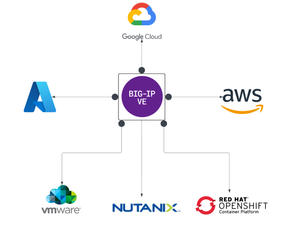
Scope: As enterprises deploy multiple instances of the same applications across diverse infrastructure platforms such as VMware, OpenShift, Nutanix, and public cloud environments and across geographically distributed locations to support redundancy and facilitate seamless migration, they face increasing challenges in ensuring consistent performance, centralized security, and operational visibility. The complexity of managing distributed application traffic, enforcing uniform security policies, and maintaining high availability across hybrid environments introduces significant operational overhead and risk, hindering agility and scalability. F5 BIG-IP Application Delivery and Security address this challenge by providing a unified, policy-driven approach to manage secure workloads across hybrid multi-cloud environments. It can be used to scale up application services on existing infrastructure or with new business models. Introduction: This article highlights how F5 BIG-IP deploys identical application workloads across multiple environments. This ensure high availability, seamless traffic management, and consistent performance. By supporting smooth workload transitions and zero-downtime deployments, F5 helps organizations maintain reliable, secure, and scalable applications. From a business perspective, it enhances operational agility, supports growing traffic demands, reduces risk during updates, and ultimately delivers a reliable, secure, and high-performance application experience that meets customer expectations and drives growth. This use case covers a typical enterprise setup with the following environments: VMware (On-Premises) Nutanix (On-Premises) OCP (On-Premises) Google Cloud Platform (GCP) Architecture: As illustrated in the diagram, when new application workloads are provisioned across environments such as AWS, GCP, VMware (on-prem), Nutanix (on-prem & VMware) BIG-IP ensures seamless integration with existing services. Platforms Supported Environments VMware On-Prem, GCP, Azure Nutanix On-Prem, AWS, Azure OCP On-Prem, AWS, Azure This article outlines the deployment in VMware platform. For deployment in other platforms like Nutanix and GCP, refer the detailed guide below. F5 Scalable Enterprise Workload Deployments Complete Guide Scalable Enterprise Workload Deployment Across Hybrid Environments Enterprise applications are deployed smoothly across multiple environments to address diverse customer needs. With F5’s advanced Application Delivery and Security features, organizations can ensure consistent performance, high availability, and robust protection across all deployment platforms. F5 provides a unified and secure application experience across cloud, on-premises, and virtualized environments. Workload Distribution Across Environments Workloads are distributed across the following environments: VMware: App A & App B OpenShift: App B Nutanix: App B & App C → VMware: Add App C → OpenShift: Add App A & App C → Nutanix: Add App A Applications being used: A → Juice Shop (Vulnerable web app for security testing) B → DVWA (Damn Vulnerable Web Application) C → Mutillidae Initial Infrastructure: & B, Nutanix: App B &C, GCP: App B. VMware: In the VMware on-premises environment, Applications A and B are deployed and connected to two separate load balancers. This forms the existing infrastructure. These applications are actively serving user traffic with delivery and security managed by BIG-IP. Web Application Firewall (WAF) is enabled, which will prevent any malicious threats. The corresponding logs can be found under BIG-IP > Security > Event Logs Note: This initial deployment infrastructure has also been implemented on Nutanix and GCP. For the full details, please consult the complete guide here Adding additional workloads: To demonstrate BIG-IP’s ability to support evolving enterprise demands, we will introduce new workloads across all environments. This will validate its seamless integration, consistent security enforcement, and support for continuous delivery across hybrid infrastructures. VMware: Let us add additional application-3 (mutillidae) to the VMware on-premises environment. Try to access the application through BIG-IP virtual server. Apply the WAF policy to the newly created virtual server, then verify the same by simulating malicious attacks. Nutanix: The use case described for VMware is equally applicable and supported when deploying BIG-IP on Nutanix Bare Metal as well as Nutanix on VMware. For demonstration purposes, the Nutanix Community Edition hypervisor is booted as a virtual machine within VMware. Inside this hypervisor, a new virtual machine is created and provisioned using the BIG-IP image downloaded from the F5 Downloads portal. Once the BIG-IP instance is online, an additional VM hosting the application workload is deployed. This application VM is then associated with a BIG-IP virtual server, ensuring that the application remains isolated and protected from direct external exposure. OCP: The use case described for VMware is equally applicable and fully supported when deploying BIG-IP with Red Hat OpenShift Container Platform (OCP) including Nutanix and VMware-based infrastructures. For demonstration, OCP is deployed on a virtualized cluster, while BIG-IP is provisioned externally using an image from the F5 Downloads portal. BIG-IP consumes the OpenShift configuration and dynamically creates the required virtual servers, pools, and health monitors. Traffic to the application is routed through BIG-IP, ensuring that the application remains isolated from direct external exposure while benefiting from enterprise-grade traffic management, security enforcement, and observability. GCP (Google Cloud Platform): The use case discussed above for VMware is also applicable and supported when deploying BIG-IP on public cloud platforms such as Azure, AWS, and GCP. For demonstration purposes, GCP is selected as the cloud environment for deploying BIG-IP. Within the same project where the BIG-IP instance is provisioned, an additional virtual machine hosting application workloads is deployed and associated with the BIG-IP virtual server. This setup ensures that the application workloads remain protected behind BIG-IP, preventing direct external exposure. Key Resources: Please refer to the detailed guide below, which outlines the deployment of Nutanix on VMware and GCP, and demonstrates how BIG-IP delivers consistent security, traffic management, and application delivery across hybrid environments. F5 Scalable Enterprise Workload Deployments Complete Guide Conclusion: This demonstration clearly illustrates that BIG-IP’s Application Delivery and Security capabilities offer a robust, scalable, and consistent solution across both multi-cloud and on-premises environments. By deploying BIG-IP across diverse platforms, organizations can achieve uniform application security, while maintaining reliable connectivity, strong encryption, and comprehensive protection for both modern and legacy workloads. This unified approach allows businesses to seamlessly scale infrastructure and address evolving user demands without sacrificing performance, availability, or security. With BIG-IP, enterprises can confidently deliver applications with resilience and speed, while maintaining centralized control and policy enforcement across heterogeneous environments. Ultimately, BIG-IP empowers organizations to simplify operations, standardize security, and accelerate digital transformation across any environment. References: F5 Application Delivery and Security Platform BIG-IP Data Sheet F5 Hybrid Security Architectures: One WAF Engine, Total Flexibility Distributed Cloud (XC) Github Repo BIG-IP Github Repo359Views2likes0CommentsDistributed Cloud for App Delivery & Security for Hybrid Environments
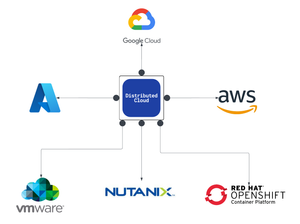
As enterprises modernize and expand their digital services, they increasingly deploy multiple instances of the same applications across diverse infrastructure environments—such as VMware, OpenShift, and Nutanix—to support distributed teams, regional data sovereignty, redundancy, or environment-specific compliance needs. These application instances often integrate into service chains that span across clouds and data centers, introducing both scale and operational complexity. F5 Distributed Cloud provides a unified solution for secure, consistent application delivery and security across hybrid and multi-cloud environments. It enables organizations to add workloads seamlessly—whether for scaling, redundancy, or localization—without sacrificing visibility, security, or performance.377Views4likes0Comments
Illegal Metacharacter in Parameter Name in Json Data
Dears, Can someone tell what is the issue here as the BIG IP is reporting the illegal metacharacter "#" in parameter name but the highlighted part of the violation doesnt contain metacharacter # in the first place and the parameter which BIG IP displayed in the highlighted part is actually not a parameter. I believe the issue is with the BIG IP only. Any suggestions here, please? I think issue is that BIG IP is not paring the Json payload properly77Views0likes3Comments